









What’s New With Breeze Assistant? The Unbound 2026 Fall Update, Explained

Key Takeaways
- Breeze Assistant is the one “Breeze” name that survives HubSpot’s AI rebrand, because it does one clearly defined job.
- Five improvements matter most: richer context, more “done for you” actions, connections to outside tools, Projects and Artifacts, and wider mobile reach.
- You can now talk to Breeze instead of typing, including logging notes and updating records hands-free from the mobile app.
- Breeze can call on your other custom agents directly, and it can generate a real formatted document, not just a chat reply.
- Most of this sits on Professional and Enterprise plans, so confirm Projects and Voice on Mobile against your specific plan before you promise your team anything.
If you’re tired of AI assistants that just gave you generic, “could’ve-Googled-it” answers, Breeze Assistant’s Unbound 2026 update is here to help.
But will it be enough for growing your business?
RedPandas Digital runs the client-facing sessions, walking teams through this update, so what follows is the same explanation the team gives in the room, not a rewritten press release.
Here’s what’s actually new, what you can now ask Breeze to do, with a real example for each, and whether it’s worth your time if you’ve only used it occasionally before:
Quick Answer
Breeze Assistant, HubSpot’s AI assistant, picked up five major upgrades for Unbound 2026:
- Richer context from your CRM and permissions
- More actions done automatically rather than just suggested
- Connections to external tools
- A “Projects” feature for ongoing context, plus generated documents called Artifacts
- Much wider mobile access, including voice
Most of it sits on Professional and Enterprise plans, and it’s the one HubSpot AI product that kept the “Breeze” name through the platform’s rebrand.
But these Breeze Assistant updates only work best with a healthy portal.
If you’re curious as to whether yours is in the right shape to reap the benefits, take the free HubSpot Health Check quiz below and find out in two minutes:


Take the Free HubSpot Health Check Quiz
Why Breeze Assistant Kept Its Name
Across the rest of HubSpot, “Breeze” is disappearing.
Breeze Agents and Breeze Studio are folding into standard HubSpot features as part of the platform’s shift to calling itself an agentic customer platform.
But Breeze Assistant is the exception.
It survives because it does one job clearly: it’s the assistant you talk to directly, wherever you’re working in HubSpot, to get something done or find something out.
That’s worth knowing before you read the rest of this update, because it tells you what HubSpot thinks this product actually is. Not a chatbot bolted onto the CRM as a demo feature. The one AI product worth giving its own name.
The 5 Biggest Improvements to Breeze Assistant After Unbound 2026
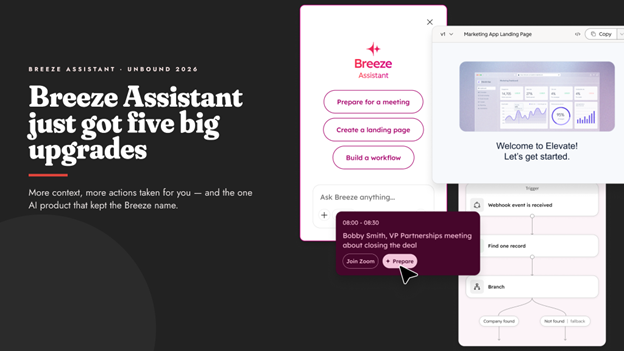
So, what actually earned Breeze Assistant that dedicated name? The answer is in five changes, working together rather than as isolated add-ons:
| Update | What Changed? |
| 1. Richer, More Trustworthy Answers | Breeze now reads your role, permissions, CRM records, and reporting data before it answers, and links back to where the answer came from. That’s the difference between a guess and something you can actually act on. |
| 2. More “Done For You,” Less “Here’s What You Should Do” | New tools let Breeze draft emails directly inside the CRM, surface next steps automatically in search, and turn a logged call straight into updated records and tasks. |
| 3. Connections To The Tools You Already Use | Breeze can now pull data from and coordinate actions with external apps your team already runs day to day, rather than staying siloed in HubSpot. Worth doing this properly from the start, since a poorly configured integration can quietly corrupt your CRM data long before anyone notices. |
| 4. Projects And Artifacts | You can give Breeze ongoing context for a run of related work through Projects, and it can generate a real, formatted document, not just a chat reply, through something HubSpot calls Artifacts. |
| 5. Wider Mobile Reach | Voice input, file access, meeting prep, and reviewing generated documents are now supported from the HubSpot mobile app, not just desktop. |


How to Use HubSpot Breeze AI for Marketing, Sales and Customer Service
Ask: Talk to Breeze Instead of Typing
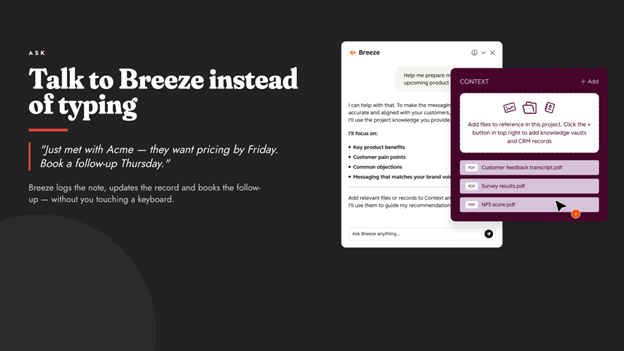
Let’s say you’ve just walked out of a client meeting.
Instead of opening HubSpot later and typing up notes, you can tell Breeze what happened, out loud, from the HubSpot mobile app, like:
- What was discussed
- What the next step is
- When to follow up
Breeze logs the note, updates the record, and books the follow-up, without you touching a keyboard.
This is possible thanks to two new updates:
- Projects give Breeze a dedicated space with persistent context across related conversations, similar to how ChatGPT’s memory feature carries context between chats. Set instructions once, attach the files or knowledge you want it working from, and every new chat inside that project starts already briefed. With projects, you stop re-explaining who you are and how you want things formatted every single time
- Slack integration means you can reach Breeze without opening HubSpot. Mentioning it directly inside a Slack thread gets you the same assistant, right where your team is already talking
Build: Agent Builder and Calling Other Agents from Inside Breeze
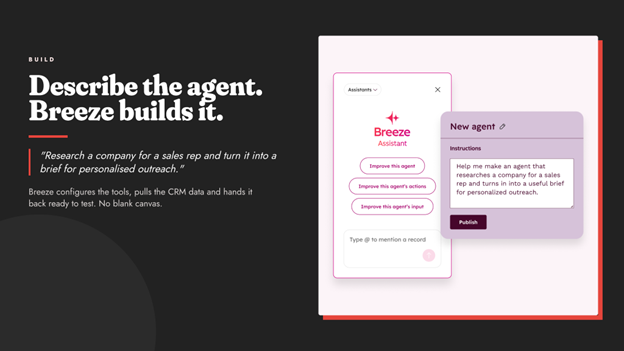
Breeze now includes its own Agent Builder.
The way it works is that you describe what you want an agent to do in plain language, and Breeze configures the tools, pulls in the relevant CRM data, and sets it up ready to test.
No blank canvas or manual setup needed here.
If your business already has custom agents built, Calling Agents lets you reach them directly from inside a Breeze conversation. You can either mention the agent by name, or just describe the task and let Breeze route it to the right one automatically.
The result comes back inline, in the same conversation, instead of you having to find and open a separate agent.
If you haven’t built a custom agent yet, our guide to HubSpot’s new AI features from Unbound 2026 covers how Agent Builder works at the platform level.
Create: What Artifacts Actually Produce
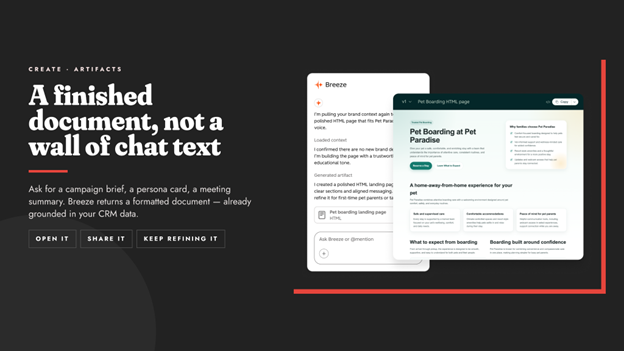
Ask Breeze for a campaign brief, a buyer persona card, a meeting summary, or a competitive snapshot, and it generates an actual formatted document, grounded in your real CRM data, not a wall of chat text you have to tidy up yourself.
You can open it, share it, or keep refining it in the same conversation.
Here’s what makes this update stand out: most AI output creates extra work, because you still have to format it, check it, and ground it in your actual business before you can use it.
Artifacts skip that step because the document is already grounded in your data by the time you see it.
HubSpot AI 2026: The Complete Guide to Breeze, Agents and MCP
Frequently Asked Questions: Unbound 2026 Breeze Assistant Updates
What’s new with Breeze Assistant for Unbound 2026?
Breeze Assistant picked up five major improvements: richer context, more automated actions, connections to external tools, a Projects and Artifacts feature, and wider mobile access, including voice.
We already use ChatGPT or Copilot for this. Why is Breeze different?
Those are genuinely good general-purpose tools. The difference is integration. Breeze already has your CRM data, brand voice, and deal history, so you don’t have to copy and paste records back and forth or re-explain your sales process every time you open a new chat. HubSpot has even built a direct ChatGPT connector for teams who want to keep using both.
Is my data safe, or will Breeze just make things up?
Breeze answers from your actual HubSpot CRM data: contacts, deals, companies, tickets, emails, notes, and activity, plus anything you’ve added to your business context. It doesn’t pull from the open internet and present a guess as fact.
Is this only available on Enterprise?
No, but check your specific plan. Most Breeze Assistant capability sits on Professional and Enterprise, though it’s worth confirming Projects and Voice on Mobile against your exact plan rather than assuming either way.
Is Breeze Assistant just a chatbot?
No. Unlike a generic chatbot, Breeze reads your actual CRM data, permissions, and reporting before answering. It can complete tasks like drafting emails or updating records, not just suggest them.
Can I talk to Breeze Assistant instead of typing?
Yes. Voice on Mobile lets you speak to Breeze in the HubSpot mobile app to log notes, update records, and schedule follow-ups hands-free.
Does Breeze Assistant work with custom agents I’ve already built?
Yes. Calling Agents lets you reach any custom or native agent directly from a Breeze conversation, either by name or by describing the task and letting Breeze route it automatically.
What data does Breeze Assistant actually use?
Breeze draws on your HubSpot CRM data, including contacts, deals, companies, tickets, emails, notes, and activity, along with any business context you’ve added, rather than the open internet.
Is Breeze Assistant only for Enterprise customers?
No. Most of its capability sits on Professional and Enterprise plans, but it’s worth confirming features like Projects and Voice on Mobile against your specific plan.
What are Artifacts in Breeze Assistant?
Artifacts are real, formatted documents Breeze generates on request, such as a campaign brief or a meeting summary, grounded in your actual CRM data rather than a chat reply you have to tidy up yourself.
How is Breeze Assistant different from ChatGPT or Copilot?
The difference is integration. Breeze already has access to your CRM data, brand voice, and deal history, so you don’t need to copy information across or re-explain your business every time.
Where Should You Start?
You don’t need to test everything in this update today. Pick one.
If logging notes after every call is the thing eating your day, start with Voice on Mobile this week and see how much of it disappears.
Or, if you’re juggling the same context across a run of related conversations, set up one Project and notice whether you stop repeating yourself.
As a HubSpot Diamond Partner, RedPandas Digital runs client-facing workshops that walk teams through this update.
If you’d rather see it demonstrated on your own portal than test it cold yourself, get in touch, and the team will show you over a free consultation:
Get In Touch With RedPandas’ HubSpot Experts
And while you’re here, check out these other guides on the main HubSpot Unbound 2026 releases to watch out for:
- HubSpot Unbound 2026 Guide: 6 New Updates You Need to Know
- What Is HubSpot Work? The New AI-First Workspace, Explained
- HubSpot AI Features Are Taking a New Turn: Agent Hub, Context Home and Agent Builder Explained
- Unbound 2026 HubSpot Marketing Automation Updates: Marketing Studio 2.0 + AEO Search Sensor Widget
- New HubSpot Sales Hub Features: Deal Progression and Revenue Agent Explained
- HubSpot for Developers: What’s New at Unbound 2026?
About the Author
This article was written by the team at RedPandas Digital, a HubSpot Diamond Partner based in Sydney, Australia, and one of only four HubSpot-accredited Diamond partners in the Asia-Pacific region.
RedPandas has implemented and optimised HubSpot for businesses across construction, healthcare, legal, education, and professional services. Learn more in this HubSpot partner profile.



Get the best content marketing insights right in your inbox!
Subscribe to our Newsletter and get marketing insights delivered to your inbox every week.