









What Is HubSpot Work? The New AI-First Workspace, Explained

Key Takeaways
- HubSpot Work is a new AI-first workspace for internal projects like onboarding, webinar prep, and content pipelines, not just a rebadged to-do list
- It’s built on three pillars: Smart Creation, CRM Context, and Shared Workspace
- It’s natively connected to your CRM data, so a task or document already knows which contact or deal it relates to
- HubSpot has published nine ready-made use cases, from Client Onboarding to HubSpot Admin Request Management
- It’s currently in private beta, available from Starter plans up with a Core seat
HubSpot Work is a new AI-first workspace inside HubSpot, built for the internal projects your team currently manages in Asana, Trello, Monday, or a spreadsheet.
Your daily to-dos, like onboarding a new client, prepping a webinar, or tracking a content pipeline, can now live on the CRM for everyone to see.
But is it worth the switch?
RedPandas runs HubSpot onboarding and optimisation for a living, so the team sees exactly where internal workflows break down around HubSpot every day.
It just so happens that this is the same gap HubSpot Work promises to close.
It’s currently in private beta, available from Starter plans up with a Core seat, and it’s natively connected to your CRM data rather than sitting apart from it.
This article breaks down what it does, what it looks like in practice, and whether it’s worth trying.
Quick Answer
HubSpot Work isn’t a rebadged to-do list.
It’s a project workspace that automatically pulls in your CRM data, so a task, document, or workflow already knows who the contact is, what deal it’s tied to, and what’s happened so far.
HubSpot has published nine ready-made use cases for it, covering everything from client onboarding to internal admin requests. But as of 16 September 2026, it’s still in private beta, so you’ll need to request access.
But the latest HubSpot Work update works best with a healthy portal.
If you’re curious as to whether yours is in the right shape for it, take the free HubSpot Health Check quiz below and find out in two minutes:


Take the Free HubSpot Health Check Quiz
What Is HubSpot Work?
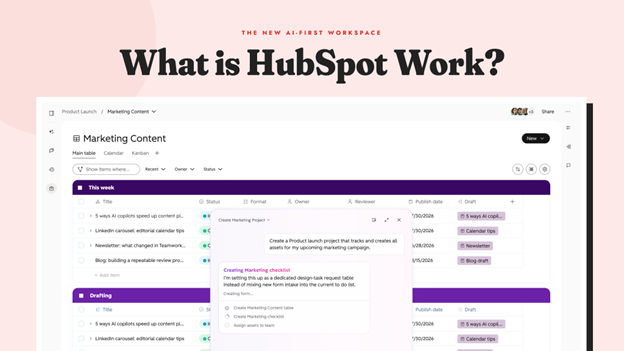
If you’ve heard the “this does everything” pitch before, you’re not wrong to be sceptical. Most “all-in-one” tools end up as one more login your team half-uses before drifting back to five separate apps within a month.
But HubSpot’s new release from Unbound 2026 aims to actually make a difference.
HubSpot Work is built around three pillars, and the CRM connection is the part that matters most:
- Smart Creation. You describe what you need in plain language, and HubSpot Work builds the project table, document, form, or automation for you. No blank canvas, no starting from a template you have to strip down first
- CRM Context. Your contacts, deals, companies, and support tickets are already there, so a messy HubSpot portal shows up in your tasks just as much as a clean one does. A task inside HubSpot Work isn’t a floating to-do item. It’s connected to the actual record it relates to
- Shared Workspace. Your team and HubSpot’s AI agents work in the same place. A task can be assigned to a person, tracked automatically by an agent, or both
The difference from a standalone project tool is that second pillar.
A generic PM tool has no idea who a contact is or which deal a task relates to. HubSpot Work already knows, because it’s built on top of the CRM you’re already using.
How Can HubSpot Work Fit In Your Business?
The clearest way to understand HubSpot Work is through an example HubSpot has been showing partners: running an entire webinar production process inside it.
From a single marketing event, HubSpot Work sets up a complete task table, organised by how many weeks out the event is, with an owner, a due date, and a status for each task.
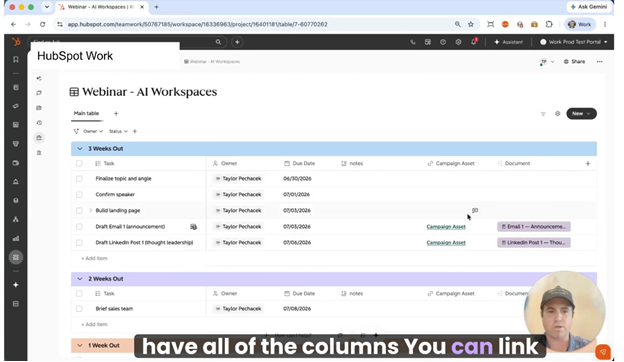
The same tasks also show up in a shared calendar view, so a marketing lead can flip between “what’s due this week” and “what’s the whole timeline” without leaving the tool. Linked documents sit right alongside the tasks, so a brief or a run sheet isn’t buried in a separate drive somewhere.
While the team works, a dedicated agent runs quietly in the background.
For a recurring webinar, it keeps production on track by watching task status, due dates, and ownership, and sending reminders as deadlines approach, even when nobody on the team is actively checking in on it.
That’s the actual pitch: less time spent chasing status updates, because the tracking happens automatically and the context is already there.
The 9 Ways You Can Use HubSpot Work
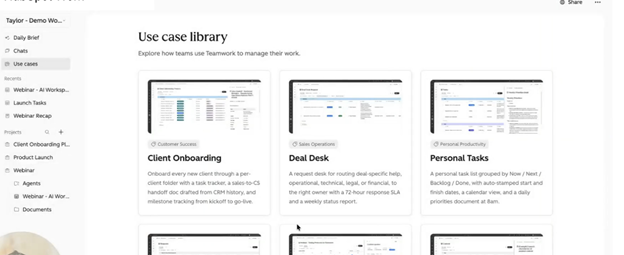
Rather than leaving you to figure out what to build, HubSpot has published nine pre-configured HubSpot Work setups. Each one replaces a specific workaround teams already use:
| Use case | Who it’s for | What it replaces |
| 1. Client Onboarding | Customer Success, Post-Sale Operations | Manual handoff documents and spreadsheet tracking between sales and CS |
| 2. Deal Desk Routing | Sales Ops, RevOps, Deal Desk | Slack threads and email chains for legal, finance, or technical review |
| 3. Personal Task Tracking | Individual contributors and managers | Sticky notes and disconnected task apps |
| 4. Targeted Account Action Plans | Sales, Account Management, Business Development | Manually matching case studies to accounts by hand |
| 5. Webinar Event Prep | Marketing, Events, Content | A prep timeline and draft assets scattered across tools |
| 6. Content Pipeline | Marketing, Content Strategy | Editorial calendars that are disconnected from the actual drafts |
| 7. Internal Request Inbox | Operations, IT, HR, Office Management | Requests arriving as random Slack pings and shoulder taps |
| 8. Internal Intake via HubSpot Work Forms | Sales Ops, RevOps, Deal Desk | Internal forms that clutter up your CRM properties |
| 9. HubSpot Admin Request Management | HubSpot Admins, RevOps, IT | An admin acting as a bottleneck for every access or reporting request |
Client Onboarding automatically creates an onboarding row, a handoff document, and a welcome sequence the moment a deal closes. This means the sales-to-CS handover no longer depends on someone remembering to send an email.
Personal Task Tracking gives an individual a simple Now, Next, Backlog, and Done board, with an automatic daily priorities summary each morning, which is a genuinely useful feature even if your team never touches the bigger use cases.
Not sure which of the nine use cases fits how your team actually works? That’s exactly the kind of assessment RedPandas Digital runs as part of HubSpot optimisation for clients, and it’s a faster answer than testing all nine yourself.
Availability, Tier, and Beta Caveats
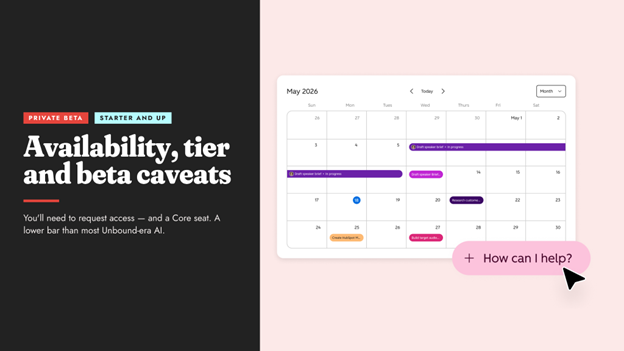
HubSpot Work is currently in private beta, which means it’s not switched on for every account and you’ll need to request access rather than finding it already live in your portal.
It’s available from Starter plans and up, provided the person using it has a Core seat. That’s a meaningfully lower bar than most of HubSpot’s other Unbound-era AI features, which mostly sit on Professional or Enterprise only.
Because it’s still in beta, expect some rough edges as HubSpot Work first rolls out.
Beta features can change behaviour, get renamed, or have functionality added between now and general release, so treat what you see today as an early look rather than a finished product.
For more on the platform HubSpot Work sits alongside, see our guide to HubSpot’s new AI features, Agent Hub and Context Home and our full roundup of what changed at HubSpot Unbound 2026.
Frequently Asked Questions: HubSpot Work
What is HubSpot Work?
HubSpot Work is HubSpot’s new AI-first workspace for internal team projects, currently in private beta, that connects tasks, documents, and automations directly to your CRM data rather than existing as a separate standalone tool.
Does HubSpot Work replace Asana, Trello, or Monday?
It can, for internal projects that benefit from being connected to CRM data, such as client onboarding or account planning. It’s not necessarily a like-for-like replacement for every project management use case, especially those with no CRM connection.
Is HubSpot Work available on the Starter plan?
Yes. HubSpot Work is available from Starter plans up, provided the user has a Core seat, which is a lower bar than most other HubSpot AI features released around Unbound 2026.
What are the 9 HubSpot Work use cases?
The nine published use cases are Client Onboarding, Deal Desk Routing, Personal Task Tracking, Targeted Account Action Plans, Webinar Event Prep, Content Pipeline, Internal Request Inbox, Internal Intake via HubSpot Work Forms, and HubSpot Admin Request Management.
Is HubSpot Work generally available yet?
No. As of Unbound 2026, HubSpot Work is in private beta, so you need to request access rather than automatically enabling it for every account.
What’s the difference between HubSpot Work and a custom object with a nicer interface?
The CRM connection. HubSpot Work automatically pulls in contacts, deals, companies, and tickets, so tasks are tied to real records rather than existing as disconnected entries you’d have to link manually.
Do I need technical skills to set up HubSpot Work?
No. Smart Creation is designed so you describe what you need in plain language, such as “set up a webinar prep timeline,” and HubSpot Work builds the table, document, or workflow for you.
How is HubSpot Work different for marketing versus operations teams?
The underlying tool is the same, but the use cases differ. Marketing teams tend to use it for webinar prep and content pipelines, while operations, IT, and HR teams tend to use it for internal request inboxes and admin request management.
Where to Start With HubSpot Work
Don’t try to plan for all nine use cases before you’ve touched any of them. Pick one.
If HubSpot Work sounds like it could finally close the gap between your CRM and your project tool, request beta access this week and test it against a single low-stakes use case.
Personal Task Tracking or Content Pipeline are the easiest places to start. Give it about two weeks on one real project before deciding whether the CRM connection actually earns its keep.
The tools that stick solve a problem your team already feels, not the ones you add because they’re new.
If you’re not sure which of the nine use cases fits how your team actually works, that’s exactly the kind of assessment RedPandas Digital runs as part of HubSpot optimisation for its clients. It’s a faster answer than testing all nine yourself.
So, if you’d rather skip the guesswork, get in touch and we’ll tell you exactly where to start:
Get In Touch With RedPandas’ HubSpot Experts
Check these other guides on the main HubSpot Unbound 2026 releases to watch out for:
- HubSpot Unbound 2026 Guide: 6 New Updates You Need to Know
- HubSpot AI Features Are Taking a New Turn: Agent Hub, Context Home and Agent Builder Explained
- Unbound 2026 HubSpot Marketing Automation Updates: Marketing Studio 2.0 + AEO Search Sensor Widget
- New HubSpot Sales Hub Features: Deal Progression and Revenue Agent Explained
- HubSpot for Developers: What’s New at Unbound 2026?
- What’s New With Breeze Assistant? The Unbound 2026 Fall Update, Explained
About the Author
This article was written by the team at RedPandas Digital, a HubSpot Diamond Partner based in Sydney, Australia, and one of only four HubSpot-accredited Diamond partners in the Asia-Pacific region.
RedPandas has implemented and optimised HubSpot for businesses across construction, healthcare, legal, education, and professional services. Learn more in this HubSpot partner profile.



Get the best content marketing insights right in your inbox!
Subscribe to our Newsletter and get marketing insights delivered to your inbox every week.