









New HubSpot Sales Hub Features: Deal Progression and Revenue Agent Explained

Key Takeaways
- Deal Progression now monitors calls, emails, and meetings continuously in the background, logging every touchpoint instead of waiting for a rep to update a record
- Revenue Agent drafts personalised invoice reminders and prioritises overdue accounts, but every reminder needs human approval before it sends
- Neither tool replaces reps or finance staff. Both hand back admin time so people can focus on judgement calls, not data entry
- HubSpot’s demo shows a rep working from one prioritised action list, instead of opening deal records one at a time to figure out what needs attention
- Deal Progression’s email and CRM update features are in Private Beta, with transcript tools in Public Beta; Revenue Agent sits within the same Sales Hub release
Stop me if you’ve heard this one before: a rep finishes a great discovery call, and then spends the next twenty minutes doing the unglamorous part of the job.
Updating the deal stage. Logging next steps. Setting a follow-up reminder.
None of it is selling… And it still has to happen anyway.
But can HubSpot’s latest Sales Hub features from Unbound 2026 finally help you get more ROI from your strategy?
That’s the exact gap RedPandas configures Agent Builder and sales workflows to close for clients, including identifying which pipeline stages quietly leak deals.
HubSpot’s own worked demo accounts give a grounded, specific view of how Deal Progression and Revenue Agent behave in practice, rather than a generic feature list, so this is the same lens RedPandas uses when scoping a client rollout.
Here’s exactly what these two agents do automatically, what stays in your control, and what proof there is that it works:
Quick Answer
HubSpot’s newest Sales Hub features target the two admin burdens that eat into a sales team’s day: updating deal records after every call and chasing overdue invoices.
Deal Progression now monitors calls, emails, and meetings continuously in the background and logs every touchpoint, not just meetings, moving from Private Beta with email and CRM updates into Public Beta with added transcript tools.
Revenue Agent is brand new: it prioritises overdue invoices, drafts personalised reminders, and handles responses, but every reminder sits behind a human approval step before it sends. Neither replaces your reps.
Both are designed to hand back the admin time so reps and finance staff can spend it on the parts of the job that need a person.
But the Deal Progression and Revenue Agent only work best with a healthy portal.
If you’re curious as to whether yours is in the right shape to reap the benefits, take the free HubSpot Health Check quiz below and find out in two minutes:


Take the Free HubSpot Health Check Quiz
HubSpot Sales Hub Features: What’s New After Unbound 2026?
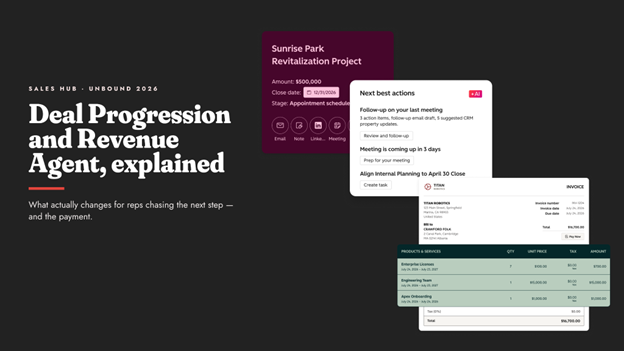
Two products sit at the centre of this update, and each solves a different problem:
| Feature | What It Does | Status (as of 16 Sep 2026) |
| Deal Progression (improved) | Monitors emails, calls, and meetings continuously in the background, instead of waiting for a rep to update a record. This feature now expands beyond logged meetings to analyse and log every buyer interaction it can see. | Email and CRM updates: Private Beta Transcript tools: Public Beta |
| Revenue Agent (new) | Supervises and tracks all outstanding invoice actions, dispatches intelligent reminders to secure on-time payments, and closes the loop by locking down incoming cash flow. Tracks DSO and time to first outreach as key metrics. | New this release |
Alongside both, a set of Agent Builder use cases built specifically for sales teams rounds out the release:
| Agent Builder Use Case | What It Does |
| Personalised Demo Prep | Tailors demo flows and assets to a buyer’s industry and pain points |
| Pipeline & Risk Review | Analyses deal signals to flag stuck pipelines and risk factors |
| Multi-Threading Assistant | Maps buyer committees and drafts targeted outreach to each stakeholder |
If you’re not sure which Sales Hub tier you’re even on, our guide to Sales Pro vs Sales Starter is worth checking before you scope a Deal Progression rollout.
Deal Progression in Action: A Real Demo Walkthrough
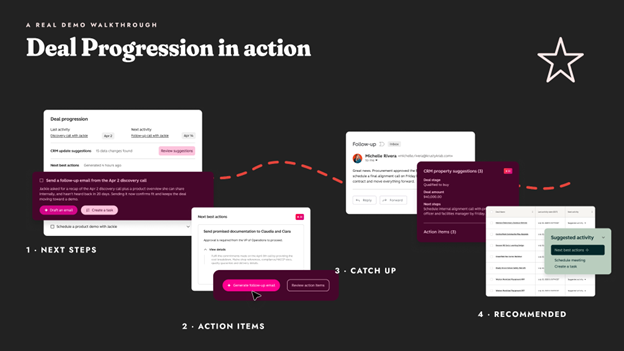
The clearest way to understand Deal Progression is to see it in action on a real deal.
HubSpot’s demo opened on a Quarterly Business Review record for a deal in the “Bought In” stage, with four panels doing the actual work:
| Panel | What it shows |
| Next Steps | An AI-generated meeting summary with a suggested deal stage change and a concrete next action, such as sending an updated proposal and ROI calculation by Thursday |
| Review Action Items | Specific commitments made on the call, already attributed to the named contacts involved |
| Catch Up | Follow-up work such as sending pilot ROI and projected deployment numbers to a contact, or preparing a side-by-side comparison |
| Recommended Actions | A ready-to-send email for the next best action, not a blank compose window waiting for the rep to start from scratch |
Zoom out to the full pipeline view, and the same pattern repeats across every open deal, each with its own suggested next action.
Instead of opening records one at a time to figure out what needs attention, a rep works from a single prioritised list.
Deal Progression only helps if your deal records are set up properly in the first place, which is exactly what our best practices for HubSpot deals guide covers.
Revenue Agent: Collecting Cash Faster, Without the Awkward Chasing
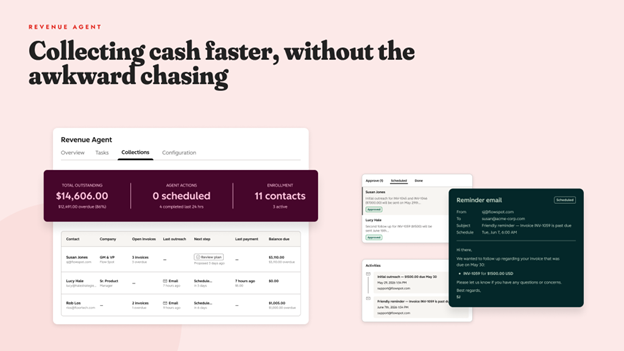
Revenue Agent’s own framing is direct: collect cash faster, without chasing. When applied, it:
- Prioritises what matters most
- Follows up at the right moment
- Handles responses instantly
- Drafts every action for a human to check first
Configuration works on an enrolment basis, either specific contacts or your whole customer list, against a connected inbox.
Here’s the part to keep in mind if you’re worried about AI touching client relationships unsupervised: every drafted reminder sits behind an Approve or Request Changes control before it sends. Nothing goes out on its own.
Here’s a sample workflow from HubSpot’s demo in Unbound 2026 that gives a concrete idea of this feature in play:
| Detail | What happens |
| Example invoice | Roughly AUD $3,160, overdue by several weeks |
| First reminder | Drafted immediately |
| Second reminder | Staged for day 6 |
| Third reminder | Staged for day 15 |
| Optional fourth reminder | The reviewer can add one a week after that, if needed |
| Account view, total outstanding | Roughly AUD $6,650 across the whole book |
| Account view, contacts enrolled | Multiple, each with its own running email thread |
Every reminder email is generated in full, subject line, invoice reference, and payment link included, and queued as “Needs approval” until someone clicks Approve.
The same agent also shows a live invoice list alongside that running email thread per contact.
The same discipline that makes a good HubSpot sequence work applies here too. See our HubSpot sequences best practices guide for the fundamentals.
What Stays in Your Control
If you’re wondering whether this means handing collections over to AI, the honest answer is: not without you seeing it first.
Every Revenue Agent reminder requires human approval before it sends, so your finance team keeps the final say on tone and timing.
Deal Progression works the same way on the sales side: it drafts, suggests, and prioritises, but a rep decides what actually goes out and what gets actioned.
That said, “AI reading our calls and touching deal records” is a fair thing to want scoped properly before you turn it on for a whole team, not after.
This is exactly the kind of rollout that benefits from a proper diagnose-first approach: figure out which stage is leaking deals, or which invoice ageing bucket is the problem, before configuring the agent around it.
If your team already has CRM adoption issues, adding an AI agent to the mix without fixing that first tends to make things worse, not better. This piece on why sales teams resist using a CRM walks through how to fix the underlying problem.
Availability and What to Check Before Turning It On
Deal Progression’s email and CRM update features are in Private Beta, with transcript tools in Public Beta.
Revenue Agent and the sales-specific Agent Builder use cases sit within the same Sales Hub release.
Custom agent use consumes HubSpot credits, so confirm expected usage against your plan before rolling either one out to a full team.
Before switching anything on, it’s worth checking three things:
- Which pipeline stage is actually losing you deals. Deal Progression only helps if it’s aimed at the right problem
- What your current DSO and overdue invoice value look like today, so you have a baseline to prove improvement against later
- Who on your team needs to review and approve what these agents draft

HubSpot Cost & Add-Ons: What to Buy for Marketing, Sales, and Service Teams
Frequently Asked Questions: New HubSpot Sales Hub Features (2026)
What is Deal Progression in HubSpot?
Deal Progression is a Sales Hub agent that continuously monitors emails, calls, and meetings, logs every buyer interaction, and suggests next steps and CRM updates automatically, instead of waiting for a rep to update the deal manually.
What is Revenue Agent in HubSpot?
Revenue Agent is a new Sales Hub feature that monitors outstanding invoices, prioritises which ones need attention, and drafts personalised payment reminders to reduce Days Sales Outstanding and the total value of overdue invoices.
Do Deal Progression and Revenue Agent replace sales reps or finance staff?
No. Both agents draft, suggest, and prioritise work, but a person reviews and approves before anything is sent to a customer or updated in a way that affects the deal.
Does Revenue Agent send reminders automatically, without anyone checking first?
No. Every drafted reminder is queued as “Needs approval” and requires a human to click Approve before it sends.
What tier do I need for Deal Progression and Revenue Agent?
These are Sales Hub features tied to this release; confirm the specific tier and beta access against your current plan, since email and CRM update features are in Private Beta and transcript tools are in Public Beta.
How does Deal Progression know what to do after a call?
It analyses the call transcript and meeting record, generates a summary with suggested next steps, and attributes specific commitments to named contacts, which a rep then reviews and actions.
Will this spam customers with reminder emails?
Every reminder is drafted first and held for human approval before sending, and configuration is enrolment-based, so nothing goes to a contact who hasn’t been added to the workflow.
Is this expensive to run because of credit consumption?
Custom agent use consumes HubSpot credits on top of your existing subscription, so confirm expected volume and cost against your plan before enrolling a full contact list or team.
Why This Can’t Wait Until Next Quarter
Every deal sitting untouched in your pipeline and every invoice sitting unchased has a cost attached, even if nobody’s tracking it yet.
A stalled deal doesn’t fix itself by staying stalled longer. An overdue invoice doesn’t get less overdue while it waits for someone to have a free afternoon.
That’s the actual argument for looking at this now rather than “when things calm down”: things calming down isn’t the trigger; a decision is.
Neither of these tools does its best work switched on blind.
The businesses that get the most out of Deal Progression and Revenue Agent are the ones who diagnose their actual leaking stage or their actual DSO problem first, then configure the agent around it, rather than turning everything on and hoping.
If you already know which pipeline stage or which invoice bucket is your problem, you’re ready to scope a rollout.
If you don’t, that’s worth finding out before you spend a single credit on either agent.
Book a free pipeline and cash flow audit with RedPandas, or read our guide to diagnosing a broken sales pipeline in HubSpot to see how we find the leaking stage first.
And while you’re here, check out these other guides on the main HubSpot Unbound 2026 releases to watch out for:
- HubSpot Unbound 2026 Guide: 6 New Updates You Need to Know
- What Is HubSpot Work? The New AI-First Workspace, Explained
- HubSpot AI Features Are Taking a New Turn: Agent Hub, Context Home and Agent Builder Explained
- Unbound 2026 HubSpot Marketing Automation Updates: Marketing Studio 2.0 + AEO Search Sensor Widget
- HubSpot for Developers: What’s New at Unbound 2026?
- What’s New With Breeze Assistant? The Unbound 2026 Fall Update, Explained
About the Author
This article was written by the team at RedPandas Digital, a HubSpot Diamond Partner based in Sydney, Australia, and one of only four HubSpot-accredited Diamond partners in the Asia-Pacific region.
RedPandas configures HubSpot’s Sales Hub, Agent Builder, and revenue workflows for clients across construction, healthcare, legal, education, and professional services. Learn more in this HubSpot partner profile.



Get the best content marketing insights right in your inbox!
Subscribe to our Newsletter and get marketing insights delivered to your inbox every week.