









HubSpot Marketing Automation Updates: Marketing Studio 2.0 + AEO Search Sensor Widget

Key Takeaways
- Marketing Studio 2.0 merges campaign planning, execution, and reporting into one workspace, replacing the old, disconnected Campaign Planning Canvas
- You can describe a campaign goal in a chat panel and get a full campaign brief back, assets, automation, and rationale included
- HubSpot’s own customer data shows 81% more campaigns built and a 14% lift in marketing reach for teams using it
- The AI Search Sensor Widget is free to embed today, no beta wait required, and shows how your brand shows up in ChatGPT, Gemini, and Perplexity
- Marketing Studio 2.0 itself is still in Private Beta on Pro+ Marketing Hub, so treat it as something to start testing now, not fully rely on yet
81 per cent more campaigns built, with the same team and the same hours in the day.
That’s the headline number HubSpot is putting behind Marketing Studio 2.0, and it’s the kind of stat that only means something if you’ve felt the problem it’s solving.
If you’ve ever built a campaign report by pulling data from five different tools, you know the feeling.
You’re not analysing performance. You’re doing data entry, and the actual thinking happens in whatever time is left over.
So, how can Marketing Studio 2.0 make a difference?
As a HubSpot Diamond Partner, RedPandas Digital runs attribution and HubSpot portal setups for paid media and campaign work every day, so this isn’t just a feature list pulled from a press release. The team has built and optimised setups to run these campaigns on real client budgets, so the insights covered include their expert input.
This article walks you through what’s actually changed, what building a campaign looks like now, and what you can try for free today.
Quick Answer
HubSpot’s marketing automation platform just had its biggest rebuild in years.
Marketing Studio 2.0 replaces the old Campaign Planning Canvas with one connected workspace for planning, building, and reporting on campaigns. The release includes a chat-based flow that turns a one-line goal into a full campaign brief with assets and a workflow attached.
It’s rolling out on Pro+ Marketing Hub as a private beta ahead of HubSpot’s Unbound conference.
Alongside Marketing Studio 2.0, a free AI Search Sensor Widget shows how engines like ChatGPT, Gemini, and Perplexity are shifting traffic in your industry. HubSpot’s own data shows customers using it to build 81 per cent more campaigns and see a 14 per cent lift in marketing reach.
But the Marketing Studio 2.0 and the new AI Search Sensor Widget only work best with a healthy portal.
If you’re curious as to whether yours is in the right shape to reap the benefits, take the free HubSpot Health Check quiz below and find out in two minutes:


Take the Free HubSpot Health Check Quiz
What’s New With HubSpot Marketing Studio 2.0?
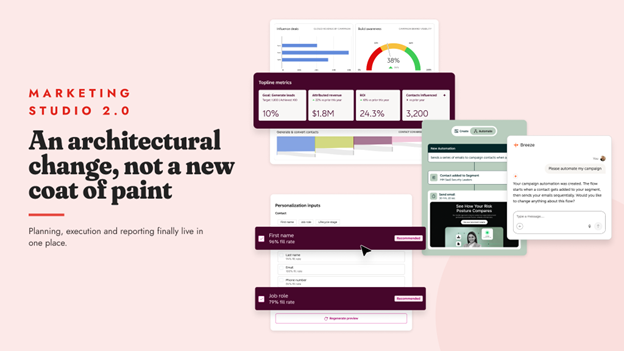
Marketing Studio 2.0 sits at the centre of HubSpot’s rebuilt approach to marketing automation, and it’s a genuine architectural change, not a new coat of paint. The old Campaign Planning Canvas kept planning, execution, and reporting separate and disconnected.
Marketing Studio 2.0 links them into one workspace with three tabs:
- Overview: A chat panel where you can ask Breeze Assistant for help, sitting next to flagged campaign issues like broken links and a live campaign pipeline chart
- Analyze: Your topline numbers in one place: goal progress, attributed revenue and its year-on-year change, ROI, and contacts influenced, plus a brand visibility gauge and a contact conversion flow diagram.
- Insights: Breeze surfaces AI search visibility recommendations directly against a live campaign, with a suggested content mix and one-click options to create a campaign, create a task, or ask for more detail
The before and after is worth spelling out plainly, because it’s the actual pitch:
| Campaign Planning Canvas (Before) | Marketing Studio 2.0 (Now) | |
| Interface | A confusing canvas, with reporting kept separate from the planning work | One connected workspace linking strategy straight to execution |
| Collaboration | Hidden, hard to see who changed what | Visible in the same view your team already works from |
| Reporting | Built by stitching data from multiple tools | Live, in the same tab as the campaign itself |

HubSpot Marketing Hub Free vs Starter vs Professional vs Enterprise
Building a Campaign by Describing It in Chat
Marketing Studio 2.0 aims to turn the traditional campaign-building process on its head by skipping the blank page entirely.
The workflow looks like this: Describe your campaign goal in a sentence, and Breeze builds the whole thing with concept, assets, and automation while you’re still in the chat window.
Here’s what that looked like in HubSpot’s demo from Unbound 2026:
- A marketer opens the Overview tab and describes the campaign in the chat panel instead of starting from a blank canvas
- When asked whether the goal is more sales meetings, they confirm it
- Breeze asks one clarifying question, then generates a complete campaign brief, grounded in the marketer’s own uploaded notes rather than generic filler.
- The brief also includes a full asset plan: a landing page, two emails, an interactive call to action, and a form, each with a stated rationale for why it’s there
- Approving the brief lays every asset out on a shared canvas
- From there, the marketer sets up the automation: a contact submitting the campaign’s form immediately receives an introductory email, with a follow-up delayed by three days if there’s no reply
The entire build, from a one-line goal to a live, automated campaign, happens inside a single chat-driven session.
If you’re picturing generic AI output that still needs cleaning up before you can use it, that’s a fair objection. The honest answer is that quality depends heavily on what HubSpot already knows about your business, your brand voice, and your past campaigns.
That’s a separate, often overlooked piece of setup work, and it’s exactly where an audit with a HubSpot Partner earns its keep before you rely on chat-built campaigns for anything client-facing.
Even when Breeze builds your landing page for you, it’s worth checking the result against our best practices for HubSpot landing pages before you publish it.
Meet the Free AI Search Sensor Widget
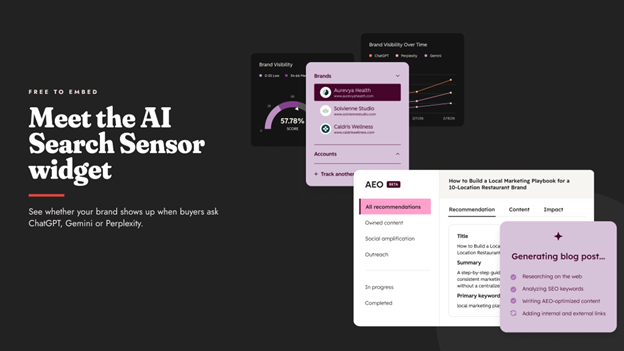
Marketing Studio 2.0 solves campaign chaos, while the AI Search Sensor Widget solves a newer, less visible one: not knowing whether your brand shows up when people ask ChatGPT, Gemini, or Perplexity a question your business should be answering.
The widget is free to embed and shows how these AI engines are shifting traffic and visibility for your brand or industry.
HubSpot frames it as a four-step way to build demand from it:
- Embed it on high-traffic pages to add timely market intelligence your visitors can’t get anywhere else
- Pair it with a call to action, such as “Want to see how your brand shows up in AI search? Book an assessment”
- Send a monthly AI visibility pulse: One trend, one recommended action, and an invite to a live session
- Turn the insight into services: Content refreshes, digital PR, review programmes, ongoing visibility reporting
For Australian businesses, this matters more than it might look at first glance.
If AI search assistants are already answering questions your website used to get the click for, you need a way to see it happening, not just suspect it.
And if you want to go deeper on AI search visibility before you touch the widget, our guide on how to rank in AI search with HubSpot’s AEO Grader tool covers the companion tool this widget builds on.
The Proven Results So Far
These numbers are HubSpot’s own reported figures, so treat them the way you’d treat any vendor’s stats: directionally useful, worth verifying against your own results once you’re live.
Here’s a quick rundown of what to know:
- 81 per cent more campaigns built, with the ease and accuracy of Marketing Studio, according to HubSpot’s customer data.
- 14 per cent average increase in marketing reach and a nine per cent improvement in brand visibility for customers using Content Agent
- Direct customer feedback: Kaplan Early Learning Company reports the Campaign Agent “helps us move from a blank page to a structured, strategic campaign much faster”, and Arcis Golf says “reporting that used to take 20-plus hours now takes an afternoon”, consolidating ten datasets down to one view
Availability and What to Try First
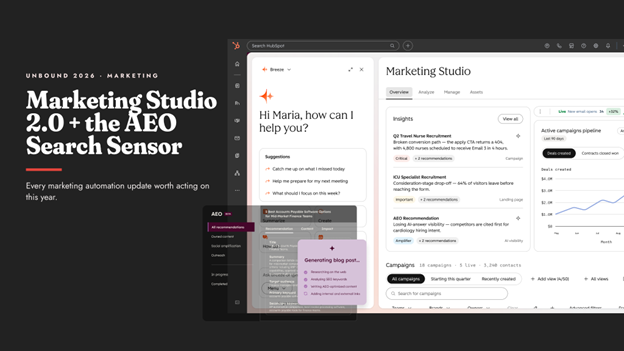
Marketing Studio 2.0 is in private beta on Pro+ Marketing Hub ahead of HubSpot’s Unbound conference in September 2026, and Campaign Agent use consumes credits at roughly AUD $7 per campaign.
The Content Agent, which generates blogs, LinkedIn posts, and landing pages, sits on the same Marketing Hub Pro+ tier alongside AEO features.
If you’re on Marketing Hub Pro or above, the AI Search Sensor Widget is the easiest place to start today, since it’s free and doesn’t require waiting for beta access.
From there, the highest-value next step is making sure HubSpot actually knows enough about your brand, your audience, and your past campaigns to generate a brief worth approving on the first try.
That’s context work, and it’s worth doing before you lean on chat-built campaigns for anything that matters.
Marketing Studio 2.0 isn’t the only AI feature worth evaluating this quarter. Our breakdown of HubSpot’s AI tools for automating website customer interactions covers where else to pay attention.
Frequently Asked Questions: HubSpot Marketing Automation
What is HubSpot Marketing Automation, and how has it changed in 2026?
HubSpot marketing automation now runs through Marketing Studio 2.0, a rebuilt workspace that connects campaign planning, execution, and reporting in one place, instead of the separate Campaign Planning Canvas used previously. It includes a chat-based way to build a full campaign from a single described goal.
What is Marketing Studio 2.0?
Marketing Studio 2.0 is HubSpot’s rebuild of campaign management into a single connected workspace with three tabs: Overview (chat and flagged issues), Analyze (topline metrics and ROI), and Insights (AI search visibility recommendations against live campaigns).
Can you really build a campaign just by describing it in chat?
Yes. HubSpot’s demo shows a marketer describing a campaign goal in chat, approving a generated brief (including assets and rationale), and configuring the automation trigger, all inside one chat-driven session, without starting from a blank canvas.
What is the AI Search Sensor Widget, and is it free?
It’s a free, embeddable widget that shows how AI engines like ChatGPT, Gemini, and Perplexity are shifting traffic and visibility for your brand or industry. It’s designed to sit on high-traffic pages alongside a call to action.
Do I need Enterprise for Marketing Studio 2.0?
No. Marketing Studio 2.0 is available on Pro+ Marketing Hub and is currently in private beta. The AI Search Sensor Widget doesn’t require any specific tier since it’s a free embed.
Will chat-built campaigns just produce generic content?
Output quality depends on how much context HubSpot has about your brand, audience, and past campaigns. Without that groundwork, briefs can read as generic. With it, HubSpot’s demo shows briefs grounded in a business’s own uploaded notes, not a template filler.
Does Marketing Studio 2.0 just create more dashboards to manage?
The opposite is the intent: reporting lives inside the same workspace as the campaign build, rather than a separate tool you stitch together afterwards. Arcis Golf’s reported experience (10 datasets down to one view) is HubSpot’s proof point for this specific concern.
How much does using Campaign Agent cost?
Campaign Agent consumes HubSpot credits at roughly AUD $7 per campaign, on top of your existing Marketing Hub subscription.
Why This Can’t Wait Until Your Next Campaign
Here’s the part that’s easy to miss: AI search engines are already deciding whether your brand gets mentioned, right now, whether or not you’re watching it happen.
Every month without the AI Search Sensor Widget is a month of flying blind on a channel that’s actively reshaping where your traffic comes from: a reason to add a free widget to your site this week instead of next quarter.
The same logic applies to Marketing Studio 2.0.
Campaigns you build now, even in beta, start feeding HubSpot the context it needs to write sharper briefs later. Teams that start testing today will have a head start over teams that wait until it feels “finished.”
You don’t need to overhaul your marketing stack to act on this: you need one campaign, or one widget install, to see where you actually stand.
If you want a second set of eyes on what that looks like for your business, book a free AI search visibility check with RedPandas, or start with our guide to AEO for Australian businesses.
And while you’re here, check out these other guides on the main HubSpot Unbound 2026 releases to watch out for:
- HubSpot Unbound 2026 Guide: 6 New Updates You Need to Know
- What Is HubSpot Work? The New AI-First Workspace, Explained
- HubSpot AI Features Are Taking a New Turn: Agent Hub, Context Home and Agent Builder Explained
- New HubSpot Sales Hub Features: Deal Progression and Revenue Agent Explained
- HubSpot for Developers: What’s New at Unbound 2026?
- What’s New With Breeze Assistant? The Unbound 2026 Fall Update, Explained
About the Author
This article was written by the team at RedPandas Digital, a HubSpot Diamond Partner based in Sydney, Australia, and one of only four HubSpot-accredited Diamond partners in the Asia-Pacific region.
RedPandas has implemented and optimised HubSpot for businesses across construction, healthcare, legal, education, and professional services. Learn more in this HubSpot partner profile.



Get the best content marketing insights right in your inbox!
Subscribe to our Newsletter and get marketing insights delivered to your inbox every week.