









What Is HubSpot Smart CRM? (Pricing, Tiers, and Who Needs What)

Key Takeaways
- HubSpot Smart CRM is the shared foundation underneath every HubSpot hub, not a separate tool bolted on top
- One customer record replaces siloed data. Every email, call, deal, and ticket lives in a single unified view
- AI runs through the whole system. Lead scoring, deduplication, forecasting, and reporting all draw from the same data layer
- Two paid tiers exist: Smart CRM Professional (AUD $78/month, 1 core seat) and Smart CRM Enterprise (starting at AUD $116/month, 1 core seat)
- Professional suits growing teams that want more reporting control without enterprise-level complexity
- Enterprise suits complex sales processes, custom objects, and high-volume record management
- Annual billing gives better value than monthly if you’re committing to Smart CRM long-term
Stop me if this sounds familiar: you’re trying to make sense of HubSpot’s “Smart CRM,” and every page you click makes things more confusing.
Marketing Hub, Sales Hub, tiers, add-ons, seats, limits. The deeper you go, the less certain you feel.
But what do you need to know about it?
You’ve read the pricing tiers and the product pages. Instead of clarity, you’re left with more questions:
- “What’s really different about the ‘Smart’ version?”
- “Which tier is actually right for my business?”
- “How can I make sure I’m not overspending on features I don’t need?”
The wrong choice here costs more than money. It costs your team time, momentum, and trust in the system you just paid for.
The good news: HubSpot’s Smart CRM is built to solve exactly these problems, once you pick the right tier and set it up properly.
As a HubSpot Diamond Partner, RedPandas Digital has helped 300+ Australian businesses pick the right Smart CRM tier. We’ve fixed the overspends and mismatched setups that come from getting this decision wrong.
In this article, you’ll learn what Smart CRM actually is. You’ll also see how it connects to Marketing Hub, Sales Hub, and the rest of HubSpot, plus know which tier fits your team and goals.
Quick Answer
HubSpot’s Smart CRM is the unified data layer connecting Marketing Hub, Sales Hub, Service Hub, and every other HubSpot tool in one customer record.
It comes in two tiers: Professional at AUD $78/month for one core seat, and Enterprise starting at AUD $116/month for one core seat.
Choose Professional if you’re a growing team that needs better contact and reporting control. Choose Enterprise if you need custom objects, field-level permissions, or high-volume record management.
Need help figuring out which setup works best for you? Get in touch with RedPandas’ HubSpot experts for a free consultation and strategy session:


Book Your Free HubSpot Smart CRM Consultation With RedPandas’ Experts
What is HubSpot’s Smart CRM?
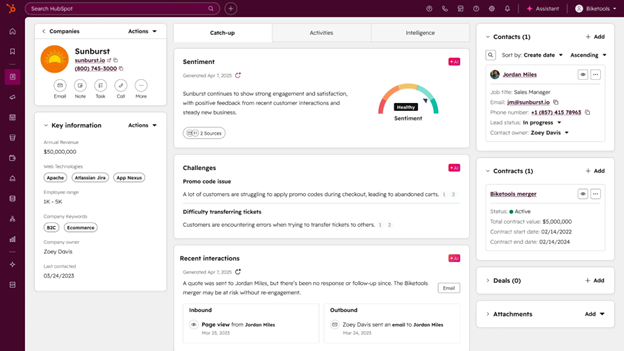
HubSpot’s Smart CRM is the new backbone of the entire HubSpot platform. It’s a shared database connecting your marketing, sales, service, and tech stacks in real time.
Here’s the part that matters most to you: Smart CRM removes the messy handovers and broken attribution holding your teams back.
Here’s how it does that:
A Single Customer Record With No Duplicates or Silos
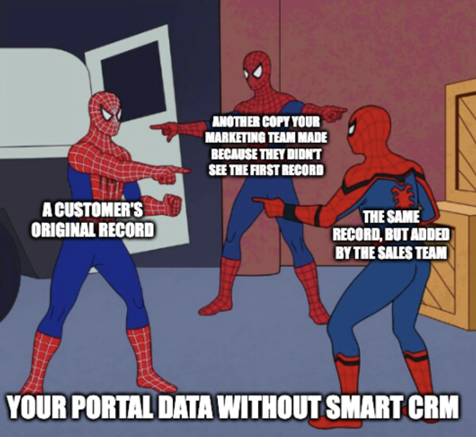
Most CRMs separate your marketing, sales, and service records into different systems. That’s why a lead looks qualified in marketing but sales sees something completely different.
Smart CRM fixes this by keeping everything in one unified record:
- Every email
- Every page view
- Every call
- Every deal
- Every support ticket
- And, every lifecycle stage change
This way, your teams spend less time cross-checking what they’re making decisions with and start working with the same information.

Honest Review: Does HubSpot Actually Help Businesses Grow?
AI is Embedded Into The Foundation
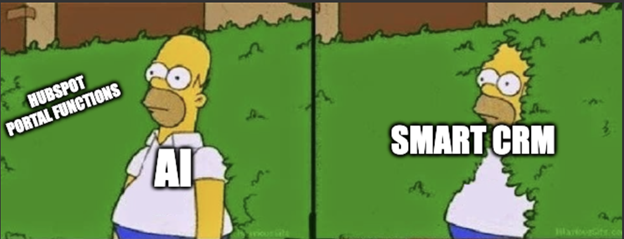
HubSpot’s Smart CRM layers AI into everything you do:
- Lead scoring
- Data hygiene and deduplication
- Content recommendations
- Forecasting
- Reporting
The AI runs on the same customer record your whole team already uses. Duplicate contacts get flagged and merged before they split your reporting.
Having this functionality allows you to spend less time cleaning data and more time acting on it.
Designed To Scale Without Becoming “Enterprise Painful”
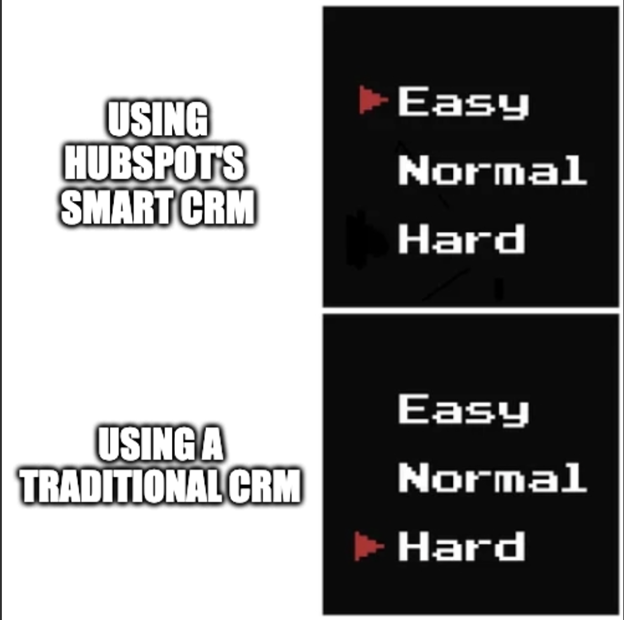
Traditional CRMs often require heavy IT involvement, custom development, and long onboarding cycles.
HubSpot built Smart CRM so you can scale from a few users to full departments without that complexity. Your teams focus on results, not on keeping the portal afloat.
HubSpot calls it “Smart CRM.” You can think of it as the system that lets your marketing, sales, and service teams finally act like one team.
It’s the foundation everything else sits on. Understand this before you look at pricing or tiers.

Is HubSpot Right for My Business? Here’s How to Tell
Normal HubSpot CRM vs. Smart CRM: What’s the Difference?
When you hear “Smart CRM,” you might assume HubSpot simply rebranded the old CRM. The details tell a different story.
HubSpot rebuilt its platform’s foundation. Marketing, sales, and service work differently today than when the original CRM launched.
Here are the key differences between Smart CRM and the old HubSpot CRM:
| Category | Old HubSpot CRM | HubSpot Smart CRM | What This Can Mean for You |
| Core Architecture | Built as a standalone CRM with hubs connected on top | Built as a unified data model that underpins the entire platform | Far fewer data inconsistencies, gaps, or sync issues: everything updates in real time |
| Data Structure | Separate data “views” for Marketing, Sales, and Service | One centralised customer record powering every hub | No more conflicting lifecycle stages or mismatched properties between teams |
| Inter-Hub Alignment | Alignment depended on settings, workarounds, and best practices | Alignment is native and automatic at the system level | Teams naturally operate from the same truth without maintaining complex rules |
| Automation Capabilities | Basic automations limited by siloed logic | Automation triggered from any hub, using any data | More sophisticated, journey-wide automation becomes easy to build |
| Intelligence & AI | Activity logging + basic enrichment | AI-powered scoring, enrichment, call summaries, recommendations | Less manual work, better prioritisation, and more accurate data for every team |
| Customisation Options | Limited, especially around objects, permissions, and modelling | Enterprise-grade modelling: custom objects, custom pipelines, field-level permissions, custom events | You can tailor the CRM to your actual business model instead of forcing processes to fit the software |
| Scalability | Strong for SMBs, but structure becomes rigid as teams grow | Designed for startups and complex enterprises simultaneously | You can start small and scale without re-platforming |
| Team Collaboration | Each hub handled part of the journey independently | Fully connected revenue journey across Marketing, Sales, Service, and Ops | No more “handover gaps,” broken funnels, or duplicated work |
| Reporting & Attribution | Reporting sometimes limited by inconsistent data across hubs | Unified reporting built on one consistent data layer | Far clearer revenue attribution and forecasting |
| Data Quality Management | Manual cleanup required; deduping was functional but basic | Smart deduplication, automatic enrichment, extensive calculated properties | CRM hygiene improves dramatically with less manual effort |
| Workflow Power | Useful, but limited when referencing cross-hub activities | High-power, cross-hub workflows using shared properties and events | Complex processes (renewals, onboarding, lead scoring, trial → paid) become simple |
| Technical Flexibility | Good for SMB workflows; less suitable for multi-team complexity | Sandbox environments, advanced permissions, custom events, scalable objects | Ideal for companies with multi-region teams, multiple brands, or strict data governance |
| Underlying Philosophy | CRM as a module | CRM as the operating system for the entire HubSpot ecosystem | A fundamentally different way of running your GTM engine |
You already saw Smart CRM’s AI layer at work in the section above. That same AI runs underneath every upgrade in this table too.
The shift from the old HubSpot CRM to Smart CRM gives your team a cleaner foundation, smarter automation, and deeper flexibility.
Smart CRM works as a different engine. It’s built to match how modern marketing, sales, and service teams operate today.
HubSpot Smart CRM Pricing & Features
HubSpot’s pricing structure for the Smart CRM is straightforward, with two primary tiers: Professional and Enterprise.
Here’s a quick breakdown of the costs, features, and what you get at each level:
| Feature | Smart CRM Professional | Smart CRM Enterprise |
| Price | AU$78/month (1 Core Seat). Additional seats at AU$78/month | Starts at AU$116/month (1 Core Seat). Additional seats at AU$116/month. |
| Calculated Properties | 40 calculated properties | 200 calculated properties |
| Custom Objects | Limited custom objects | Up to 10 custom object definitions, 1,000,000 total custom object records, 50 custom object pipelines |
| Contact Management | Yes | Yes |
| Automatic Enrichment | Yes | Yes |
| Duplicate Management | Yes | Yes |
| Custom Reporting | Yes | Yes |
| Teams | Yes | Yes |
| Standard CRM Interface Config | Yes | Yes |
| Sandbox Account | No | Yes |
| Field-Level Permissions | No | Yes |
| Custom Events | No | Yes |
| Sensitive Data Management | No | Yes |
| Organize Teams | No | Yes |
| Non-Pipeline Board Visualisation (Beta) | No | Yes |
Learn more about HubSpot Smart CRM’s pricing options, features, and tiers here.
Smart CRM Professional is ideal if you:
- Run a growing team that needs more control over contacts and reporting, without enterprise complexity
- Aren’t yet dealing with large-scale customisation or complex workflows
Smart CRM Enterprise is better suited if you:
- Run a larger team or a complex sales process
- Need custom objects, high-volume records, and granular control over data and permissions
You can pay monthly or annually for both tiers. Annual billing offers better value if you’re committing to Smart CRM long-term.
5 HubSpot Features You Can Use to Get More Sales | Episode 187
Frequently Asked Questions: HubSpot Smart CRM
What is HubSpot’s Smart CRM?
HubSpot’s Smart CRM is the unified database underpinning the entire HubSpot platform. It stores every email, call, deal, and support ticket in one shared customer record, so your marketing, sales, and service teams work from the same information. Smart CRM layers AI-powered lead scoring, forecasting, and reporting on top of that shared data.
What’s the difference between HubSpot’s old CRM and Smart CRM?
The old HubSpot CRM ran as a standalone tool with separate data views for each hub. Smart CRM replaces that with one centralised customer record powering every hub automatically. This gives you fewer data gaps, native cross-hub alignment, and AI-driven automation the old structure couldn’t support.
How much does HubSpot Smart CRM cost in Australia?
HubSpot Smart CRM Professional costs AU$78/month for one core seat, with additional seats priced the same. Smart CRM Enterprise starts at AU$116/month for one core seat, with additional seats also priced the same. Both tiers offer better value when billed annually rather than monthly.
What’s included in HubSpot Smart CRM Professional?
Smart CRM Professional includes 40 calculated properties, limited custom objects, automatic enrichment, duplicate management, custom reporting, and team functionality. It’s built for growing businesses that need more contact and reporting control but don’t yet need enterprise-level customisation or high-volume custom object records.
What’s included in HubSpot Smart CRM Enterprise?
Smart CRM Enterprise includes 200 calculated properties, up to 10 custom object definitions, 1,000,000 custom object records, sandbox accounts, field-level permissions, custom events, and sensitive data management. It suits larger teams running complex sales processes that need granular control over data and permissions.
Should I choose Smart CRM Professional or Enterprise?
Choose Professional if your team needs more contact and reporting control without enterprise complexity. Choose Enterprise if you manage complex sales processes, need custom objects, high-volume records, or granular data permissions. Match your decision to your current operational complexity, not just your company size.
Does HubSpot Smart CRM include AI features?
Yes. Smart CRM embeds AI throughout the platform, covering lead scoring, data hygiene, deduplication, content recommendations, forecasting, and reporting. This AI layer runs on the same unified customer record, so your team spends less time cleaning data and more time acting on it.
Can I buy HubSpot Smart CRM without Marketing Hub or Sales Hub?
Yes. Smart CRM is available as a standalone product in Professional and Enterprise tiers. You don’t need to purchase Marketing Hub, Sales Hub, or Service Hub to access it, though Smart CRM is also included automatically whenever you buy any of those hubs.
Your Next Best Move Could Be with HubSpot’s Smart CRM
Here’s the real question you’re probably asking yourself right now:
“So what? What does all of this mean for me and my business?”
With HubSpot Smart CRM in your toolkit, everything else becomes easier:
- Your lead handovers stop breaking.
- Your forecasts stop feeling like guesswork.
- Your reporting stops starting arguments.
- And, your revenue engine stops fighting itself.
Picking the right tier is the moment everything either clicks… or becomes expensive very quickly.
Waiting “until you have more time” won’t make the decision clearer. And, waiting “until next quarter” won’t fix the problems slowing your team down today.
And waiting “until the pain gets worse” only guarantees one thing: it will.
One small decision with the right tier that aligns with your goals can remove months of friction.
Start there, and the rest of your HubSpot journey can become significantly easier.

6 Benefits Of Onboarding with a HubSpot Partner (Instead of HubSpot’s In-House Onboarding)
About the Author




Get the best content marketing insights right in your inbox!
Subscribe to our Newsletter and get marketing insights delivered to your inbox every week.