









HubSpot Unbound 2026 Guide: 6 New Updates You Need to Know

Key Takeaways
- HubSpot is dropping “Breeze” as a marketing label for most of its AI tools. Breeze Assistant is the one name that survives
- All of HubSpot’s AI now runs on a shared foundation called Growth Context, so every agent and Hub reads from the same understanding of your business
- Agent Hub is a new control room for managing every AI agent in your portal, currently in public beta on Professional and Enterprise plans
- Context Home is where you feed HubSpot the business information its agents actually rely on, from your sales methodology to your brand voice
- Agent Builder’s new custom event triggers and one-click workflow migration are in public beta, and your existing workflows keep working unchanged
HubSpot’s Unbound 2026 announcement is the biggest repositioning the platform has had in years.
But what does this mean for your business… And could it be nothing more than hype?
As a HubSpot Diamond Partner, RedPandas Digital is already testing these exact changes on real client portals, not reading about them secondhand.
In this article, you’ll learn what changed, what’s live now versus still in beta, whether it costs more, and where to look first if you only have 10 minutes to spare.
Quick Answer
HubSpot is retiring “Breeze” as a marketing label for most of its AI tools and rebuilding the platform around a shared foundation called Growth Context.
The two biggest platform changes are Agent Hub (a control room for every AI agent in your portal) and HubSpot Work (a new AI-first workspace for internal team projects).
Most updates sit on Professional and Enterprise plans, several are still in public or private beta, and none require a rip-and-replace of what you already have running.
But the latest Unbound 2026 updates work best with a healthy portal.
If you’re curious as to whether yours is in the right shape to reap the benefits, take the free HubSpot Health Check quiz below and find out in two minutes:


Take the Free HubSpot Health Check Quiz
What Happened at HubSpot Unbound 2026?
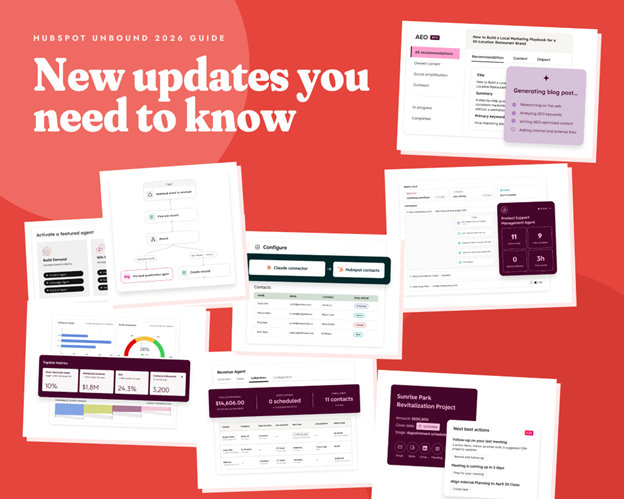
If you’ve used HubSpot for a while, you’ll remember when AI showed up as “Breeze”: Breeze Assistant, Breeze Agents, and Breeze Studio, all living inside your existing Hubs.
That framing worked while AI was still new, but it also had a side effect.
By calling it “Breeze”, HubSpot made AI sound like an add-on that just sat on top of the real product.
At Unbound 2026, HubSpot dropped that framing by unveiling its strategic move to build AI into how the whole platform works. This also meant dropping most of the “Breeze” branding for cohesion.
To make that possible, HubSpot introduced something it calls Growth Context: a shared, structured understanding of your business that every agent and every Hub now reads from before it does anything.
Think of it in three parts:
- What your business is: Your customer history, your ideal customer profile, your brand and positioning, and how your team actually works
- What acts on that information: The AI agents, the assistant, and the Hubs themselves
- The rules those actions follow: Your sales methodology, your deal stages, and your qualification criteria
Without that shared context, an AI agent is just guessing.
But with it, HubSpot argues that every agent in your portal works from the same picture of your business, instead of each tool inventing its own. This gives your business more accurate, reliable insights, data, and output from HubSpot’s features to meet your business goals better.
If you’re still getting your head around the basics, our ultimate guide to what HubSpot actually does is a good place to start before diving into what’s new.
The 6 Big Updates From Unbound 2026
You don’t need to digest all of this in one sitting. Here’s the shortlist:
| Unbound 2026 Update | What Is It? |
| 1. Breeze Assistant | HubSpot’s existing AI assistant, the one “Breeze” name that survived the rebrand, picks up a set of new capabilities at Unbound too. Read our full breakdown of what’s new with Breeze Assistant |
| 2. Agent Hub, Context Home and Agent Builder | A new control room for every AI agent in your portal, plus the place where you actually teach HubSpot about your business. Read the full breakdown of HubSpot’s new AI features from Unbound 2026 here. |
| 3. HubSpot Work | A brand new AI-first workspace for the internal projects that usually live in Asana, Trello, or a spreadsheet: onboarding, webinar prep, content pipelines, and internal requests. Read our full guide to what HubSpot Work actually does. |
| 4. Marketing Studio 2.0 | A rebuilt campaign workspace that brings planning, execution, and reporting into one connected view instead of scattered tools and tabs. Read the full breakdown of HubSpot’s Marketing 2.0 here. |
| 5. Smarter Sales and Revenue Agents | Sales updates designed to move deals forward and follow up on outstanding invoices with less manual chasing. Read the full breakdown of HubSpot’s newest Sales Hub features from Unbound 2026 here. |
| 6. Developer and Admin Tooling | Updates for teams managing multiple HubSpot portals, connecting external data, and building custom apps on top of HubSpot. Read the full breakdown of HubSpot’s new developer-focused features from Unbound 2026 here. |

Which HubSpot AI Tools Are Best for Automating Website Customer Interactions?
What’s Available Now, in Beta, or Still to Come
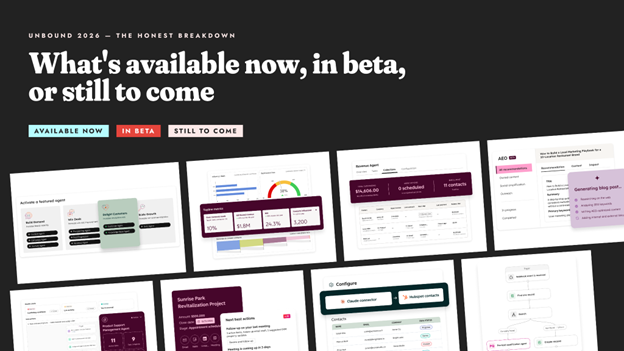
One of the most common questions RedPandas often gets as a HubSpot Diamond Partner is simple: is this real and usable today, or is it a slide from a keynote?
Here’s the honest breakdown of the latest features unveiled at Unbound 2026:
| Feature | Status | Required HubSpot Tier for Access |
| Breeze Assistant | Existing product, new capabilities roll out at Unbound (16 September) | Professional and Enterprise for most features |
| Agent Builder custom event triggers | Public beta (live since July 2026) | Professional and Enterprise |
| Agent Hub | Public beta | Professional and Enterprise |
| Context Home | Rolling out alongside Agent Hub | Professional and Enterprise |
| HubSpot Work | Private beta | Starter and up, with a Core seat |
| Marketing Studio 2.0 | Private beta until Unbound | Marketing Hub Professional and up |
Private beta means you’ll need to request access rather than switching it on yourself. Public beta means it’s visible in eligible portals now, but HubSpot can still change how it behaves before general release.
If a row above says “beta”, treat what you see as a preview instead of a finished feature.
Does This Cost More or Need a Tier Upgrade?
Mostly, there’s no rip-and-replace and no mandatory new spend just to keep using HubSpot the way you already do.
But there are three things worth knowing before you get your hopes up:
- Most of what’s new sits on Professional and Enterprise plans. If you’re on Starter, HubSpot Work is the one exception designed to be available to you, but it still needs a Core seat
- Custom AI agents you build yourself run on a credit system, separate from your regular subscription. The more custom automation you build, the more credits you’ll use, so plan for it rather than assuming it’s unlimited.
- Nothing currently running in your portal will break or get switched off. These are new capabilities sitting alongside your existing setup, not a replacement for it
Most of what’s new sits on Professional and Enterprise plans. If you’re on Starter, HubSpot Work is the one exception available to you, though it still needs a Core seat.
Where to Start If You Only Have 10 Minutes
If you’re going to look at exactly one thing before your next team meeting, here’s where to start:
- Check whether your portal is on Professional or Enterprise. That single fact determines which of the new tools you can even see
- Open Agent Hub if it’s visible in your portal, and look at what’s already switched on. You may already have agents running that nobody told the team about
- Skim the HubSpot Work use cases if your team juggles a separate project tool alongside HubSpot. It’s the change most likely to actually save your team time this quarter
- Ignore anything not confirmed as live yet. HubSpot has a habit of previewing further ahead than what’s usable on day one, and chasing beta features before they’re stable is a fast way to waste an afternoon
Should You Do Anything Right Now?
Not urgently, and that’s a good thing: nothing here forces a decision this week.
The businesses that get the most out of a release like this are the ones who take 30 minutes to:
- Understand what changed
- Decide which one or two pieces are actually relevant to their team
- Ignore the rest until it’s ready
As a HubSpot Diamond Partner and one of only four HubSpot-accredited partners in APAC, RedPandas Digital will configure, test, and troubleshoot these exact features on real client portals over the coming weeks.
If you’d rather have someone who does this daily walk you through what’s genuinely worth adopting for your business, that’s exactly the conversation we have with clients every time HubSpot ships something this size:
Get In Touch With RedPandas’ HubSpot Experts for a Free Consult
Frequently Asked Questions: HubSpot Unbound 2026
What is HubSpot Unbound 2026?
HubSpot Unbound 2026 is HubSpot’s annual conference, held 16 to 18 September 2026, where the company announced its shift from a CRM with bolted-on AI features to a full agentic customer platform.
Is HubSpot getting rid of Breeze?
Mostly, yes. Breeze Agents and Breeze Studio drop the “Breeze” name and become standard parts of HubSpot. Breeze Assistant is the one exception that keeps its name.
Do I need to upgrade my HubSpot plan because of Unbound 2026?
Not automatically. Most of the new capability sits on Professional and Enterprise, and HubSpot Work is also designed to reach Starter plans with a Core seat. Nothing already running in your portal is being removed.
What is Growth Context in HubSpot?
Growth Context is HubSpot’s term for a shared understanding of your business, covering your customer history, your team’s way of working, and your sales rules, that every AI agent and Hub can read from before acting.
Is Agent Hub available now?
Yes, Agent Hub is in public beta on Professional and Enterprise plans, meaning it’s visible in eligible portals now but can still change before its full release.
What is HubSpot Work, in one sentence?
HubSpot Work is a new AI-first workspace, currently in private beta, built for internal team projects such as onboarding, webinar prep, and content pipelines that usually live in a separate tool alongside HubSpot.
Will this affect my existing HubSpot workflows and automations?
No. These are new capabilities that sit alongside what you already have. Nothing you’ve already built is switched off or altered without your involvement.
How do I know if my business is ready to use any of this?
Start with whether your team’s problem is actually a HubSpot problem. If your team already struggles with messy data or unclear processes, adding an AI agent on top tends to amplify that mess rather than fix it.
What’s Next After HubSpot Unbound 2026?
You don’t need a plan for everything in this guide today.
The next steps are simple: look back at “The 5 Big Updates From Unbound 2026” above and pick the single item most likely to benefit or affect your team this quarter.
That applies whether that’s HubSpot Work replacing a spreadsheet or an agent in Agent Hub nobody told you was already switched on.
Read that one deep dive properly and leave the rest for another week.
About the Author
This article was written by the team at RedPandas Digital, a HubSpot Diamond Partner based in Sydney, Australia, and one of only four HubSpot-accredited Diamond partners in the Asia-Pacific region.
RedPandas has implemented and optimised HubSpot for businesses across construction, healthcare, legal, education, and professional services. Learn more in this HubSpot partner profile.
About the Author




Get the best content marketing insights right in your inbox!
Subscribe to our Newsletter and get marketing insights delivered to your inbox every week.