









HubSpot AI Features Are Taking a New Turn: Agent Hub, Context Home, and Agent Builder Explained

Key Takeaways
- HubSpot is dropping “Breeze” as a marketing label for most of its AI tools. Breeze Assistant is the one name that survives
- All of HubSpot’s AI now runs on a shared foundation called Growth Context, so every agent and Hub reads from the same understanding of your business
- Agent Hub is a new control room for managing every AI agent in your portal, currently in public beta on Professional and Enterprise plans
- Context Home is where you feed HubSpot the business information its agents actually rely on, from your sales methodology to your brand voice
- Agent Builder’s new custom event triggers and one-click workflow migration are in public beta, and your existing workflows keep working unchanged
Confused about HubSpot AI features changing overnight? You’re not alone.
HubSpot is retiring “Breeze” as the name for most of its AI tools and repositioning the whole platform as an “agentic customer platform.”
You’ve heard “agentic” everywhere this year, so it’s fair to wonder whether this is a genuine architecture shift or just a fresh coat of paint on the same product.
But what do you need to know in light of all this?
As a HubSpot Diamond Partner, RedPandas builds and configures agent workflows and context setups for clients, so this falls under the kind of foundation work the team does daily.
With the latest updates from Unbound 2026, AI is no longer a separate layer sitting on top of HubSpot.
It’s built into the platform’s foundation through a shared system called Growth Context, with two new admin-facing tools, Agent Hub and Context Home, controlling how it works.
This article explains what changed under the rebrand and what you need to do differently in your setup from here.
Quick Answer
HubSpot’s AI features now run on a shared foundation called Growth Context, managed through two new tools:
- Agent Hub, a control room for every AI agent in your portal
- Context Home, where you tell HubSpot about your business so its agents stop guessing
Agent Builder, the tool for creating custom agents and workflows, is in public beta on Professional and Enterprise plans.
None of this requires you to rebuild your existing workflows.
But the latest HubSpot AI features only work best with a healthy portal.
If you’re curious as to whether yours is in the right shape to reap the benefits, take the free HubSpot Health Check quiz below and find out in two minutes:


Take the Free HubSpot Health Check Quiz
What Does “Agentic Customer Platform” Actually Mean?
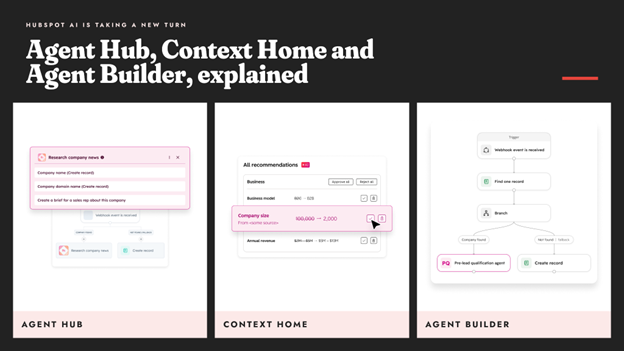
If someone on your team asked “wait, is Breeze gone?” recently, you’re not imagining things.
HubSpot is dropping “Breeze” as a marketing label for most of its AI products.
Breeze Agents and Breeze Studio lose the prefix and become standard parts of HubSpot, while Breeze Assistant is the one name that survives. It’s like Siri, which keeps its name for one clearly defined job.
Calling AI “Breeze” implied it was something extra, bolted onto the real product. HubSpot’s argument for dropping it is that AI isn’t an add-on layer anymore.
Instead, it’s meant to run through the entire platform in every Hub, workflow, and agent.
To make that real rather than just a slogan, HubSpot built a shared foundation underneath it called Growth Context.
If you want a closer look at which HubSpot AI tools are worth switching on first, we’ve broken that down separately.
Understanding Growth Context
Growth Context is HubSpot’s term for a structured, shared understanding of your business that every agent and every Hub reads from before it acts.
Instead of each AI tool guessing independently, they all pull from the same source of truth.
HubSpot describes it in three connected parts:
- Context Layer: your customer history and ideal customer profile, your brand and competitive positioning, and how your team actually works day to day
- Action Layer: the AI agents doing the work, the assistant giving recommendations, and the Hubs themselves
- Process Context: the rules underneath both layers, like your sales methodology and your deal stage and qualification criteria
With Growth Context, an agent isn’t just trained on general knowledge of how businesses work. It reads your actual customer data, brand voice, and sales process before it drafts an email or recommends a next step.
Agent Hub: Your Control Room for Every AI Agent
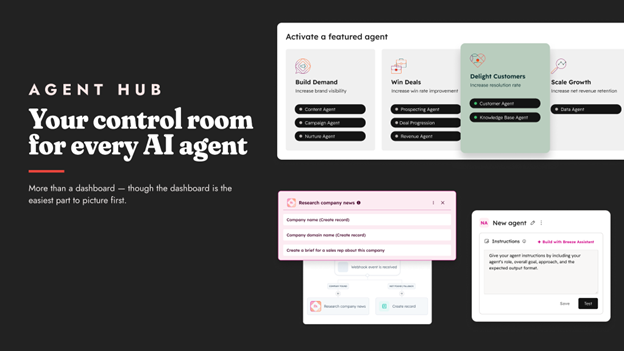
Agent Hub is a centralised place to see, manage, and run every AI agent active in your portal.
If your objection is “isn’t this just a dashboard,” the answer is more than that, though the dashboard view is the easiest part to picture first.
Inside Agent Hub, you can:
- See every agent in one place: Live status and performance for each one, so you can spot an agent that’s gone quiet or underperforming without hunting through separate settings pages
- Turn agents on with one click: Activate a native agent that isn’t running yet, rather than digging through menus to find where it lives
- Build custom agents in plain language: Agent Builder lets you describe what you want an agent to do, rather than configuring it field by field, and the Agent Marketplace offers agents built by others
- Organise by what the agent is actually for: Agents are grouped by goal, such as building demand, winning deals, or scaling growth, rather than by which Hub they happen to live in
- Manage your AI context: Agent Hub links directly to Context Home
Agent Hub is currently in public beta on Professional and Enterprise plans.
HubSpot’s own demo shows native agents like an AEO agent, a data agent, a prospecting agent, a deal progression agent, and a customer service agent loosely mapped to the customer journey from attracting a lead through serving them after the sale.
Context Home: Teaching HubSpot About Your Business
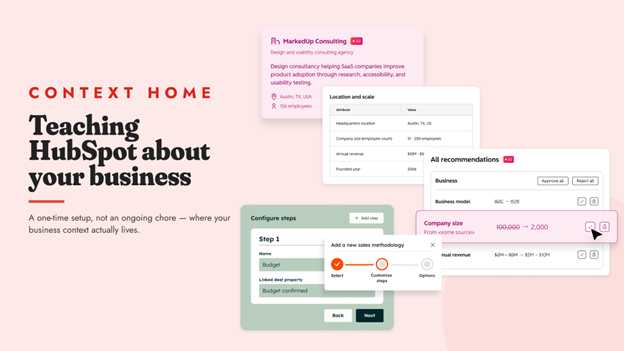
If Agent Hub is the control room, Context Home is where the actual information lives.
This directly answers, “Do I have to feed it all our business context manually?”
Yes, to an extent, but HubSpot has tried to make that a one-time setup rather than an ongoing chore.
Context Home is where your portal’s Growth Context actually gets managed, and it’s built around a few key areas:
- A business summary: Company description, headquarters location, employee count, and revenue band, all visible for the whole account so agents know the basic shape of the business they’re working for
- Sales methodology: Add how your team qualifies and closes deals, so agents follow your process rather than a generic one
- Files and custom context: Upload documents and control who can see them, and define things like buyer roles, seniority, and common phrases your team uses, so generated content sounds like your business rather than a generic template
- Context recommendations: HubSpot proactively flags what’s missing or thin, so you don’t have to guess what an agent still doesn’t know
Based on RedPandas’ experience configuring agent workflows and Context Home setups for clients, this is the step teams most often skip.
And it’s the one that determines whether an agent’s output is genuinely useful or embarrassingly generic.
An agent with no context about your business defaults to guessing, and it’s rarely a subtle guess.

Why HubSpot Portals Get Messy Over Time
Agent Builder: What’s New?
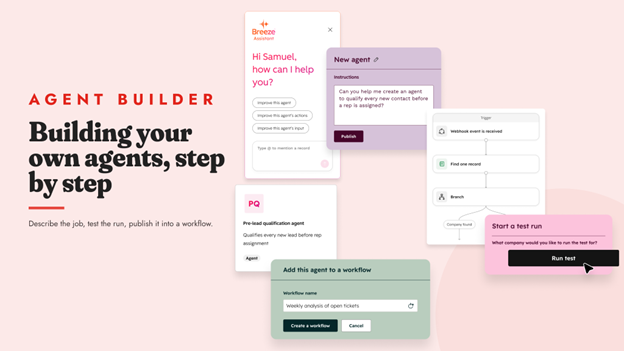
Agent Builder is the actual tool for building and customising agents and agentic workflows, and two updates from Unbound 2026 matter most:
| Feature | What Does It Do? |
| Custom Event Triggers | These let workflows fire from things happening outside HubSpot, like a Slack message, a Google Sheets update, another webhook, or a recurring schedule. This opens a genuinely new door into tools like Slack, Mailchimp, Google Sheets, Shopify, and Zoom, shown directly in the trigger builder rather than requiring a separate integration built from scratch. This has been in public beta since July 2026. |
| One-Click Workflow Migration | This feature lets Breeze Assistant convert an eligible existing workflow into an agentic one without you rebuilding it from zero, adding richer context and trigger options along the way. |
Agent Builder is in public beta on Professional and Enterprise plans, and custom agents you build consume credits separate from your regular subscription.
Frequently Asked Questions: HubSpot AI Features
What happened to HubSpot Breeze?
HubSpot is dropping “Breeze” as a marketing label for most of its AI products. Breeze Agents and Breeze Studio lose the prefix and become standard HubSpot features, while Breeze Assistant keeps its name.
What does “agentic customer platform” mean?
It means HubSpot now positions AI as built into the entire platform rather than as a separate feature layer, with every Hub and agent drawing on a shared understanding of your business called Growth Context.
What is Growth Context in HubSpot?
Growth Context is HubSpot’s shared understanding of your business, made up of a Context Layer (your customer and business information), an Action Layer (the agents and Hubs that act on it), and Process Context (the sales rules underneath both).
What is Agent Hub?
Agent Hub is a centralised dashboard for viewing, managing, and building every AI agent active in your HubSpot portal, currently in public beta on Professional and Enterprise plans.
What is Context Home?
Context Home is where you manage the business information that HubSpot’s AI agents rely on, including your company summary, sales methodology, and uploaded files, so agents work from real information about your business rather than guessing.
Do I have to manually set up all my business context for the AI to work?
Largely yes, at least once. Context Home makes that a structured setup process, and it proactively flags what context is still missing, rather than leaving you to guess.
Will my existing HubSpot workflows and automations still work?
Yes. Agent Hub, Context Home, and Agent Builder are new capabilities that sit alongside your existing setup. Nothing you’ve already built will be switched off or automatically altered.
What’s new in Agent Builder for Unbound 2026?
Two things: custom event triggers so that workflows can fire from external tools like Slack or Google Sheets, and one-click migration of eligible existing workflows into agentic ones.
Where to Start With the Newest HubSpot AI Features
You don’t need to touch everything in this guide today. You need one starting point.
Check your plan tier first.
Agent Hub, Context Home, and Agent Builder are on Professional and Enterprise, so if you’re on Starter, there’s nothing to configure yet and nothing to worry about.
If you’re on Professional or Enterprise, open Agent Hub this week and see what’s already switched on. Then, spend 20 minutes in Context Home before you judge a single agent’s output.
A generic answer almost always means missing context, not a broken feature, and context is the one thing worth fixing before anything else.
Everything you’ve already built keeps working exactly as it does now. This sits alongside your existing setup, not instead of it.
As a HubSpot Diamond Partner, RedPandas Digital gets partner-level access to these tools ahead of general availability, so we’re testing this on real client portals, not reading about it secondhand.
If you want a second opinion on whether your Context Home setup is actually feeding your agents useful information, get in touch, and we’ll take a look before you judge the AI itself:
Get In Touch With RedPandas’ HubSpot Experts
Check these other guides on the main HubSpot Unbound 2026 releases to watch out for:
- HubSpot Unbound 2026 Guide: 6 New Updates You Need to Know
- What Is HubSpot Work? The New AI-First Workspace, Explained
- Unbound 2026 HubSpot Marketing Automation Updates: Marketing Studio 2.0 + AEO Search Sensor Widget
- New HubSpot Sales Hub Features: Deal Progression and Revenue Agent Explained
- HubSpot for Developers: What’s New at Unbound 2026?
- What’s New With Breeze Assistant? The Unbound 2026 Fall Update, Explained
About the Author
This article was written by the team at RedPandas Digital, a HubSpot Diamond Partner based in Sydney, Australia, and one of only four HubSpot-accredited Diamond partners in the Asia-Pacific region.
RedPandas has implemented and optimised HubSpot for businesses across construction, healthcare, legal, education, and professional services. Learn more in this HubSpot partner profile.



Get the best content marketing insights right in your inbox!
Subscribe to our Newsletter and get marketing insights delivered to your inbox every week.