









Which HubSpot AI Tools Are Best for Automating Website Customer Interactions?

Key Takeaways
- Customer Agent, part of HubSpot’s Agent Hub, is the HubSpot AI tool built specifically for automating website customer interactions
- It requires a Professional or Enterprise seat and runs on outcome-based pricing, at roughly AUD $0.70 per resolved conversation (50 credits)
- HubSpot claims Customer Agent resolves over 65% of inquiries automatically. Treat this as a vendor claim rather than a guarantee, since results depend on your knowledge base and CRM data quality
- Breeze Assistant, the free reactive layer, doesn’t run live website conversations. Agent Hub’s autonomous agents, including Customer Agent, handle that job
- A clean knowledge base, tidy CRM data, and clear escalation rules need to be ready before activation
- Agent Hub remains in public beta as of August 2026, though it’s fully available to Professional and Enterprise customers
- RedPandas configures these HubSpot AI tools directly for Australian businesses, including escalation rules tuned to local support hours
It’s 4 pm, and your website chat has fielded the same questions all day. This is exactly the gap HubSpot AI tools like Customer Agent were built to close.
Your team keeps typing the same answers, over and over, while actual sales conversations sit waiting.
But are the HubSpot AI tools you see enough for automating customer interactions on your website?
At RedPandas, we configure Customer Agent inside real client portals across Australia. We set up the knowledge base and escalation rules that decide when it hands off to your team.
That’s how we know exactly what this tool delivers in practice.
This guide breaks down what Customer Agent resolves on its own, what it hands off, and what it costs. You’ll also learn what to prepare before switching it on.
Quick Answer
Customer Agent, part of HubSpot’s Agent Hub, is a HubSpot AI tool built to automate customer interactions on your website.
It works autonomously across live chat, email, and messaging. It requires a Professional or Enterprise seat and costs roughly AUD $0.70 per resolved conversation.
Pair it with a clean knowledge base and clear escalation rules for the best results.
But Customer Agent is only as good as the CRM data and knowledge base behind it.
Not sure yours are ready? Run our free 10-point HubSpot Health Check and get an instant score:


Run Your Free HubSpot Health Check
What Are HubSpot AI Tools?

HubSpot AI tools are split into two layers, and knowing which is which matters for your website:
Breeze Assistant vs Agent Hub: Comparing HubSpot AI Tools by Automation Level
Breeze Assistant is the free, conversational layer included on every HubSpot plan.
You prompt it to draft an email, summarise a record, or search your CRM. It works alongside your team as they complete tasks.
Agent Hub is where the autonomous agents live. It launched in public beta on 23 July 2026.
It’s available on Professional or Enterprise, across Marketing, Sales, Service, Data, and Content Hub, plus Smart CRM.
It currently houses several pre-built agents, including:
- Data Agent
- Prospecting Agent
- Deal Progression
- Customer Agent
A CRM event or an external source can trigger these agents. You don’t need to prompt them each time.
This is why the distinction matters for website automation.
How HubSpot Breeze Assistant works is that it supports your team while they work inside HubSpot. Customer Agent, running inside Agent Hub, handles the actual conversation with your website visitor.
Here’s how these HubSpot AI tools compare for automating website customer interactions:
| Tool | Reactive or autonomous | What it automates on your website | Plan required | Cost model |
| Breeze Assistant | Reactive | Nothing directly; supports staff drafting and CRM tasks behind the scenes | All plans (included) | No extra cost for standard use |
| Customer Agent | Autonomous | Resolves visitor questions, qualifies leads, hands off to a person | Professional or Enterprise | Approx. AUD $0.70 per resolved conversation (50 credits) |
| Other Agent Hub agents (Prospecting, Data, Deal Progression) | Autonomous | Lead-finding and internal CRM work, not live website chat | Professional or Enterprise | Outcome-based, priced per agent |
Of the HubSpot AI tools listed here, only one is purpose-built for live website conversations: Customer Agent.
How does HubSpot’s breeze data enrichment work?
Customer Agent: The Best of the HubSpot AI Tools for Website Automation
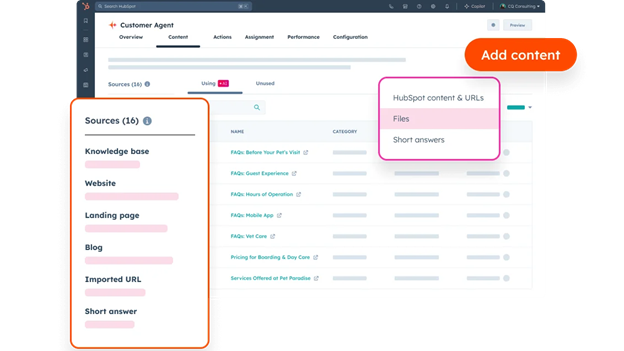
Customer Agent is the specific tool behind HubSpot’s ability to automate your website’s customer interactions. Here’s what it resolves, what it hands off, and what it costs:
What This HubSpot AI Tool Resolves Without a Human
Customer Agent sits on your live chat, email, and messaging channels. It reads each question and answers it from your synced knowledge base, website, and policies.
It typically resolves:
- Password resets and account access issues
- Plan or subscription changes
- General “how do I” questions from your help content
- Order or ticket status checks, where connected
Teams with strong, current documentation see deflection rates of 30 to 50 per cent. Teams with thinner documentation see closer to 10 to 20 per cent with the same setup.
When This HubSpot AI Tool Hands Off to a Person
When a question falls outside its training, the Customer Agent flags the gap and brings in a person. Complex or emotionally charged conversations also get escalated.
The full conversation history stays intact, so your team doesn’t start from zero.
Common handoff triggers include:
- Billing disputes or refund requests
- Frustrated or upset customers
- Questions with no matching knowledge base content
Plan Requirement and Credit-Based Cost for This HubSpot AI Tool
Customer Agent needs a Professional or Enterprise seat, since it lives inside Agent Hub. Pricing is outcome-based, so you only pay when it resolves a conversation.
That works out to $0.50 USD per resolved conversation, or 50 HubSpot Credits. At current exchange rates, that’s roughly AUD $0.70.
HubSpot offers a free 28-day trial for Customer Agent, so you can test it before committing budget.
Supporting HubSpot AI Tools That Improve Website Automation
Although it can automate most interactions on your website, Customer Agent doesn’t work alone. Two supporting HubSpot AI tools shape how well it performs on your website:
Buyer Intent: The HubSpot AI Tool for Routing High-Intent Visitors
Buyer Intent sits inside Breeze Intelligence, HubSpot’s data enrichment and buyer intent toolset. It flags which companies are browsing your site with genuine interest.
It tracks four signal types:
- Visitor intent, from page visits and browsing behaviour
- Research intent, from repeat visits and competitor comparisons
- Company news signals
- Contact-level signals
When Customer Agent is handling a conversation with a high-intent visitor, this signal helps your team prioritise that handoff.
Buyer Intent runs on its own HubSpot Credit pool, separate from Customer Agent’s.
Chat Widget and Knowledge Base: Prerequisites for HubSpot AI Tools
Before switching on Customer Agent, you need two things in place:
- Your chat widget comes from Chatflows, HubSpot’s chat builder. Live chat is free on every plan, including Free. If your website isn’t hosted on HubSpot, install the HubSpot tracking code first. Without it, the widget won’t appear
- Your knowledge base is a Service Hub Professional or Enterprise feature. Connect it in the chatflow’s Knowledge Base tab, so Customer Agent has content to search when answering visitors

Home arrow Learn What is HubSpot’s AI Prospecting Tool and How Does It Work?
Setting Up Customer Agent: What to Prepare Before Activating This HubSpot AI Tool

Before you activate this HubSpot AI tool, you need a few things ready.
Content and Knowledge Base Readiness
Customer Agent answers from what you’ve given it: knowledge base articles, uploaded files, and approved public URLs.
Feed it content that matters most, like:
- Knowledge base articles for step-by-step how-to guides
- Internal policy documents: SLAs, warranty terms, refund policies
- Problem-solving blog posts for common questions
- Support playbooks or escalation matrices to keep tone and workflow consistent
Thin or outdated content leads to more handoffs, which slows the whole system down.
CRM Data Quality
Customer Agent and every other HubSpot AI tool inside Agent Hub read directly from your CRM records.
Clean, deduplicated, and standardised data feeds better answers and fewer errors. Messy CRM data causes problems well beyond Customer Agent, so it’s worth fixing regardless.
Before activating, check for duplicate contacts, missing fields, and inconsistent naming conventions.
Escalation Rules and Handoff Triggers
You control when a conversation moves to a person. Set rules based on topic, sentiment, or customer tier, then route the ticket to the right team by expertise.
Define these before launch:
- Which topics stay with the agent (password resets, plan questions, general FAQs)
- Which topics need a human immediately (billing disputes, complaints, legal questions)
- Who receives an escalated conversation, and how fast
Rollout Timeline for HubSpot AI Tools in Australia
Most Australian implementation partners deploy Customer Agent to a single channel first, usually live chat. They expand to email or other channels once it’s proven.
On average, RedPandas gets Customer Agent live for local businesses within four to six weeks.
Budget for a one-time onboarding fee on Professional and Enterprise plans as well.
Figures vary by hub, so confirm the current amount on HubSpot’s live Australian pricing page before committing.
How RedPandas Configures These HubSpot AI Tools for Australian Businesses
Knowing which HubSpot AI tool to switch on is one thing. Setting it up so it doesn’t frustrate your customers is another.
At RedPandas, the team of HubSpot experts has felt that same uncertainty from the other side of the screen, in client portals across Australia. The team configures Customer Agent directly, from knowledge base audits to escalation rules.
RedPandas Digital is a HubSpot Diamond Solutions Partner based in Sydney, Australia. The team has implemented HubSpot for 300+ Australian businesses across B2B services, SaaS, and professional services.
For website automation specifically, our setup covers:
- Auditing your existing knowledge base for gaps before training the agent
- Writing escalation rules tuned to your team’s actual support hours
- Testing handoff triggers on live chat before expanding to other channels
- Reviewing early conversations to catch knowledge gaps in the first few weeks
Want to see how this looks for a real client, start to finish? Read the full Out of Bounds case study for the complete breakdown.
How Out of Bounds Turned $20,000 of Unused HubSpot Into $113,000 of Annual Value
Frequently Asked Questions: HubSpot AI Tools for Website Automation
Which HubSpot AI tools are best for automating customer interactions on my website?
Customer Agent, part of HubSpot’s Agent Hub, is the tool built specifically for this. It runs autonomously on live chat, email, and messaging, using your CRM and knowledge base to resolve queries or hand off to a person. It requires a Professional or Enterprise seat and outcome-based pricing.
What is Customer Agent, and how is it different from a regular chatbot?
Customer Agent reasons about each question using your CRM and content. A rule-based chatbot only follows scripted paths someone has already written. Customer Agent can answer with a cited source, ask a clarifying question, or escalate, depending on what the conversation actually needs.
Can Customer Agent replace a support team entirely?
No. Customer Agent takes repetitive, first-tier questions off your team’s plate. Every pre-built Agent Hub tool, including this one, is designed with a human review or handoff point built in, right where judgement matters most. Your team still owns the harder conversations.
What plan do I need for Customer Agent?
Customer Agent requires a Professional or Enterprise seat, since it runs inside HubSpot’s Agent Hub. Pricing is outcome-based, at roughly $0.50 USD (about AUD $0.70) per resolved conversation. A free 28-day trial is available, so you can test it before committing budget.
How does Customer Agent decide when to hand off to a human?
You set the rules. Escalation triggers can be based on topic, sentiment, or customer tier, and you choose which team or person receives the conversation. Customer Agent also escalates automatically when a question falls outside its trained content, keeping the full conversation history intact for your team.
Does Customer Agent work with an existing knowledge base?
Yes. Customer Agent connects directly to your HubSpot knowledge base, along with uploaded files and approved public URLs. It searches this content to answer visitor questions, and flags any gaps it finds so your team can add new articles later.
What’s Next for Automating Your Website with HubSpot AI Tools
You now know which HubSpot AI tools handle website customer interactions. You know what Customer Agent resolves, what it hands off, and what it costs.
The next step is smaller than it looks.
Audit your current knowledge base first, then note where it’s thin, outdated, or missing entirely.
From there, set your escalation rules and turn on Customer Agent for live chat alone.
Expand to email and other channels once you’ve watched a few weeks of real conversations.
If you’d rather skip the trial and error, RedPandas can configure it for you. That means a knowledge base audit, escalation rules, and a rollout tuned to your support hours.
Get In Touch With RedPandas’ HubSpot Experts
About the Author




Get the best content marketing insights right in your inbox!
Subscribe to our Newsletter and get marketing insights delivered to your inbox every week.