









HubSpot Cost & Add-Ons: What to Buy for Marketing, Sales, and Service Teams

Key Takeaways
- HubSpot’s CRM is free, but Marketing, Sales, and Service Hub are priced and billed separately, from AUD $28/seat to AUD $5,080/month
- Marketing Hub charges a flat fee at the Professional and Enterprise tiers. Sales Hub and Service Hub charge per seat at every tier
- Add-ons stack on top of your base Hub cost: extra contacts, extra seats, dedicated IP, sandboxes, and HubSpot Credits for AI agents
- Onboarding is a mandatory one-time cost, from roughly AUD $2,115 to AUD $9,870 depending on the Hub and tier
- Each team needs a different combination: Marketing typically needs Marketing Hub Professional, while Sales and Service need their own Professional tier plus seats and AI credits
- Buying Hubs separately is cheaper for small teams. Bundling into the Customer Platform usually wins once combined headcount passes about six seats
- Sales Seats and Service Seats sit on top of Core Seats, in the bundle and standalone alike, so role-specific access costs extra either way
Your HubSpot cost conversation probably starts the same way.
Marketing wants Marketing Hub, sales wants Sales Hub, and your customer support department wants Service Hub.
But nobody’s added up what buying all three, plus their add-ons, would cost your business.
So, how do HubSpot CRM pricing and add-ons work together for different teams or use cases?
At RedPandas Digital, we map HubSpot Hub and add-on combinations for Australian teams every week. We see exactly where costs quietly stack, and where one bundled plan saves thousands.
In this article, you’ll learn how HubSpot pricing and add-ons combine for marketing, sales, and service teams. You’ll walk away with one clear cost picture for your whole business.
Quick Answer
HubSpot’s CRM is free, but Marketing, Sales, and Service Hub are priced separately.
Pricing runs from AUD $28 per seat on Starter to AUD $5,080 a month on Enterprise. Add-ons for contacts, seats, and AI credits stack on top, so your HubSpot cost depends on your team size.
Bundling into the Customer Platform usually costs less once your combined headcount passes about six seats.
Curious about what the total bill might look like for your team? Try out RedPandas’ free HubSpot pricing calculator to get an accurate calculation based on your needs:


Try Out the Free HubSpot Pricing Calculator Here
HubSpot Pricing
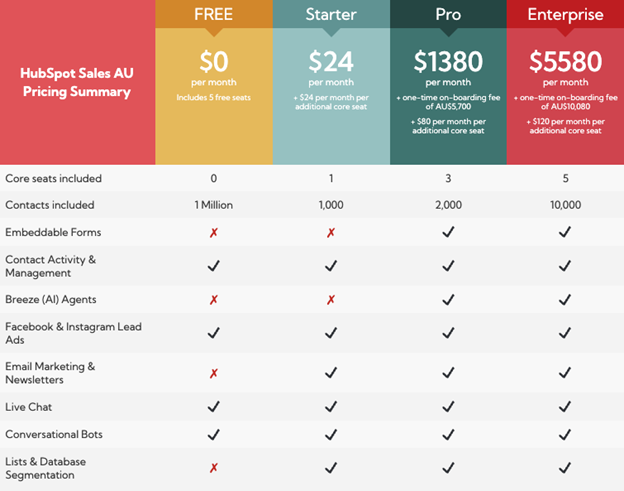
HubSpot’s CRM is free for up to two users, with no credit card required.
Every paid Hub builds on top of this free CRM. Marketing, sales, and service teams work from the same contact records, deal data, and ticket history.
This shared foundation changes how you calculate your HubSpot cost.
Each Hub adds capability on top of the same connected account you already have.
Your HubSpot Cost, Hub by Hub: Marketing, Sales, and Service
Each Hub has its own Starter, Professional, and Enterprise tier.
Pricing below is in AUD, converted from HubSpot’s published USD rates as of August 2026:
| Hub | Starter | Professional | Enterprise | Priced per |
| Marketing Hub | AUD $28/seat/month | AUD $1,130/month (3 seats included) | AUD $5,080/month (5 seats included) | Flat rate + seats |
| Sales Hub | AUD $28/seat/month | AUD $141/seat/month | AUD $212/seat/month | Per seat |
| Service Hub | AUD $28/seat/month | AUD $141/seat/month | AUD $212/seat/month | Per seat |
Marketing Hub charges a flat monthly fee at Professional and Enterprise, with a set number of Core Seats included. Sales Hub and Service Hub charge per seat at every paid tier.
Onboarding through HubSpot is a separate, one-time cost. Professional plans carry a mandatory onboarding fee from AUD $2,115 to AUD $4,230, depending on the Hub.
Enterprise onboarding runs from AUD $4,935 to AUD $9,870.
These figures convert HubSpot’s live USD pricing using current exchange rates.
Confirm your exact AUD checkout price before signing, and check whether GST applies based on your ABN registration.
But take note that HubSpot internal onboarding isn’t your only option.
If you want to learn more about the alternative options, check out this article on the difference between onboarding with RedPandas and onboarding with HubSpot.
HubSpot Add-Ons: What They Add to Your HubSpot Cost
Add-ons sit on top of your base Hub subscription.
They raise a specific limit, like contacts, seats, or send volume, without upgrading your whole tier.
Marketing Hub’s add-ons scale with contact volume. Sales Hub and Service Hub add-ons scale with usage, like calling minutes or AI credits.
Marketing Hub’s biggest add-on cost is extra marketing contacts.
Starter and Professional both bill roughly AUD $70 per additional 1,000 contacts once you cross your included limit.
Sales Hub and Service Hub scale differently: extra seats cost the same per-seat rate as your tier, and AI credits top up once you exceed what’s included.
The Add-Ons That Most Affect Your HubSpot Cost
| Add-On | What It Does + Impact |
| Extra Marketing Contacts | Roughly AUD $70 per additional 1,000 contacts (Marketing Hub) |
| Extra Seats | Priced at your tier’s per-seat rate, added one at a time as your team grows |
| HubSpot Credits | Power AI agents like the Customer Agent, Data Agent, and Prospecting Agent, priced from about AUD $14 per 1,000 credits |
| Dedicated IP Address | Roughly AUD $1,410/month, for higher email-sending volume and deliverability control |
| Transactional Email | Roughly AUD $70/month for 2,500 sends, separate from your marketing email allowance |
| Sandbox Accounts | Roughly AUD $420/month, for testing changes before they go live |
| LinkedIn Sales Navigator | A separate subscription, required if your Sales Hub sequences use LinkedIn actions |
None of these add-ons is mandatory, but your real HubSpot cost usually includes two or three of them once your team outgrows Starter limits.

HubSpot Vs GoHighLevel: Which Is Better For You?
Matching Your HubSpot Cost to Marketing, Sales, and Service Needs

Here’s a quick rundown of how you can best match your HubSpot cost expectations to your different needs:
Marketing Teams and Your HubSpot Cost
Marketing Hub Professional unlocks:
- Omni-channel automation
- A/B testing
- Custom reporting
- Lead scoring for up to five scores
It also includes campaign reporting for up to 5,000 campaigns and social media management across 50 connected accounts.
Enterprise adds multi-touch revenue attribution, customer journey analytics, and AI-assisted lead scoring for up to 50 scores.
Your marketing HubSpot cost is driven by contact volume, not just seats.
Model your contact list 24 months out, not just where it sits today, since crossing a contact-tier threshold triggers a full upgrade regardless of how many extra contacts you add.
Sales Teams and Your HubSpot Cost
Sales Hub Professional unlocks:
- Sequences, at 5,000 per account
- Default forecasting, up to 300 workflows
- Five playbooks
Enterprise adds:
- Conversation intelligence
- Forecasting across team hierarchies
- Additions up to 5,000 playbooks
The Prospecting Agent, part of HubSpot’s Breeze AI suite, runs on HubSpot Credits at roughly AUD $1.41 per lead outreach.
If you need help weighing the different tier options, this guide on HubSpot Sales Starter vs. Professional has you covered.
Your sales-related HubSpot cost scales with seats and AI usage together.
Sales Seats give reps the full toolset, while Core Seats suit admins who only need CRM access, so right-sizing seat types keeps your bill closer to what your team actually uses.
Service Teams and Your HubSpot Cost
Service Hub Professional unlocks:
- The Help Desk workspace
- Ticket automation
- A 2,000-article knowledge base
- Customer feedback surveys
Enterprise expands this to:
- 100 knowledge bases
- Advanced routing
- Customer journey analytics
The Breeze Customer Agent resolves routine tickets automatically, priced at roughly AUD $0.70 per resolved conversation through HubSpot Credits.
Your service HubSpot cost grows with resolved conversation volume.
A support team fielding 2,000 AI-resolved conversations a month adds roughly AUD $1,400 in credit spend on top of seat costs.
Multi-Team Businesses: Bundling to Control Your HubSpot Cost
Core Seats carry across every Hub you own.
A user with access to Marketing, Sales, and Service Hub pays once for a seat, priced at your highest subscribed tier, rather than once per Hub.
This is why most Australian businesses running two or more teams on HubSpot compare a bundled Customer Platform quote against buying each Hub separately before committing.
Single-Hub vs Bundled Customer Platform: Which Lowers Your HubSpot Cost?
| Scenario | Buying Hubs separately (Professional) | Customer Platform bundle (Professional) |
| Small team, 1 seat each in Sales and Service | AUD $1,130 (Marketing, 3 seats included) + AUD $141 (Sales) + AUD $141 (Service) = AUD $1,412/month | AUD $2,045/month (includes 6 Core Seats) |
| Growing team (Enterprise) | AUD $5,080 (Marketing) + AUD $212 (Sales) + AUD $212 (Service) = AUD $5,504/month | AUD $6,630/month (includes 8 Core Seats) |
At a lean headcount, buying each Hub separately costs less than the bundle. The bundle’s value shows up once more people across more teams need paid access.
When Bundling Actually Lowers Your HubSpot Cost
The bundle’s included seats cover people across Marketing, Sales, and Service at once.
Buying separately means paying Marketing Hub’s flat fee, then a full per-seat Sales Hub price, then a full per-seat Service Hub price, with no seat-sharing between them.
Once your combined headcount across all three teams passes the bundle’s included seat count, roughly six seats at Professional or eight at Enterprise, the bundle starts working out cheaper per person.
Sales Seats and Service Seats sit on top of Core Seats, in the bundle and standalone alike.
A rep who needs full sequence and forecasting tools, or an agent who needs full ticketing tools, still needs that role-specific seat regardless of which path you take.
Run your actual headcount by team through HubSpot’s own bundle calculator before settling a specific break-even number.
The seat-type mechanics above are confirmed from HubSpot’s Product and Services Catalogue, but the exact crossover point shifts with your Sales Seat and Service Seat counts.
Frequently Asked Questions: HubSpot Cost
How do HubSpot CRM pricing and add-ons work together for different teams or use cases?
Your HubSpot cost combines a separate subscription for each Hub, Marketing, Sales, and Service on top of the free CRM. Add-ons like extra contacts, seats, and AI credits layer onto whichever Hub each team uses, so your HubSpot cost depends on which teams are active.
Which HubSpot Hub does a marketing team need?
Marketing teams need Marketing Hub, usually at the Professional tier for full automation, A/B testing, and custom reporting. Starter keeps your HubSpot cost lower for small teams sending basic email campaigns without deep automation. The right tier depends on contact volume and how much automation your campaigns require.
What add-ons does a sales team typically need on HubSpot?
Sales teams typically add extra seats as headcount grows, HubSpot Credits for the Prospecting Agent, and LinkedIn Sales Navigator if sequences use LinkedIn actions. Professional tier already includes sequences and forecasting, so most of your sales-related HubSpot cost comes from seats and AI credit usage rather than separate feature add-ons.
Is it cheaper to buy the HubSpot Customer Platform or individual Hubs?
Buying Hubs separately usually keeps your HubSpot cost lower for a lean team using only one or two Hubs with few seats. The bundled Customer Platform lowers your HubSpot cost once your combined headcount across Marketing, Sales, and Service passes its included seat allowance, roughly six seats at Professional or eight at Enterprise.
Can different teams in the same company be on different HubSpot tiers?
Yes. You can run Marketing Hub Professional alongside Sales Hub Enterprise, with each Hub billed at its own tier. HubSpot prices your shared Core Seats at the highest tier you own across any Hub, so mixing tiers can raise your overall HubSpot cost even for teams sitting on a lower tier.
What add-ons are available on HubSpot Starter vs Professional?
Starter keeps your HubSpot cost lower with add-ons limited to extra seats, extra marketing contacts, and basic HubSpot Credits for entry-level AI features. Professional raises your HubSpot cost ceiling with additional add-ons like sandboxes for testing, a dedicated IP address for email sending, and higher-volume AI credits for the Customer, Data, and Prospecting Agents.
Do add-ons need to be repurchased per seat?
No. Most add-ons that shape your HubSpot cost are billed at the account level rather than per seat. Extra marketing contacts, dedicated IP addresses, sandboxes, and HubSpot Credits apply across your whole portal. Extra seats are the exception, since each additional user adds its own line item to your HubSpot cost at your Hub’s per-seat rate.
Turn Your HubSpot Cost Numbers Into a Decision
You’ve now got the numbers: Hub-by-Hub pricing, add-on costs, and the bundling math for your team size.
The next step is to apply these numbers to your specific headcount.
Start with your seat count.
Add up how many people in Marketing, Sales, and Service actually need paid access today. Then compare that number to the bundle’s included seats.
This tells you whether buying Hubs separately or bundling saves you more in minutes.
Waiting to do this math can cost you more every month you delay.
A team that outgrows Starter contact limits keeps paying the wrong price.
The same applies once headcount crosses the bundle’s seat threshold.
Book a free HubSpot cost review with RedPandas Digital. We’ll map your exact Hub and add-on combination against your actual team structure:
Get In Touch With Our HubSpot Experts
About the Author
This article was written by the team at RedPandas Digital, a HubSpot Diamond Solutions Partner based in Sydney, Australia. RedPandas is one of a small number of agencies accredited under HubSpot’s Partnered Scale Onboarding program and has delivered results including a 49.8% revenue increase and 378% lead growth within five months for an Australian client.



Get the best content marketing insights right in your inbox!
Subscribe to our Newsletter and get marketing insights delivered to your inbox every week.