

Related Posts



Podcasts




If you’re managing a sales team inside HubSpot, you know the pain of too many leads and not enough structure.
Reps get assigned contacts, but no one’s sure where those leads are in the journey. Some get followed up with. Others sit untouched. And before you know it, your deal pipeline is bloated with prospects that were never properly qualified in the first place.
HubSpot’s Leads object is built to solve that exact problem.
It gives you a clear space in your CRM to track, manage, and qualify leads before they’re ready to become deals.
It’s designed for sales teams who rely on outbound, SDRs, or appointment setters to do that early qualification work, but it can be a game-changer for any team struggling with messy sales handoffs or visibility issues.
In this article, you’ll learn:
- Who should be using the HubSpot Leads object
- What it actually does and how it fits into your sales process
- How it compares to lifecycle stages and lead status
- What to watch out for when setting it up
If your current system leaves reps chasing the wrong leads or your CRM feels cluttered and chaotic, this feature might be exactly what you’ve been missing.
What Is the HubSpot Leads Object
The Leads object in HubSpot is a relatively new addition to the CRM, aimed at giving teams a dedicated layer between raw contacts and full-blown deals.
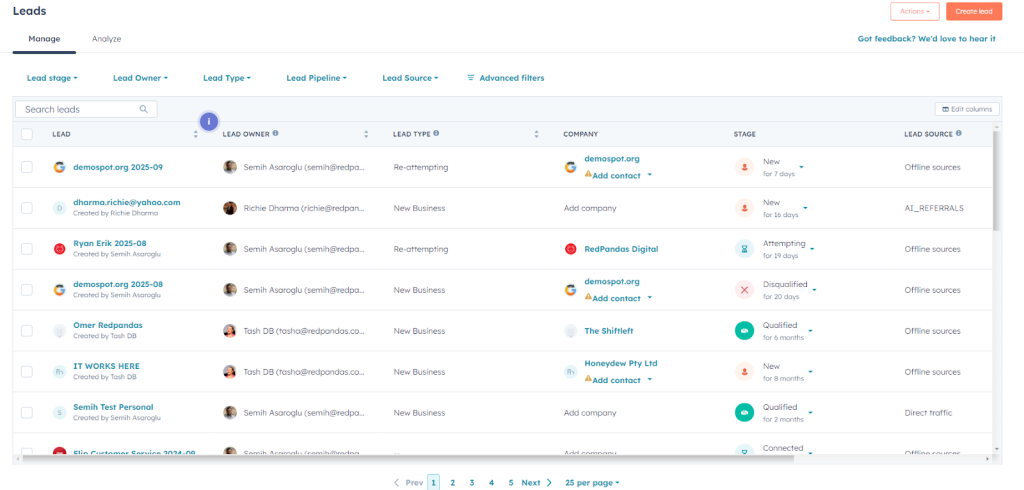
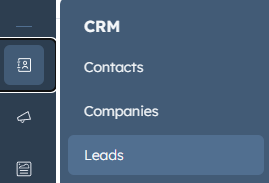
To access the above, go to CRM > Leads, as shown below:
The Lead Object is designed to manage prospect qualification work in a structured way before something becomes an opportunity.
Think of it as a “pre-deal” workspace: your team can engage, test, disqualify, or qualify prospects, without prematurely pushing them into your main deal pipeline.
NOTE: The Leads object is not available in free or Starter tiers. You’ll need either:
- Sales Hub Professional, or
- Sales Hub Enterprise
If you’re on Starter or using only the Marketing Hub, you won’t see the Leads object at all.


How to Get More ROI from HubSpot (without spending more)
Here are the core attributes and structure of the Leads object:
- Separate object from contacts and deals: Unlike using a property on Contact (like Lead Status), a lead is its own record. It associates with a contact (or company) but lives in its own pipeline of lead stages.
- Many-to-one relationships: A single contact can have multiple leads over time. So if a prospect goes cold and later re-engages, you can open a new lead record for that fresh engagement, without overwriting historical data.
- Dedicated lead pipelines & stages: Leads move through their own stages (e.g. “New,” “Attempting,” “Connected,” “Qualified,” “Disqualified”) in a pipeline designed around qualification work rather than revenue opportunity.
- Automation & stage progression: HubSpot can automate transitions based on activities (calls, emails, meetings). For instance, upon logging an email or call, a lead might shift from “New” → “Attempting.” A reply or meeting booking might trigger “Connected.”
- Analytics & dashboards: There’s a Leads Summary dashboard that gives insight into open leads, average time to first touch, disqualification reasons, conversion performance, and more.
The Leads object is a response to a familiar pain point: using just Contact properties (like Lead Status or lifecycle stage) often leads to messy, ambiguous data and weak visibility.
Before, teams would often create deals too early simply to track outreach work, bloating the pipeline with unqualified opportunities.
Lead Status properties (flat fields on the contact) are prone to inconsistency: reps forget to update them, different reps interpret statuses differently, and reporting becomes messy.
You lose context about multiple qualification efforts over time if everything is collapsed into one record.
The Leads object solves that by creating a more natural place for sales development / qualification activity to live, cleanly separated from actual revenue opportunity tracking.
Where the Leads Object Sits in Your Funnel
One of the trickiest parts to grasp is when in your funnel or process a Lead record should exist versus a Deal record.
Here’s an example of how it could fit in your funnel::
- Contact exists first: Every person you interact with is (or becomes) a Contact in HubSpot. The contact record holds properties, history, engagements, etc.
- When work begins, Lead record is created: Only when you want to actively qualify a contact do you spin up a Lead record. The lead record is essentially a “work in progress” container. It lives before the deal stage.
- For example: you decide this contact is worthy of outreach, so you assign it to a rep, start calls, emails, discovery.
- At this point, the lead is not yet an opportunity or a sales deal, but it’s being worked on.
- Qualification phase inside the Leads object: Inside the Leads pipeline, the rep moves the lead through stages like:
- New (just created)
- Attempted (outreach done)
- Connected (they responded)
- Qualified / Disqualified
- Only when the lead meets your criteria (budget, fit, authority, timeline, etc.) does it move to Qualified.
- Conversion to a Deal (if qualified): Once a lead is marked Qualified, you convert it into a Deal record. At conversion, relevant properties or context from the Lead can carry over, and the real revenue opportunity lives in the Deal pipeline.
- Disqualification or recycling: If a lead fails qualification, you mark it Disqualified (with reasons), or you might put it into a “recycle” path for future follow-up. Because Lead is its own object, you can archive or close it without cluttering your actual deals.
Key Platform Changes in 2025 That Affects the Lead Object
There have been some changes in 2025 which you need to be aware of regarding the Lead Object in HubSpot:
| Feature / Update | What Changed & When | Why It Matters for Leads Object Usage |
| Legacy Scoring Sunset & New Lead & Health Scoring Apps | HubSpot is retiring its old scoring properties. From May 1, 2025, you can no longer create new score properties under the old system; by August 31, 2025, existing scores will stop updating. | If your lead qualification logic was heavily reliant on scoring on contact properties, you’ll need to migrate to the new scoring apps or rethink your scoring approach. That may change when or how you convert leads, or how you trigger automations based on scores. |
| Expanded Visibility of Source Data to Objects | In Feb 2025, HubSpot expanded the visibility of source data to include new objects (lead, appointment, course, listing, service). | That means you can more cleanly track and report where a lead came from (marketing, ad campaign, etc.) at the lead object level, helping you tie qualification performance back to lead sources rather than only contact-level data. |
| New Objects & Smarter Data Tools (Fall 2025 Spotlight) | HubSpot launched major investments around hybrid AI, data unification, and new default objects (Projects, enhanced Data Hub, AI agents, etc.). | As HubSpot becomes more of a unified platform, leads will live in a more intelligent data context. Cleaner data, unified records, and AI-assisted insights can help improve lead-to-deal conversion decisions, clean up duplicates, and spot anomalies earlier. |
| Prospecting Workspace & Live Lead Management | The Leads object is accessed via the “Leads” tab inside the Prospecting workspace. It is not a replacement of contacts, but a new object associated with contacts/companies. | The UI and workspace orientation is evolving. Your team’s adoption may depend on how intuitive and integrated this workspace becomes in 2025. As HubSpot invests more here, usability and reporting may improve. |
What the Leads Object Can Actually Do: Key Capabilities & Features
At first glance, the Leads object might seem like just another place to store data.
But its real value is in how it structures your sales development process and gives you control over the grey area between “new contact” and “qualified deal”.
Here’s what it actually does, and why it matters.
1. Dedicated Pipeline for Lead Qualification
The Leads object comes with its own pipeline (separate from your deals) where each lead moves through defined stages like:
- New
- Attempting
- Connected
- Qualified
- Disqualified
This lets your team track qualification work in a structured, repeatable way without touching your deal stages.
2. Multiple Leads Per Contact
Unlike deals or tickets, the Leads object supports many-to-one relationships. A single contact can have multiple lead records over time, for example, if they’re recycled after disqualification or if they return after going cold.
This gives you a historical view of each engagement cycle without overwriting previous activity.
3. Better Reporting and Forecasting
Because leads are now standalone records, you can build reports that answer questions like:
- How many leads are being worked?
- What’s our average time to qualification?
- Which reps are disqualifying leads, and why?
- What’s the conversion rate from lead to deal?
You also get access to the Leads Summary Dashboard in HubSpot, which gives real-time visibility into lead pipeline health, rep performance, and qualification bottlenecks.
4. Automation and Workflows
You can use HubSpot’s workflows to automate lead stage progression based on actions like:
- A logged call or email
- A reply received
- A meeting booked
- A disqualification trigger
This helps keep your pipeline up to date, without relying on reps to manually update fields every step of the way.
5. Cleaner Sales Handoffs
When a lead becomes qualified, it’s converted into a Deal. You can choose what information maps over, ensuring that the deal record inherits the right context, history, and qualification details.
This avoids the classic “rep-to-AE black hole” where context is lost and the prospect has to repeat themselves.
6. Structured Disqualification
You can build in disqualification reasons and track them over time. This is especially useful if you want to improve targeting, understand drop-offs, or revisit disqualified leads in future campaigns.
In short, the Leads object isn’t just a place to park data, it’s a functional system for managing pre-deal activity with structure, visibility, and automation.

How Can You Track Where Your Leads Come From in HubSpot?
Who Should Be Using the Leads Object?
The Leads object isn’t for everyone and that’s a good thing.
It’s specifically designed for sales teams that need a structured way to manage lead qualification work before a deal is even on the table.
If that sounds like your world, the Leads object can be a game-changer. Here’s how to know if it’s a good fit.
You’re a strong fit if…
- You have SDRs, BDRs, appointment setters, or outbound reps: These roles live in the qualification phase. They spend their day chasing replies, booking calls, and filtering out the time-wasters. The Leads object gives them a focused pipeline that tracks all of this without muddying up your deal stages.
- You run outbound or high-volume campaigns: Whether it’s cold email, LinkedIn outreach, events, or intent-based ads, these activities create a flood of raw contacts. Most might not convert. The Leads object helps you process, qualify, and disqualify without cluttering your main CRM structure.
- You want a cleaner, more disciplined sales pipeline: If your current deal pipeline is filled with unqualified “maybes” and ghosted leads, that’s a sign you’re pushing contacts into deals too early. The Leads object acts as a buffer; reps can work leads until they’re truly deal-ready.
- You’re already using lifecycle stages and want more control: If you’re trying to track MQLs, SQLs, SALs, or other handoff stages, you’ve probably realised lifecycle stages alone don’t give enough context. The Leads object lets you manage those handoffs in a more dynamic, auditable way.
It’s not for you if…
- You’re a solo founder or very small team with just a few leads per week
- You don’t have a dedicated qualification step (you go straight from form fill to pitch)
- Your process is low-volume, high-touch and already works without much friction
- You rely heavily on Deals as your sole record of sales activity (and that’s working well)

The One HubSpot Tool That Can Instantly Improve Your Marketing ROI
Best Practices for Setup, Adoption, and Automation of the Lead Object
Rolling out the Leads object isn’t just about turning it on, it’s about designing it to fit your sales process and making sure your team knows exactly how to use it.
Done right, it can massively improve qualification, visibility, and pipeline quality.
Done wrong, it can cause confusion and CRM sprawl.
Here’s how to set it up properly.
1. Define Your Lead Qualification Process Before You Start
Before creating a single lead record, get alignment on:
- What counts as a lead?
- When should a contact become a lead?
- Who owns the lead (SDR, BDR, AE)?
- What criteria determine if a lead is qualified or disqualified?
- What happens when a lead is disqualified or goes cold?
This gives you a foundation to configure your lead stages and automation properly.
2. Customise the Lead Stages to Match Your Sales Motion
HubSpot gives you a default pipeline, but you should customise the lead stages to match how your team works.
For example:
- New → Attempting → Connected → Discovery → Qualified → Disqualified
- Or even more granular: “First Touch,” “Replied,” “Booked Meeting,” etc.
The goal is to make stages clear, action-oriented, and specific enough to guide rep behaviour, but not so many that it becomes admin-heavy.
3. Automate Stage Progression Wherever Possible
Use workflows to reduce manual effort. For example:
- Move leads to “Attempting” when a task or email is logged
- Move to “Connected” when a meeting is booked
- Mark as “Disqualified” if a rep sets a disqualifying value in a custom property
This keeps your lead pipeline clean and accurate without relying on manual updates.
4. Train Your Reps on When and How to Use It
Give your team clear guidelines:
- When should a lead be created?
- Where do they work leads (Prospecting Workspace)?
- How do they progress leads through stages?
- What are the required actions or fields before a lead can be qualified?
If your reps aren’t confident using the tool, or don’t see how it helps them, it won’t stick.
5. Use Views and Dashboards to Drive Accountability
Set up filtered views:
- “My Open Leads”
- “Leads Needing Attention”
- “Disqualified Leads This Week”
Then layer in dashboards showing:
- Time to first touch
- Time in stage
- Rep-level conversion rates
- Disqualification reasons
This turns the Leads object into a performance tool, not just a CRM feature.
6. Align With Marketing and RevOps
Since the Leads object lives between marketing handoff and sales opportunity, you’ll need buy-in from both sides.
Make sure marketing knows:
- When a lead gets worked
- How qualification is measured
- What happens if a lead is rejected or sent back
And ensure RevOps supports proper property mapping, reporting, and lifecycle alignment.
Should You Use the HubSpot Leads Object?
The Leads object isn’t a shiny new feature for the sake of it.
It solves a very real problem that many growing sales teams face: too many unqualified contacts, unclear ownership, and a deal pipeline that’s more chaos than clarity.
If your reps are working leads before they’re truly ready to become opportunities, and you need a better way to manage that qualification process, this is your fix.
It brings structure to your early-stage sales motion, helps your team stay focused, and gives your CRM the hygiene it needs to scale.
That said, it’s not for everyone. If your sales process is lean, low-volume, and simple, you may not need the extra layer.
But if you’ve got SDRs, outbound efforts, or a high lead-to-deal drop-off rate, it’s probably time to take this seriously.

How to Tell If You’re Using HubSpot to Its Full Potential