
Related Posts



Podcasts

You followed the steps. Built the campaign. Chose your audience. Synced your CRM. Launched from HubSpot’s Ads tool, hoping for solid leads and clean reporting.
But the results? Underwhelming. Click-through rates flatlined. Conversions? Minimal. And worst of all… you can’t quite figure out why.
Here’s the thing: you’re not alone, and you’re not doing it wrong. You’re just using the wrong tool for the job.
HubSpot’s Ads tool is built for convenience, not control.
It makes launching campaigns easy, but easy doesn’t always mean effective. And when performance matters, building directly inside the ad platform (like Google Ads or Meta Ads Manager) gives you access to more data, more customisation, and ultimately, better results.
In this article, you’ll learn why HubSpot campaigns often underdeliver, what native ad platforms offer that HubSpot can’t, and how to make smarter decisions about where to build your next campaign.
The Appeal of HubSpot Ads Campaigns
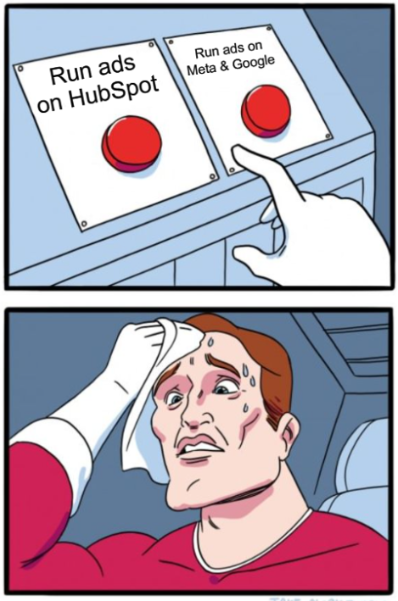
Let’s be honest: on paper, HubSpot Ads campaigns sound ideal.
You can build your ads directly inside the same platform that houses your CRM, email workflows, and contact data. It promises full-funnel visibility, simplified reporting, and fewer tools to juggle.
For busy marketers, that’s tempting.
There’s also a sense of security… you feel like you’re doing things “the right way” by keeping everything in one place. You can sync audiences based on contact properties, trigger workflows off ad engagement, and see ad-attributed contacts neatly slotted into your lifecycle stages.
If you’re running small-scale lead gen campaigns and prioritising simplicity over performance, HubSpot’s built-in ads tool isn’t the worst option.
But if performance does matter and you’re trying to scale or optimise in any meaningful way, cracks may start to show quickly.


Why Facebook and Instagram Ad Campaigns Fail: Common Mistakes
Where HubSpot Falls Short
The moment you try to optimise a campaign inside HubSpot, you hit a wall.
You can’t tweak placements, control bid strategies in detail, or test creative variations at scale. Want to run dynamic creatives, adjust audience exclusions, or A/B test landing pages properly? Not happening here.
And then there’s the data… or lack of it.
HubSpot’s reporting gives you surface-level metrics: impressions, clicks, conversions. But it misses the nuance.
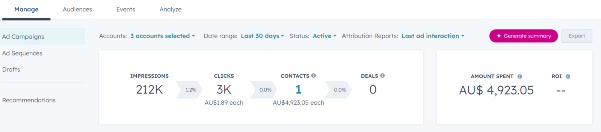
Here’s all of the available ad metrics HubSpot does give you:
- Ad Account Name
- Amount Spent
- Amount Spent (Currency Converted)
- Campaign Type
- Click-Through Rate (CTR)
- Clicks
- Cost Per Click (CPC)
- Cost per Customer
- Cost per Contact
- Cost per Lead
- Cost per Marketing Qualified Lead
- Cost per Opportunity
- Cost per Sales Qualified Lead
- Cost per Deal
- Cost per Session
- Customers
- Deals
- Engagements
- Impressions
- Leads
- Likes
- Marketing Qualified Leads
- Network Conversions
- Opportunities
- ROI
- Revenue (Currency Converted)
- Revenue from Deals
- Sales Qualified Leads
- Sessions
- Total Contacts
- Video Plays at 25%
You can’t dig into creative fatigue, thumb-stopping rates, or where people are dropping off in your funnel.
For example, you can’t view things like:
- Meta Ads Metrics (Facebook/Instagram)
- Reach: The total number of unique people who saw your ad.
- Frequency: The average number of times each person saw your ad.
- Engagement Rate: The percentage of people who interacted with your ad, including likes, shares, comments, and clicks.
- Cost per Engagement (CPE): The cost associated with each engagement action on the ad.
- Post Engagements: The total number of interactions (likes, comments, shares) with your ad content.
- Page Likes/Followers: The number of new likes or follows generated by the ad.
- Link Clicks: The number of clicks on the link in your ad, which might not be captured under “Clicks” alone if it includes other types of clicks.
- Video Views at 75% vs 25%: Only 25% is available on HubSpot, but on Meta, you can see the number of users that watched a video to 25%, 50%, 75% and 100% completion.
- Thumb stopping rate (and any other custom metric): Custom metrics can help you get a deeper understanding of how your ads are performing.
- Ad Recall Lift: The estimated number of people who remember seeing your ad.
- Conversion Rate: The percentage of people who completed an action (like purchasing) after interacting with your ad.
- Cost per Thousand Impressions (CPM): The cost to reach 1,000 impressions.
- Cost per 1,000 People Reached: The cost to reach 1,000 unique people.
- Google Ads Metrics
- Impressions Share: The percentage of impressions your ads received out of the total available impressions.
- Search Impression Share: The percentage of impressions your ads received in search results compared to the total possible impressions.
- Cost per Thousand Impressions (CPM): The cost to get 1,000 impressions for display ads.
- Cost per Acquisition (CPA): The average cost of acquiring a customer or conversion.
- Quality Score: A metric that measures the relevance and quality of your ads, keywords, and landing pages, affecting ad rankings.
- Ad Rank: Determines your ad’s position in the auction based on bid, Quality Score, and other factors.
- Top of Page Rate: The percentage of your ad impressions that show at the top of the search results page.
- Absolute Top of Page Rate: The percentage of your ad impressions that appear in the top position on the search results page.
- View-Through Conversions: The number of conversions that happen after someone sees your ad but doesn’t click on it.
- Click-Through Rate (CTR) (Search vs Display): While HubSpot has CTR, it’s important to distinguish between CTR in search and display campaigns, as they are tracked differently.
- Average Position: Indicates where your ad typically appears in the search results (often replaced by top impression metrics).
And these are just some of the metrics that you’re not able to view via the HubSpot Ads dashboard.
Those insights live inside the native platforms and they’re essential if you actually want to improve performance.
It’s like trying to fly a plane with half the dashboard missing. You’re technically in the air, but you’ve got no idea what’s going on under the hood.
Why Facebook and Instagram Ad Campaigns Fail: Common Mistakes
The Power of Native Ad Platforms
When you build your campaigns directly in Meta Ads Manager, Google Ads, or LinkedIn Campaign Manager, you unlock a level of control and insight that HubSpot simply can’t offer.
Here’s what you get right out of the gate:
Greater control over campaign structure
- Create multiple ad sets with nuanced targeting
- Fine-tune placements, devices, and bid strategies
- Run dynamic creative or video-first campaigns tailored to platform behaviour
Deeper, platform-native analytics
- See which creatives actually stop the scroll with metrics like thumb-stopping rate
- Track video watch times, engagement breakdowns, and ad relevance scores
- Spot signs of creative fatigue before your results tank
Faster testing and optimisation
- A/B test headlines, CTAs, and visuals at scale
- Adjust campaigns mid-flight based on real-time data
- Get immediate feedback on what’s working and what’s wasting spend
More accurate audience insights
- Build lookalike audiences based on in-platform signals, not just contact lists
- Exclude low-intent users or past converters
- Layer in behavioural data you simply don’t get from CRM-based syncing
Yes, native platforms come with a steeper learning curve. But if you care about performance, control, and growth, this is where the real game is played.
Custom Metrics and Deeper Insights
HubSpot’s ad reporting looks clean but when you’re trying to optimise performance, it quickly starts to feel shallow. You get a basic overview: impressions, clicks, cost-per-contact. But what about why those results are happening?
To really understand ad performance, you need to dig beneath the surface. And that’s where native platforms shine, giving you access to deeper metrics that let you see what’s resonating, what’s being ignored, and what needs fixing.
Here’s how the data compares:
| Metric / Capability | HubSpot Ads Tool / Reporting | Native Ad Platforms |
| Impressions, Clicks, Spend | ✔ Available in HubSpot dashboards and reports | ✔ Always available |
| Engagements (likes, shares, etc.) | ✔ Available for social ads under general “Engagements” metric | ✔ Detailed engagement breakdowns |
| Video play thresholds (e.g. 25%) | ✔ Supports basic thresholds like 25% video plays for Facebook ads | ✔ Full video watch metrics (watch time, drop-off points) |
| Custom metrics (scroll depth, thumb-stopping) | ✖ Not supported or surfaced in HubSpot | ✔ Supported through platform insights or third-party tools |
| Creative fatigue / performance decay flags | ✖ Not surfaced in HubSpot | ✔ Platforms give signals on ad relevance and fatigue |
| A/B testing and real-time optimisations | ✔ Allows ad management but with limited optimisation control | ✔ Full A/B testing and real-time performance data |
| Export at ad-level (individual ad / keyword) | ✖ Only supports export at campaign or ad set level | ✔ Ad-level export supported |
When you’re trying to scale a campaign, tiny insights lead to big wins. Knowing your ad is being skipped at the 3-second mark? You can cut that opening scene.
Seeing one creative outperform another with a higher thumb-stopping rate? You double down on that format.
You can’t optimise what you can’t see and HubSpot doesn’t let you see enough.

How to Create High-Performing Meta Ad Creatives
When to Use HubSpot, and When to Step Outside It
To be clear: HubSpot Ads isn’t useless. It has its place, you just need to know when to lean on it, and when it’s time to move beyond it.
Use HubSpot Ads when:
- You’re running small, simple campaigns and value speed over precision
- You need quick visibility into lead source and attribution for internal reporting
- You’re syncing audiences based on HubSpot contact properties for basic targeting
- Your marketing team isn’t yet comfortable inside native ad platforms
Step outside HubSpot Ads when:
- Performance matters and you need to scale or optimise
- You want to test different creatives, placements, or bidding strategies
- You care about deeper insights (like video engagement, scroll behaviour, or ad fatigue)
- You’re running complex funnels or campaigns that require tight control
Think of it like this: HubSpot is great for centralising your CRM-driven marketing. But when it comes to performance marketing, the kind that requires daily testing, creative variation, and data-deep diving, it’s a blunt instrument.
There’s no shame in starting with HubSpot. But if you want to win in the ad space, eventually you need to move into the cockpit and take full control.

How to Set Up an Instagram Ad Campaign (Step by Step Tutorial)