
Related Posts



Podcasts




Originally published on February 6, 2023 and updated on December 5, 2025.
Content management systems (CMS) are an essential tool for businesses of all sizes to manage and organise their digital content.
When it comes to choosing the right CMS for your business, two of the most popular options that come up against each other are WordPress and HubSpot.
Both platforms are widely used and have their own unique features and benefits. But they also have different use cases and target audiences.
In this article, we will compare WordPress and HubSpot to help you decide which platform is right for your business.
What is a CMS?

A CMS is a software application that allows users to manage and organise digital content, such as text, images, videos, and audio files.
Typically, a CMS provides an interface for creating, editing, and publishing web pages, and can be used to build and maintain websites and blogs.
Some popular examples of CMS options include WordPress, Joomla, Wix, and HubSpot. These systems provide a range of features and functionalities, such as templates, user management, and analytics, that make it easier for users to create and maintain their website, even without technical knowledge.
Typically speaking, a good CMS includes the following features:
- Content creation and editing: Allows users to create and edit text, images, videos, and other types of content.
- Templates and themes: Provides pre-built templates and themes that can be used to design and style your website.
- User management: Allows for the creation of different user roles and permissions, such as editors, authors, and administrators.
- Media library: Allows for the storage and management of multimedia files such as images and videos.
- SEO optimisation: Includes built-in tools for optimising your website’s content for search engines.
- High-level analytics and reporting: Allows for the tracking and analysis of website traffic and user behaviour.
- Security: Provides built-in security features to protect your website from hacking and other security threats.
- Backup and restore: Allows you to create backups of your website and restore it in case of any issues.
- Plugins and add-ons: Some CMSs offer a wide range of plugins and add-ons to extend the functionality of the platform.
- Mobile optimisation: Some CMSs also include features to optimise your website for mobile devices.
It’s worth noting that the specific features of a CMS can vary depending on the platform you choose.
Some CMSs may have additional features, while others may lack some of the features listed above. It’s important to research the features of different CMSs and choose the one that best suits your needs.
WordPress CMS vs HubSpot CMS Comparison
While both WordPress and HubSpot are content management systems, they have different features and use cases.
When we are comparing the two CMS platforms, you generally want to consider the following aspects:
Customisation Capabilities
When we talk about customisation, we’re particularly referring to website building.
Ultimately, if you have the technical skills, you can pretty much completely customise both HubSpot and WordPress websites.
WordPress generally offers more raw customisation potential than HubSpot CMS, but HubSpot offers a more controlled, marketer‑friendly customisation experience rather than “anything is possible.”
On WordPress, when you build a website, you can use different plugins to help you build it. For example, you might use Elementor, which is a popular drag-and-drop builder with almost complete customizability.

On the other hand, you might choose to use Divi, another WordPress builder that focuses on high-quality designs but is a bit harder to use than Elementor.
With these builders, you can create a highly custom website, and you don’t necessarily need to be a coder to do this.
If you’re going to set up a site on HubSpot, each website theme you use dictates the level of flexibility you have over the build.
If you want to completely customise the design, you can do this, but you’ll need to custom-code it in the backend. This way, HubSpot is just as customisable as WordPress… but if you’re using simple-to-use drag-and-drop builders, HubSpot is much more limited in its level of customisation than WordPress.
Here’s a quick comparison between WordPress and HubSpot when it comes to customisation capabilities:
| Aspect | WordPress customisation | HubSpot CMS customization |
|---|---|---|
| Code access | Custom code via HubL, modules, and themes, but within the HubSpot environment. | HubSpot CMS customisation |
| Ecosystem size | Massive theme and plugin ecosystem, with many page builders. | Smaller, curated theme and module marketplace. |
| Flexibility (ceiling) | Nearly limitless in development resources. | Near‑limitless in development resources. |
| Non‑technical editing | Depends heavily on chosen theme/builder; can be confusing. | Strong drag‑and‑drop, theme fields, and marketer‑friendly UI. |
Verdict: When it comes to customisation, WordPress wins if we’re looking at the ease of making more complex customisations. But both platforms are equal in terms of their actual customisation capabilities.
CMS Features & Tools
Here are some key CMS features and tools you might want to consider when choosing between HubSpot and WordPress:
- Live website chat: Support for live website chat tools.
- Standard SSL Certificate: SSL is a standard website security certificate that keeps your website and your content safe.
- User and role-based administration: The ability to grant certain users access to your content and website with different permissions.
- Dynamic personalisation, smart content, and reporting: display tailored content and web experiences to different visitors based on their behaviour, profile data or attributes (for example, country or lifecycle stage), and measure performance at a granular level.
- SEO Recommendations and optimisations: Identifying SEO issues across your website with insights on how to improve these.
- A/B Testing: Running A/B tests for landing pages and website pages to determine the best variations in copy and design. In HubSpot, this is also known as “dynamic page testing” or “adaptive testing” in some HubSpot tiers.
- Additional root domains: Building and managing multiple websites within one CMS.
- Memberships: Restricting access to specific blog posts, landing pages and website pages by requiring users to sign in with a username and password.
The following features are not standard in a typical CMS, but are also useful to consider in a CMS:
- Email marketing: build and send bulk email marketing campaigns.
- Custom reporting: building custom reports that combine website data with CRM data.
- Web apps: custom builds web app experiences, which may include Learning Management Systems, event systems, a calculator, a customer portal, and more.
HubSpot actually has all of these features; however, some of the features are only available on higher payment plans. On the other hand, you can also have these features in WordPress, but take note that they’re plugin or host‑dependent, so you might need to integrate them yourself or request your hosting provider to handle the process.
Let’s take a look at what this looks like altogether:

But, to achieve the same result with WordPress, you’re going to have to download a plugin for most of these features. In 2025, many managed WordPress hosts and plugins provide free Let’s Encrypt SSL and automate renewal, even though it is still technically handled via the host rather than WordPress itself.
The Plugin Problem
If you want to use WordPress and have every single other feature on this list, you’ll need to find a plugin that helps you achieve them. But, there are four main issues with this:
- Although high‑quality plugins are either one‑time paid, freemium, or free, the problem here is stacking multiple tools and paying extra for trial-and-error. This can usually end up costing you more compared to having a CMS with the same features already integrated into the platform.
- Plugins must be updated regularly. Breakages do happen, but managed WordPress hosting and safer update workflows (staging, auto‑rollback, selective auto‑updates) have made this more controlled nowadays.
- Plugins not updated regularly are a massive security risk. Often, plugins are updated to patch up backdoor security issues. An update to a plugin may create compatibility issues with other parts of your site. But at the same time, the security of a site is of utmost importance.
- Anyone can create a plugin, which means other than looking at reviews, and this makes it crucial to identify and choose well‑maintained, reputable plugins with strong update history and security structures.
While it’s possible that WordPress and HubSpot can have all the same features, it’s more difficult to achieve this on WordPress, and it comes with its own set of challenges.
At the end of the day, HubSpot does it all in one tightly managed stack, while WordPress trades convenience for flexibility and control.
Verdict: HubSpot wins.


Best HubSpot CMS Features for Marketers
Pricing
WordPress is an open-source platform, which means that it is free to use. However, you will need to pay for hosting around AU$5 to AU$20 monthly, a domain name for around AU$15 to AU$30 annually, and any premium themes or plugins that you want to use. Hosting and domain names can vary in price, but can usually be purchased for a few dollars a month.
On WordPress, you will also have to consider upkeep costs to manage plugins. But this varies depending on whether you DIY or pay for management, as there are literally millions of developers with WordPress expertise.
Premium WordPress themes and plugins can also vary in price, with some costing as little as AU$30 and others costing hundreds of dollars.
Overall, the cost of using WordPress can be low, especially if you opt for shared hosting, a free theme, and free plugins.
On the other hand, HubSpot CMS has a free 14-day trial of the Starter Plan that’s available under the Content Hub, but it’s very limited in functionalities and capabilities. When it comes to this option, the pricing is based on the features and functionalities that you need.
Here’s what the different plans look like as :

HubSpot Content Hub Pricing as of December 2025.
You can see HubSpot CMS pricing on this page.
The HubSpot Content Hub Starter plan allows you to build and manage a website with limited functionalities, basic website analytics, and a native integration between the CMS and CRM Hubs. But, it’s important to remember that the free plan is quite limited as a CMS, so it simply cannot compare to WordPress if we’re looking at the free version.
Ultimately, the HubSpot CMS plans that are scalable could be more expensive than using WordPress. For a full guide on HubSpot pricing, check out this guide.
Verdict: WordPress wins.
Additional Marketing and Automation Tools
Some key marketing and automation tools include:
- Email marketing
- Marketing and traffic analytics
- Blog posts
- Landing page development
- SEO tools
- Social media tools (i.e. post scheduling, ads, analytics etc)
- Lead generation and forms
- Automations (i.e. email workflows or sales automation flows)
Do note that these tools are not inherently part of a CMS. However, they are important for a business’s marketing and sales efforts.
While these tools are not included in either the WordPress CMS or the HubSpot CMS, there are ways to add these tools to both platforms. As such, it’s important to look at the ease of doing this and the cost.
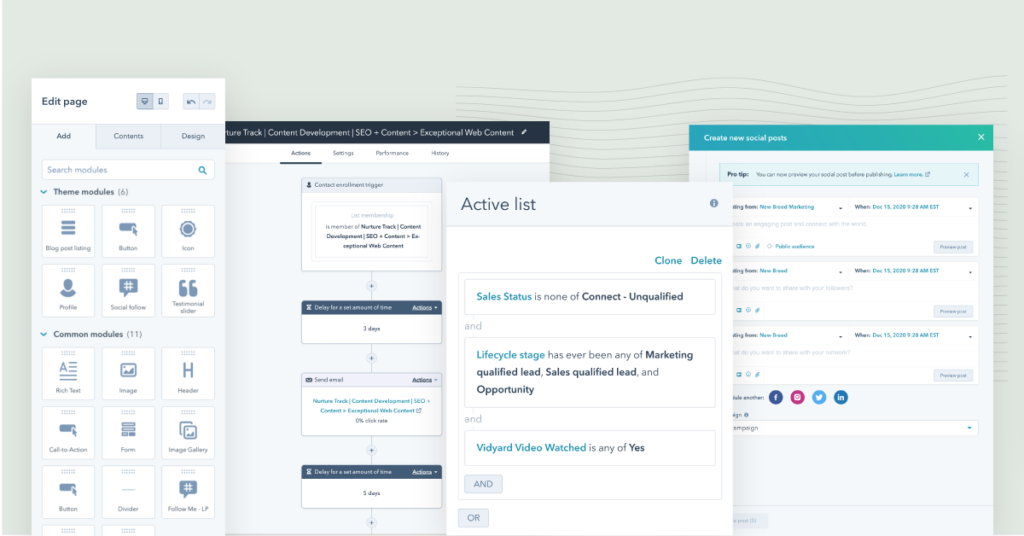
All of the above tools can be added to HubSpot by simply opting to use HubSpot Marketing Hub. Since HubSpot is an all-in-one platform, the Marketing Hub and CMS Hub combine seamlessly.
But, it’s important to remember that these tools are not part of a bare CMS. However, HubSpot provides them via Marketing Hub in the same ecosystem, whereas WordPress relies on plugins and external services
As we mentioned above, achieving the same result on WordPress is a bit harder in comparison because you might need to put more effort into integration and maintenance compared to what you’d need to do in HubSpot. To achieve this on WordPress, you’ll need to find a plugin for each of these tools, and you may need to sign up for third-party software so you can achieve these results.
For example, if you want to use email automation, you’ll have to create an account on an email marketing platform such as Mailchimp or ActiveCampaign. This will cost an additional fee, and you’ll also have to install the plugin into WordPress. As already mentioned previously, there’s a range of issues that come with plugins in WordPress, and on top of this, you’re not going to have everything in one place like HubSpot and it may become quite technical to set up.
In saying this, the cost will be much lower to achieve this result on WordPress. Depending on what plugins you choose, the cost to achieve this on WordPress will differ; however, it will be far less expensive than choosing HubSpot Marketing Hub’s Pro or Enterprise plans.
All in all, when it comes to marketing and automation tools, while you can achieve the same result with both HubSpot and WordPress, it’s much, much easier to achieve on HubSpot. It may cost more; but, there are also lower plans that allow you to have access to fewer marketing features.
Verdict: HubSpot wins


HubSpot vs Mailchimp: What Should You Get in 2026?
Ease of Use
Another important consideration when choosing a CMS is the ease of use.
WordPress can be complex to use, especially for users without technical knowledge. It can take some time to learn how to customise the platform and add new features. On top of this, it can be difficult to find and install the right plugins to extend the functionality of the platform.
On the other hand, HubSpot has a more user-friendly interface and is designed to be easy to use, even for those without technical knowledge.
The drag-and-drop editor makes it easy to design and update web pages, and the platform provides a range of pre-built templates and modules that can be used to create pages and posts.
Additionally, HubSpot’s built-in CRM, marketing automation, and analytics make it easy to manage and track your website’s visitors, leads, and customer behaviour.
Verdict: HubSpot wins

How to Set Up Your HubSpot Portal (The Basics) for CRM, Marketing Hub, Sales Hub, Service Hub and CMS
Maintenance
From a maintenance perspective, HubSpot wins.
WordPress requires regular plugin updates and hosting maintenance to stay functioning, both of which come with their own set of issues. For example, updating a plugin can easily result in breaking a website if the new update is not compatible with the website.
Updating plugins can become time-consuming as checking to make sure each plugin is compatible with the website takes time. And on top of that, if you make a mistake and the plugin breaks the website, it’s going to take a lot of time to fix the problem.
And when you thought it was all over, WordPress Hosting is another thing you’ll need to keep on top of.
On the other hand, HubSpot requires little to no maintenance when it comes to running a website.
Verdict: HubSpot wins
Technical Support
When it comes to tech support, HubSpot has a team of dedicated experts that you have access to at any time. On top of this, the HubSpot community provides a vast centre of knowledge for you to tap into at any time.
On the other hand, WordPress does not have a team of dedicated experts. If you are looking for a WordPress expert, you might have to find one yourself, and it’ll be up to you to make sure they know what they’re talking about.
Verdict: HubSpot wins
HubSpot CMS vs WordPress CMS: Which one wins overall?
We’ve given you a complete comparison of HubSpot CMS and WordPress CMS, but who wins overall?
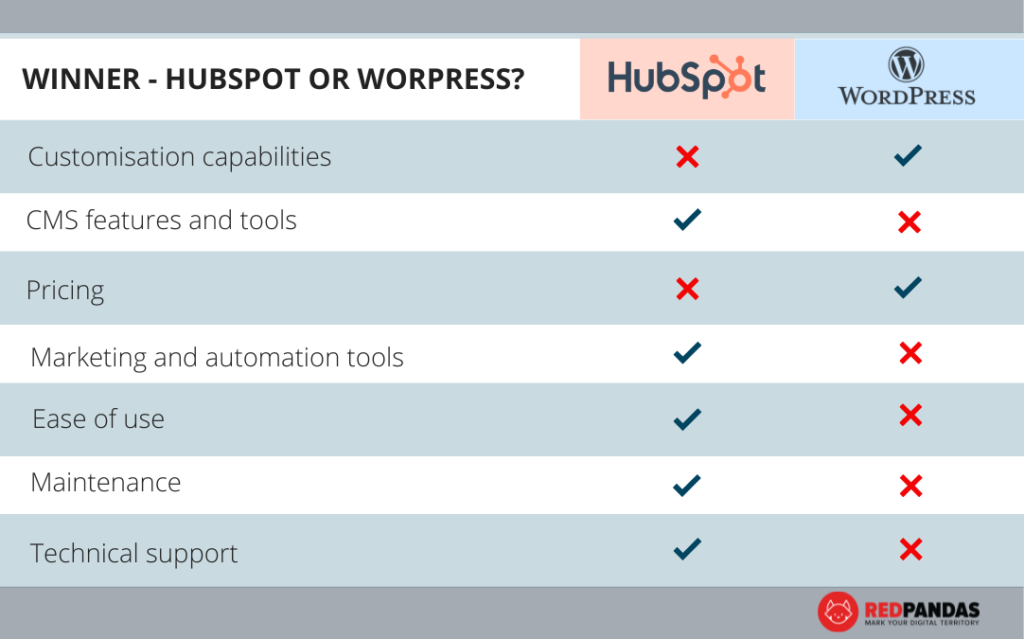
Based on the table above, HubSpot is the winner, unless the pricing is an issue or unless you need to have complex customisation options in your CMS.
Which is right for my business?
So now you know the difference between HubSpot and WordPress as a CMS, but which is right for your business?
First and foremost, it’s about budget: if you can’t afford HubSpot for now, then it’s best to put the possibility of using it off until you feel like you’re ready to upgrade your CMS.
Secondly, it’s about expertise.
If you already have a website developer, then it makes sense to use WordPress as a CMS since it’s cheaper and advanced customisation is easier to achieve.
However, if you haven’t hired an expert, then you’ll either need to be able to afford one if you plan on going with WordPress, or HubSpot could be the better choice for you.
If you can afford it and you’ll be hiring an expert either way, or if the prospect of the cost of hiring an expert isn’t enough to sway your decision, then it goes back to answering these three questions:
- Do you have an expert in place to manage website maintenance?
- Do you need a CRM in place as well?
- Are marketing, automation, and sales also important to you?
If the answer is no to the first point and yes to the next two points, then HubSpot CMS is probably the way to go. However, if you answer no to more of these things, then WordPress is a better option.
All in all, both WordPress and HubSpot are great options for your CMS, and your business goals and pain points will determine which is right for you.
Have more questions? Speak to a RedPandas expert today.

Is HubSpot Right for My Business? Here’s How to Tell