


Related Posts



Podcasts



Let’s be honest: keeping up with HubSpot’s new AI features can feel like trying to drink from a firehose.
Just when your team starts getting comfortable with one update, another drops… and this time, it’s something called Breeze Assistant.
If you’re wondering whether it’s worth your attention, you’re not alone.
Many marketing and sales leaders are asking the same question: Is this just another shiny tool, or could it actually make HubSpot easier to use and more powerful every day?
HubSpot’s Breeze Assistant is designed to do what most AI tools promise but rarely deliver: simplify your work without adding another layer of complexity.
It’s part of HubSpot’s broader AI strategy to make automation, content generation, and CRM management feel effortless across your entire platform.
At RedPandas, we’ve seen this shift up close. Many of the businesses getting the most out of HubSpot are those using these built-in assistants to eliminate small, manual tasks that clog up marketing and sales teams.
By the end of this article, you’ll understand exactly what Breeze Assistant is, how it works, and what’s included so you can decide whether it’s worth adopting in your own portal.
What Is HubSpot Breeze Assistant?
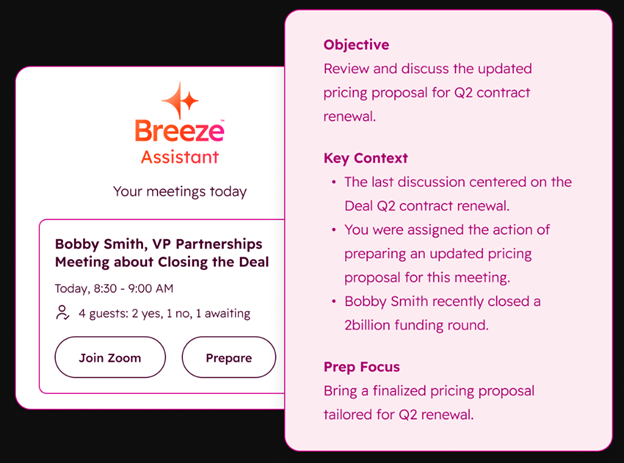
HubSpot Breeze Assistant is the latest evolution of HubSpot’s built-in AI suite: an intelligent layer designed to help users complete tasks faster, with less manual input.
Think of it as a personal assistant that lives inside your HubSpot portal, connecting your data, content, and workflows in one place.
Rather than being a standalone app or bot, Breeze Assistant is embedded directly into HubSpot’s existing tools. It learns from the data already in your CRM and uses that context to suggest, draft, or even automate actions across marketing, sales, and service.
Here’s what that means in practice:
- In Marketing Hub, it can generate campaign copy, suggest content topics, and pull performance insights in seconds.
- In Sales Hub, it helps reps summarise deals, write follow-up emails, and update CRM records automatically.
- In Service Hub, it can summarise tickets, generate knowledge-base articles, and surface insights from customer interactions.
Unlike earlier tools such as ChatSpot that focused on specific functions, Breeze Assistant is designed to work across Hubs. It pulls everything together in a single AI layer; one that adapts to your portal’s data instead of working in silos.
But remember: Breeze Assistant isn’t here to reinvent HubSpot. Instead, it aims to make what you already do in HubSpot feel smoother, faster, and smarter.


How to Use HubSpot Breeze AI for Marketing, Sales and Customer Service
How HubSpot Breeze Assistant Works
HubSpot Breeze Assistant is designed to streamline your work by understanding and automating tasks across your HubSpot portal. It’s built to work as an intelligent, context-aware assistant embedded directly into the tools you already use.
Here’s how it works in greater detail:
1. It Understands Context
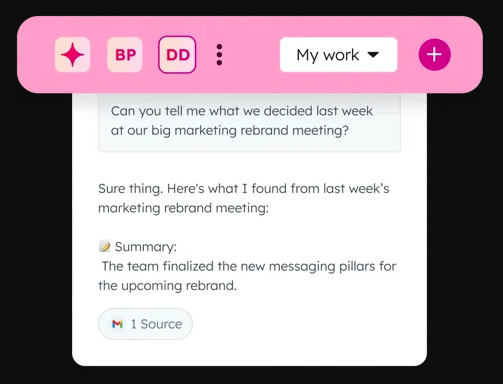
One of Breeze Assistant’s key features is its ability to understand where you are in HubSpot and what you’re trying to do. Think of it like a virtual assistant who’s constantly observing your workflow and adapting to your needs.
To better understand how this can help your workflow, let’s say you’re building an email campaign in HubSpot’s Email Editor.
Breeze Assistant might notice that you’ve been running similar campaigns for a particular product. It could suggest pulling in previous email templates or even generate subject lines based on past performance.
What makes this HubSpot feature different from any other similar option out there is that it doesn’t just give random suggestions.
Instead, it learns from your activity and the data it has access to.
But, it helps to know that Breeze Assistant doesn’t only pull from what you’ve done recently; it also learns your preferences and the nuances of your business to provide more accurate, helpful suggestions over time.
The more you use it, the smarter it becomes.
2. It Executes Commands
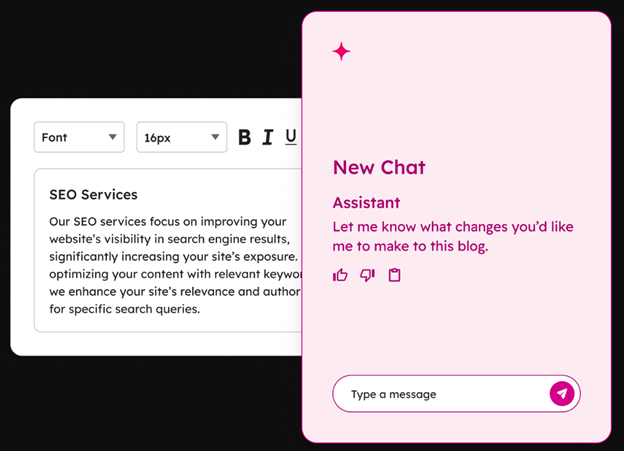
What sets Breeze Assistant apart from many AI tools is that it can actually perform what it suggests instead of just recommending steps.
You can type or select commands in plain language, and Breeze will handle the execution directly inside HubSpot.
Take this situation, for instance: you’re dealing with a large group of contacts who all need follow-up emails.
Instead of manually typing each email or using a generic template, you could type something like “Write a follow-up email for leads who attended our webinar on [topic].” Using this prompt, Breeze Assistant can then craft an email based on the data you put in, like:
- Webinar details.
- Previous email interactions.
- Customer preferences.
On top of personalisation, Breeze Assistant can automatically update records, create tasks, and complete actions without requiring you to manually input everything.
For example, after an email campaign is sent, Breeze can automatically log that engagement to relevant CRM records.
3. It Learns From Usage
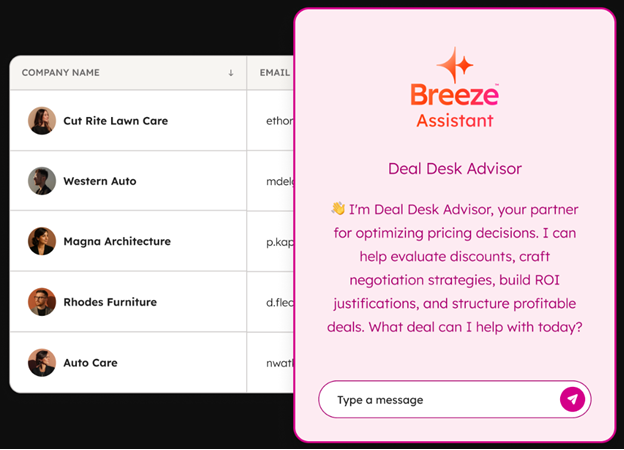
The more you use Breeze Assistant, the better it becomes at suggesting and executing tasks. It doesn’t just follow a rigid set of instructions; it adapts over time, refining its recommendations based on your usage patterns and data.
Say your sales team is using Breeze Assistant to follow up with high-priority deals.
Initially, Breeze might suggest basic follow-up templates.
But after seeing patterns in the types of emails you prefer or the responses you get, it may begin offering more tailored templates or even suggesting personalised follow-ups based on customer behaviour or past interactions.
It’s essentially learning how you work and optimising for efficiency.
Practically, this means that the longer you use Breeze Assistant, the more seamless and intuitive your experience will be. It actively works to make your HubSpot experience more tailored to your workflows.

How to Get More ROI from HubSpot (without spending more)
You’ll notice Breeze Assistant appearing inside familiar areas of HubSpot like the email editor, workflow builder, report dashboards, and CRM records. But remember, it isn’t a separate interface.
It’s woven into the experience, offering quick actions or auto-draft options exactly where you need them.
Unlike the earlier AI chat tools, Breeze Assistant can execute and streamline your workflows rather than just generate text. You can think of it as an AI teammate sitting quietly in the background, speeding up the repetitive clicks that slow teams down.
What’s Included (2025 Update)
HubSpot’s 2025 release of Breeze Assistant is a structural upgrade that ties AI into nearly every core HubSpot function.
Here’s a breakdown of what’s now included across the main Hubs:
| HubSpot Hub | Feature | Description & Use Cases |
| Marketing Hub | AI Campaign Builder | Automatically drafts campaign plans, email sequences, and ad copy tailored to your goals. |
| Content Drafting Tools | Suggests copy for landing pages, blog posts, and CTAs based on existing content. | |
| Performance Insights | Provides summarised performance data, highlighting trends and key metrics. | |
| AI Segmentation | Creates smart contact segments based on engagement, behaviours, and historical interactions. Use Case: Breeze automatically segments contacts into a list of ‘engaged but not converted’ leads, which a marketer can target with a retargeting campaign. | |
| Sales Hub | Email & Sequence Generation | Generates personalised outreach emails and sequences for different stages of the sales funnel. |
| Deal Summaries | Provides summarised deal information from notes and activities to help sales reps get up to speed quickly. | |
| CRM Record Updates | Automatically logs calls, emails, and interactions based on your activity, saving time on manual data entry. | |
| Pipeline Insights | Offers insights into deal progress, highlighting risks and suggesting actions. | |
| Service Hub | Ticket Summarisation | Condenses customer service tickets into key points for faster resolution and prioritisation. |
| Knowledge Base Assistance | Helps create or update knowledge base articles by using historical ticket data to suggest helpful content. | |
| Tone & Response Suggestions | Recommends polite, empathetic, and on-brand responses to customer tickets. | |
| General Platform | Unified AI Panel | A central panel from which you can prompt Breeze across different HubSpot Hubs. |
| Context Awareness | Breeze adjusts its suggestions based on where you are in the portal, providing relevant actions. | |
| Privacy & Permissions | Admins can control Breeze’s access to sensitive data and assign permissions for its actions. |
Limitations of HubSpot Breeze Assistant to Watch For
tool, it has a few limitations.
To get the most out of it, you’ll need to manage expectations and be aware of where it might fall short:
1. AI Still Needs Human Oversight
Breeze Assistant can draft, summarise, and automate beautifully… but it doesn’t know your brand tone or deal nuances as well as your team does.
This means that every piece of generated content or automation you get from HubSpot’s new upgrade still benefits from a quick human check.
To avoid any issues down the line, it helps to think of Breeze as the assistant, not the decision-maker.
2. It Learns From What You Feed It
If your CRM data is messy or incomplete, Breeze Assistant will mirror that mess. It depends on accurate, consistent inputs to make good suggestions.
Before leaning on it heavily, make sure your contact data, properties, and deal stages are clean.

Is Poor HubSpot List Hygiene the Reason My Portal Has Bad ROI?
3. Access Depends on Your HubSpot Tier
Not every feature of the Breeze Assistant update is rolled out across all subscription levels yet.
Some advanced AI capabilities like multi-hub command execution or advanced segmentation may remain limited to Professional and Enterprise tiers for now. So, keep an eye out for new updates in feature access through the Product Updates page in your HubSpot portal.
4. Limited Customisation (For Now)
Unlike third-party tools where you can train or extend the model, Breeze is tightly integrated into HubSpot’s native ecosystem. That’s great for security and ease of use, but it means less control over how the AI behaves.
As the Breeze Assistant update settles in over time, however, you can expect to see changes in your ability to customise it.
5. Still Early Days
As with any new HubSpot release, the early versions of Breeze Assistant are still evolving. Expect updates, refinements, and the occasional glitch when you’re using it more often.
Teams that approach it as an experiment, rather than a replacement for existing processes, will see the smoothest adoption.

How to Rank in AI Search With HubSpot’s New AEO Website Grader Tool
While HubSpot Breeze Assistant has the potential to greatly streamline your processes, it’s important to approach it with realistic expectations.
At the end of the day, it’s still AI… and AI needs clean data, oversight, and some time to get fully accustomed to your business.
If you’re considering implementing Breeze Assistant, make sure your HubSpot portal is ready for it.
Ensure your data is well-organised, your team understands the AI’s role (and its limits), and you’re on the right subscription tier for the features you need.
With those basics covered, Breeze Assistant can make a huge difference in speeding up your workflows, improving lead management, and getting the most out of your HubSpot investment.
Scale Your Strategy’s Impact With HubSpot Breeze Assistant
HubSpot’s Breeze Assistant isn’t a shiny extra: it’s the start of how HubSpot will work from now on while quietly removing friction from your team’s day-to-day work.
If you wait too long to explore it, you’ll be left playing catch-up while others are automating, personalising, and reporting at twice the pace.
Breeze Assistant is one of those updates that rewards early adopters; the sooner your team learns to use it, the faster you’ll uncover where it genuinely saves time and improves your processes.
If you’re already on HubSpot, open Breeze Assistant and test it inside one of your most-used tools, like the email editor, workflows, or CRM records. Watch how it interacts with your data and note what feels smoother.
If you’re not sure where Breeze Assistant fits or how to get your team on board, get in touch with us for a free HubSpot Optimisation call.