




Does HubSpot’s AI Actually Improve Lead Scoring in 2026?

Key Takeaways
- HubSpot’s AI improves lead scoring when your CRM data is complete. The Lead Scoring tool builds fit, engagement, and combined scores for contacts, companies, and deals
- AI-built lead scores need Marketing Hub Enterprise and at least 50 contacts to train on: 25 who converted and 25 who didn’t
- Predictive scoring adds Likelihood to close (a 90-day close probability) and Contact priority (four tiers of 25% each) on Enterprise plans
- Breeze Intelligence was renamed at UNBOUND 2026. Enrichment now sits in Smart CRM, buyer intent continues under Marketing > Buyer Intent, and no features were switched off
- Standard data enrichment is included with paid Core Seats and uses no credits, but it’s off by default, so existing records need a bulk enrichment pass
- Buyer intent costs 10 credits per company each month (about AUD $0.14) and works at the company level, so connect it to scores through company properties
- Australian businesses should test enrichment coverage on their own accounts, confirm Sydney data hosting, and review privacy disclosures before the 10 December 2026 deadline
- A sales feedback loop keeps scores accurate. Track rejection reasons, review score bands monthly, and rebuild AI scores after major process changes
Quick Answer
Yes, HubSpot’s AI improves lead scoring when your CRM data is complete and current.
The Lead Scoring tool builds fit and engagement scores, and Marketing Hub Enterprise can build them with AI.
Enrichment is included with paid Core Seats, and buyer intent costs 10 credits per company each month at about AUD $0.14. Test enrichment against your own Australian accounts before letting scores change lifecycle stages.
Not sure where your current setup stands? Take the free HubSpot Health Check.
It scores your lead scoring, data hygiene, and workflows in about two minutes, so you’ll know exactly where to start. Access it below:


Get Your Free HubSpot Health Check Score
It’s the Monday pipeline meeting. Sales has just sent back another batch of leads HubSpot marked as sales-qualified, and most of them were never going to buy.
Everyone turns to the lead score, and nobody can explain it.
So, can HubSpot’s AI actually fix this?
Yes, when the data feeding it is right: HubSpot lead scoring starts in the Lead Scoring tool, which builds fit and engagement scores from your CRM data.
Data enrichment, included with paid Core Seats, fills in missing company details like industry and headcount. Buyer intent, which runs on HubSpot Credits, flags companies that visit your key pages or research topics linked to what you sell. On Marketing Hub Enterprise, AI can even build the score for you.
The confusing part is the naming.
Most guides still call these tools Breeze Intelligence, a brand HubSpot retired at UNBOUND in September 2026. That leaves teams unsure what changed, what costs credits, and whether the data holds up for Australian companies.
RedPandas Digital, a HubSpot Diamond Solutions Partner in Sydney, faces the same standoff with Australian B2B teams. When their scores stop making sense, the cause usually comes down to three things:
- Stale criteria
- Thin company data
- No feedback from the people working the leads
In this article, you’ll learn how HubSpot’s AI lead scoring works after the rename, what it costs in AUD, and which checks to run before you ask sales to trust the score again.
What is HubSpot Lead Scoring?
HubSpot lead scoring lives under Marketing > Lead Scoring, on Marketing Hub or Sales Hub Professional and Enterprise. Each score becomes a property you can use in views, segments, workflows, and reports.
Fit, Engagement, and Combined Lead Scores in HubSpot
HubSpot gives you three score types:
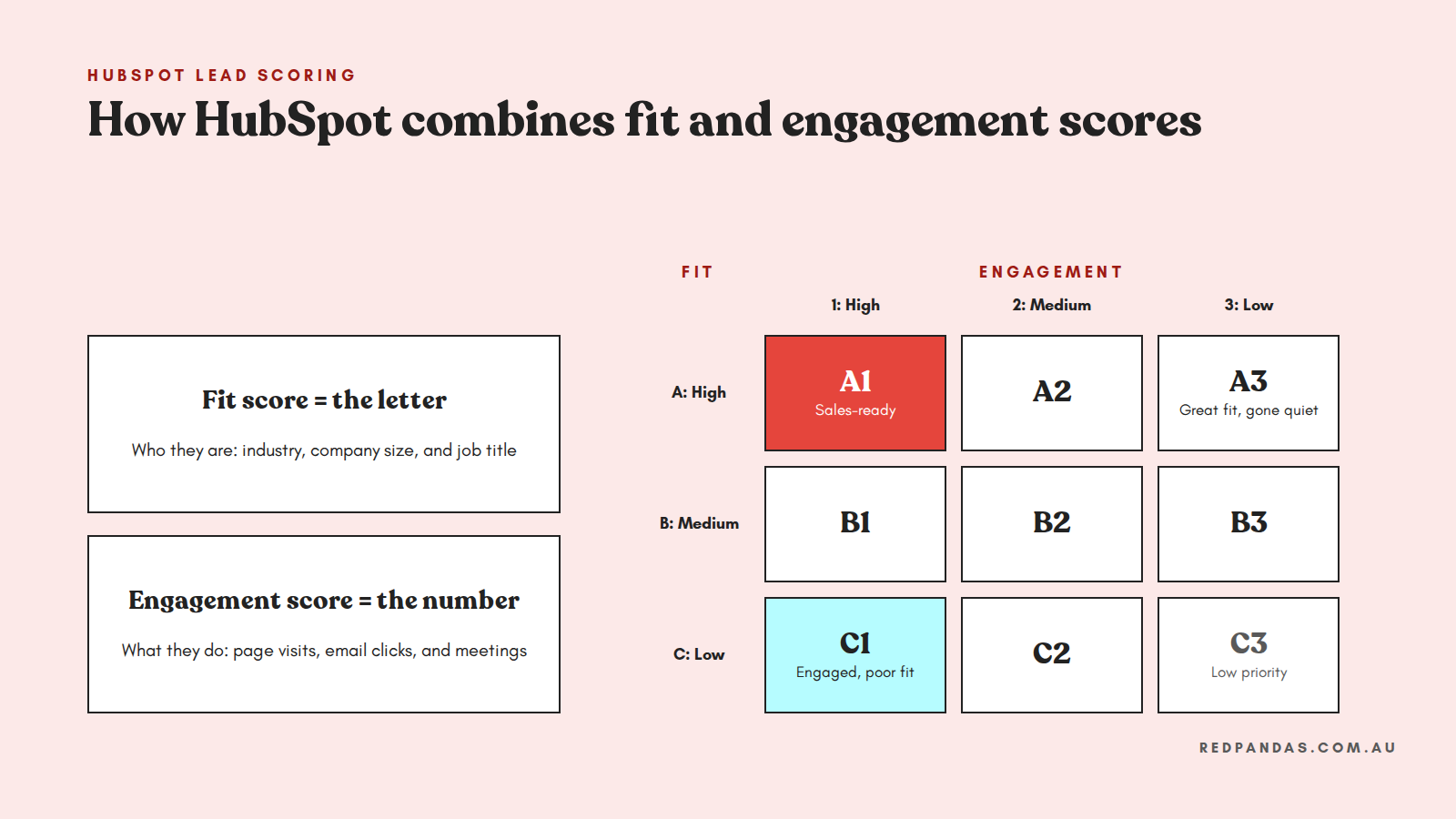
- Fit scores rate how closely a record matches your ideal customer, using properties like industry, company size, or job title
- Engagement scores rate what a record does, such as website visits, email clicks, or booked meetings
- Combined scores blend both into one total, and HubSpot keeps each value visible
| Record | Score types | Subscription needed |
| Contacts | Fit, engagement, and combined | Marketing Hub Professional or Enterprise |
| Companies | Fit, engagement, and combined | Marketing Hub or Sales Hub Professional or Enterprise |
| Deals | Combined only | Sales Hub Professional or Enterprise |
How HubSpot Calculates a Lead Score
Rules add or subtract points. Group limits stop a pile of page views from outweighing a demo request, negative points cut leads outside your service area, and score decay fades old activity over 1, 3, 6, or 12 months.
Say your fit score adds 20 points for Construction and 15 for New South Wales. A Sydney builder scores 35, and a Perth retailer scores nothing.
Combined scores use labels from A1 to C3. The letter shows fit, and the number shows engagement, so a C1 lead is highly engaged and a poor fit: often the exact lead sales sends back.
How to Build a Lead Score in HubSpot
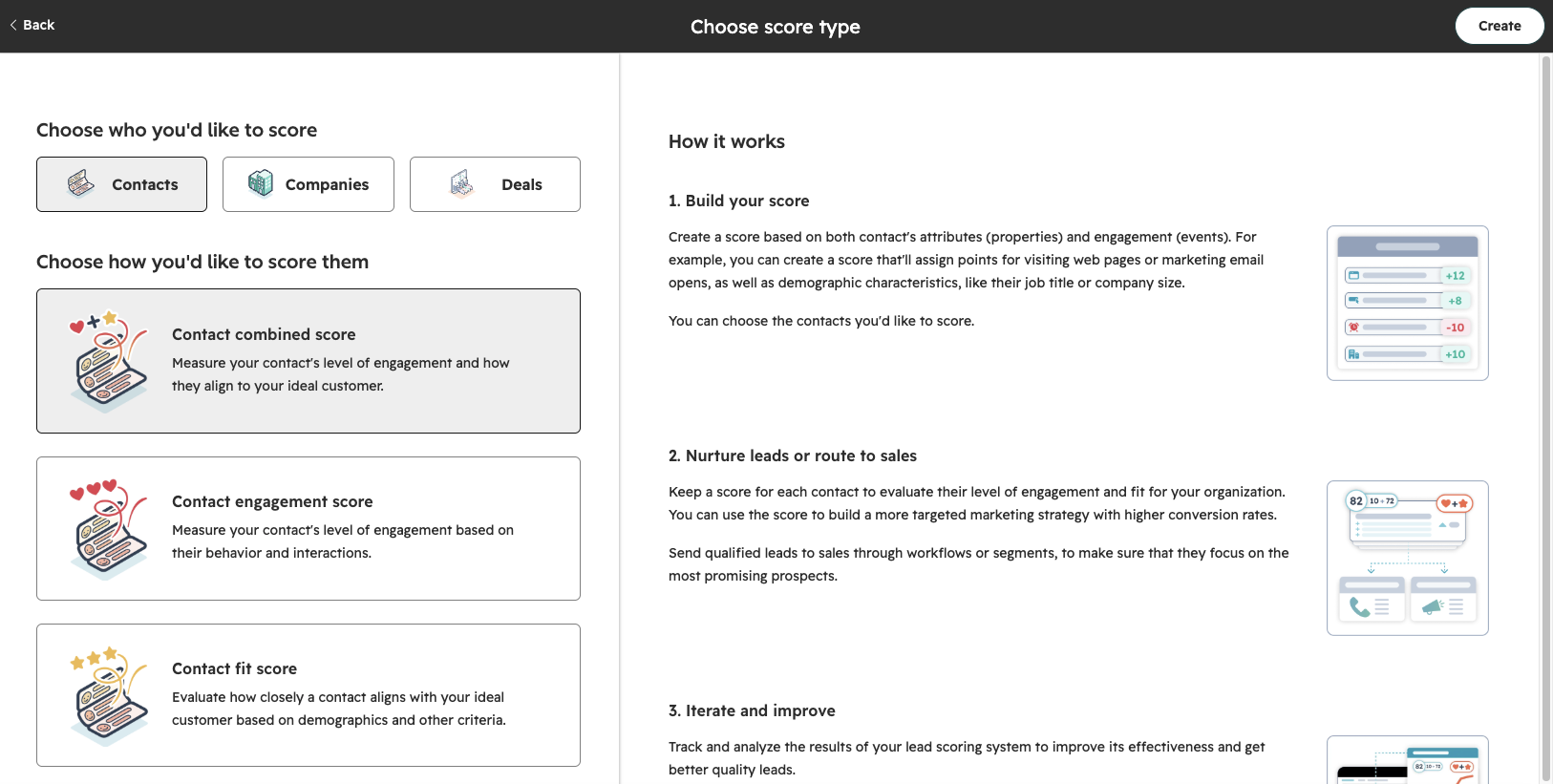
Building a manual score is quick once marketing and sales agree on what a good lead looks like. Here’s the process in HubSpot:
- Go to Marketing > Lead Scoring and start a new score
- Choose the record type and score type, such as a contact fit score
- Add property or event groups, then set points and group limits
- Set thresholds, test sample records, and turn the score on
HubSpot then scores existing records retroactively, so you see results straight away.

How Can You Track Where Your Leads Come From in HubSpot?
HubSpot Predictive Lead Scoring
HubSpot uses AI to score leads in two ways: predicting each contact’s chance of closing, and building a score from your own conversion history.
Likelihood to Close and Contact Priority
On Enterprise, HubSpot adds two predictive properties to contacts:
- Likelihood to close: the percentage chance a contact becomes a customer within 90 days
- Contact priority: four even tiers, each holding 25 per cent of contacts
The model runs as a black box, so you can’t edit the values or see why a lead scored high. Treat it as a second opinion for prioritising outreach.
AI Lead Scoring in HubSpot
On Marketing Hub Enterprise, the Lead Scoring tool can build fit and engagement scores for you.
You choose the lifecycle stage change that counts as a conversion, HubSpot finds what converted contacts share, and you edit its criteria before turning the score on.
It needs at least 50 contacts to train: 25 who converted and 25 who didn’t. The finished score uses visible rules and points, so sales can see exactly why each lead scored the way it did.
Predictive vs AI-Built vs Manual Lead Scoring in HubSpot
Each option fits a different subscription and transparency need. Here’s how the three compare:
| Option | How it works | Can you see the criteria? | Subscription needed |
| Manual lead score | You set the rules and points | Yes | Marketing Hub or Sales Hub Professional or Enterprise |
| AI-built lead score | AI recommends rules from your conversions, and you edit them | Yes | Marketing Hub Enterprise |
| Predictive scoring | Machine learning sets Likelihood to close and Contact priority | No | Marketing Hub or Sales Hub Enterprise |
If you’re on Enterprise, start with an AI-built score and use Likelihood to close as a cross-check. If you’re on Professional, a well-built manual score with decay and negative points still does the job.
What Happened to Breeze Intelligence?
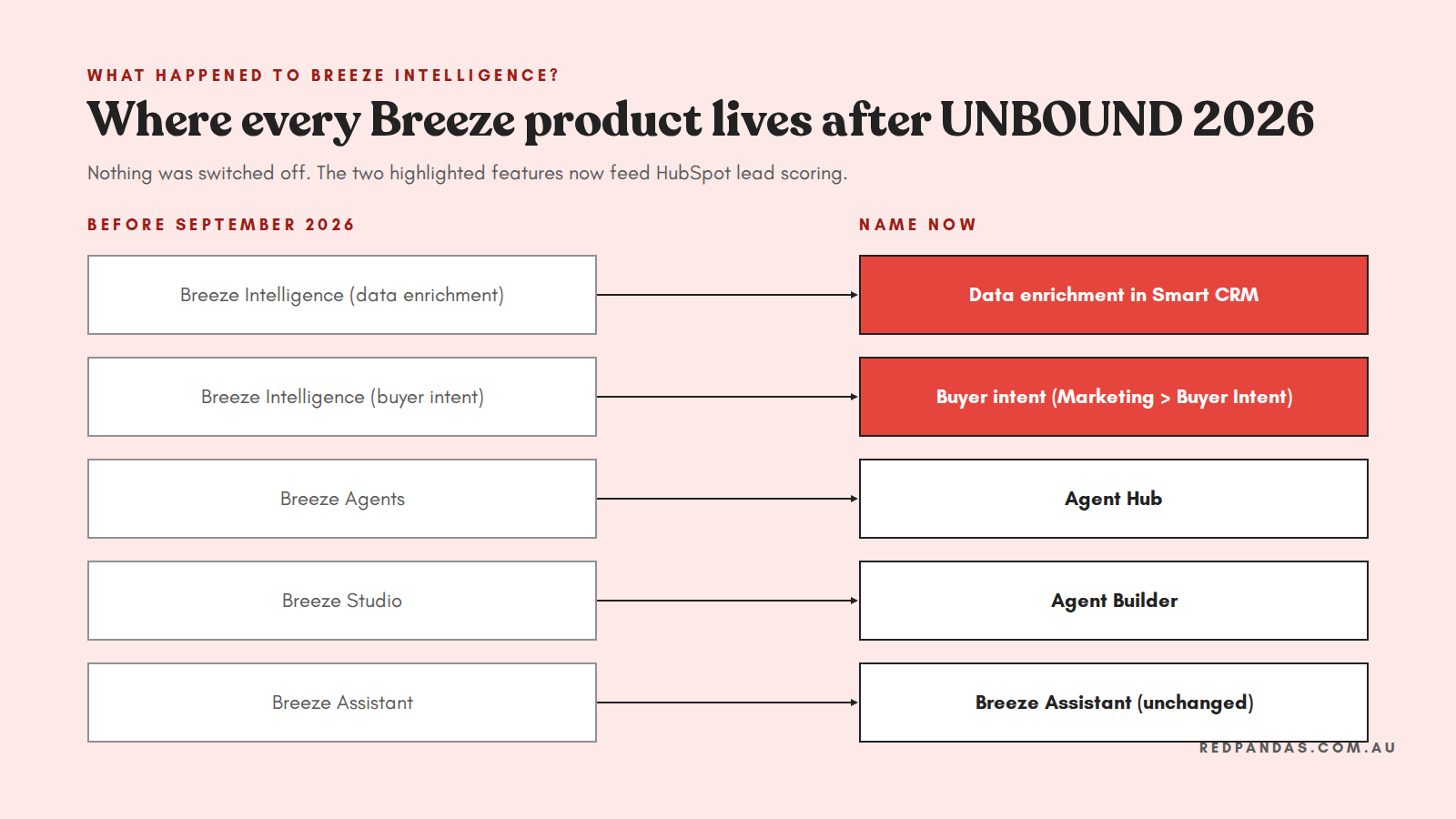
Every Breeze Intelligence feature is still running under a new name. At UNBOUND 2026 on 16 September, HubSpot retired Breeze as the umbrella brand for its AI, keeping the name only for Breeze Assistant.
Here’s where each Breeze product sits now:
| Former name | Current name | What it means for lead scoring |
| Breeze Intelligence (data enrichment) | Data enrichment in Smart CRM | Included with paid Core Seats, and fills the properties fit scores use |
| Breeze Intelligence (buyer intent) | Buyer intent, under Marketing > Buyer Intent | Company-level signals at 10 credits per company each month |
| Breeze Agents | Agent Hub | Agents like Data Agent maintain your CRM records |
| Breeze Studio | Agent Builder | Not needed for lead scoring |
| Breeze Assistant | Breeze Assistant (unchanged) | No change |
What you need to do: nothing in your portal. Update any internal docs, training, and workflow names that still mention Breeze.
HubSpot Data Enrichment and Insights
A decision-maker and a student can fill in the same form. But without company data, your fit score can’t tell them apart.
HubSpot data enrichment fills in missing details like industry, employee count, revenue range, job title, and seniority. Contact fit scores can also use the associated company’s properties, so enriched company data lifts every contact linked to it.
How HubSpot Enriches Your Records
How you enrich decides which records your fit scores can actually use. HubSpot gives you three options:
- Automatic enrichment fills blank properties on new records without overwriting existing values
- Bulk enrichment covers existing records you select
- Continuous enrichment refreshes enriched records monthly, until someone edits a value
Watch out: enrichment is off by default and only covers new records once you turn it on. Run a bulk pass, or your fit scores will undervalue older leads.
Standard enrichment is included with Core Seats on Starter, Professional, and Enterprise, with no credits used. Only smart properties or custom AI-researched fields cost credits, at 10 per record each run.
HubSpot’s dataset grew out of Clearbit, and reviews describe its coverage as strongest for US companies, so test it on Australian accounts first.
For a full walkthrough, see this guide to how HubSpot data enrichment works.
How HubSpot Buyer Intent Feeds Your Lead Score
Engagement scores only see known contacts.
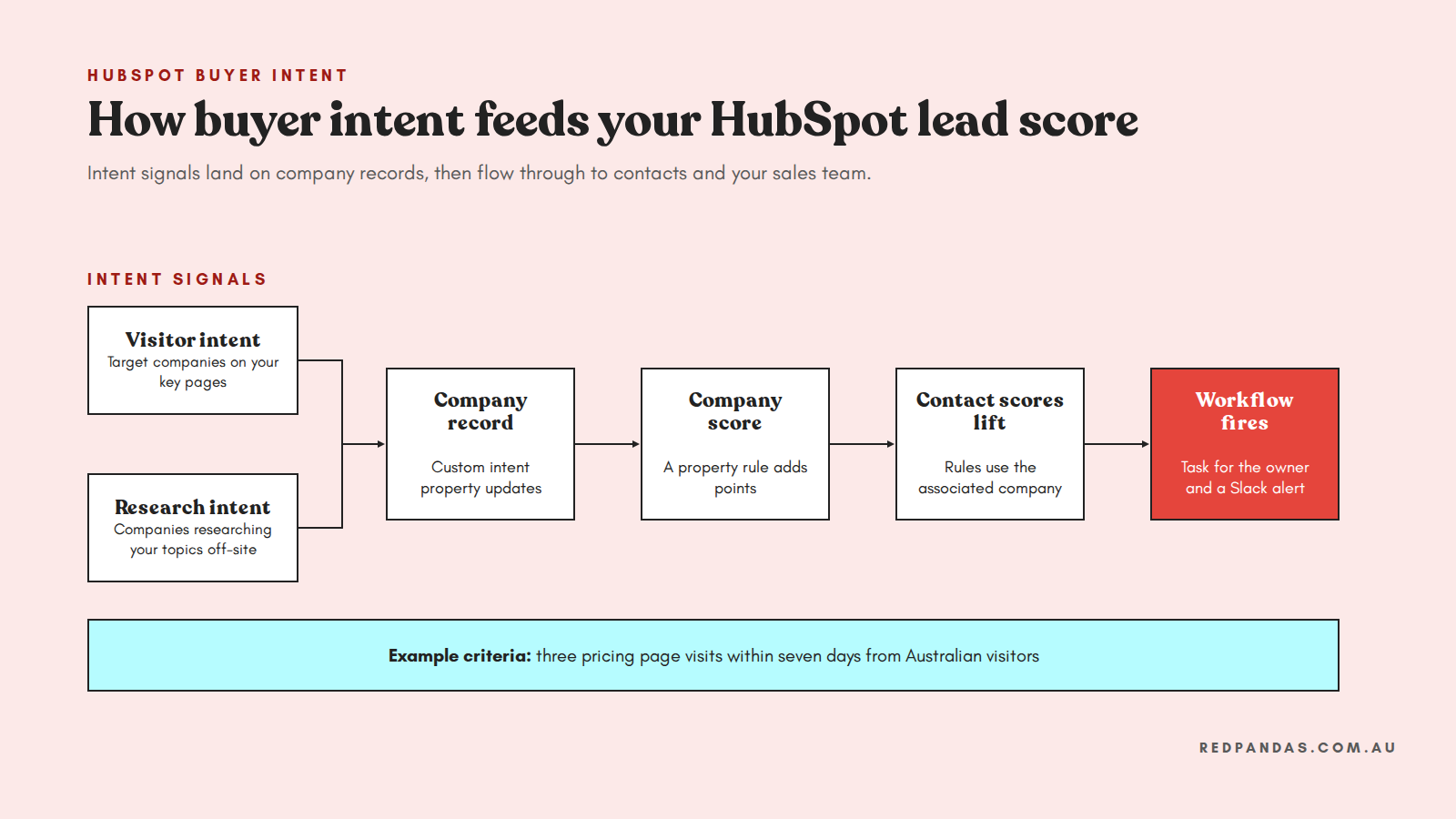
Buyer intent shows which companies are interested, often before anyone fills in a form. It’s available on Starter, Professional, and Enterprise across most Hubs, under Marketing > Buyer Intent.
Visitor Intent and Research Intent in HubSpot
Buyer intent pulls signals from your own website and from research happening elsewhere online. HubSpot tracks two kinds:
- Visitor intent matches anonymous website traffic to companies by IP address, using the HubSpot tracking code
- Research intent flags companies researching your chosen topics across HubSpot’s wider network
Both are measured against a target market you define. Intent sits at the company level, so your scoring setup has to carry it through to contacts.
How to Set Up Visitor Intent Criteria
Your criteria decide which website behaviour counts as buying interest. Set them up in four steps:
- Install the HubSpot tracking code and define your target market, such as Australian construction companies with 50 or more employees
- Create up to 10 criteria using page paths, visit counts, and a window of up to 90 days
- Filter to Australian visitors and exclude low-intent pages, like your careers page
- Save a custom intent property, so the signal lands on company records
How to Connect Buyer Intent to Your Lead Score
Add your intent property as a rule in your company score, then score contacts on their associated company’s intent property.
Say your “Pricing page” criteria needs three visits in seven days from Australian visitors. When a target company hits it, its score rises, linked contacts lift, and a workflow alerts the owner in Slack.
Browsing buyer intent is free. Adding and tracking a company costs 10 credits a month, so set monthly credit limits and exclude up to 100 domains, like competitors and existing customers.
How Much Does HubSpot AI Lead Scoring Cost in Australia?
HubSpot AI lead scoring costs from nothing extra to around AUD $5,162 a month, depending on whether you need Marketing Hub Enterprise for AI-built scores. Figures use USD $1 = AUD $1.434 as of 23 October 2026 and exclude GST:
| Feature | Plan needed | HubSpot Credits | Approx. cost (AUD) |
| Manual lead scoring | Marketing Hub or Sales Hub Professional+ | None | Included in your subscription |
| AI-built lead scores | Marketing Hub Enterprise | None listed on rate sheet | Included in your subscription |
| Predictive scoring | Marketing Hub or Sales Hub Enterprise | None | Included in your subscription |
| Standard data enrichment | Paid Core Seat, Starter+ | None | Included in your subscription |
| Smart properties | Starter+ | 10 per record, per prompt | ~$0.14 per record |
| Buyer intent tracking | Starter+ on most Hubs | 10 per company, per month | ~$0.14 per company, per month |
| Subscription | Monthly price (USD) | Approx. monthly price (AUD) | Included credits |
| Marketing Hub Professional (3 seats) | $890 | ~$1,276 | 3,000 |
| Marketing Hub Enterprise (5 seats) | $3,600 | ~$5,162 | 5,000 |
| Sales Hub Professional (per seat) | $100 | ~$143 | 3,000 |
| Sales Hub Enterprise (per seat) | $150 | ~$215 | 5,000 |
Marketing Hub also carries a one-off onboarding fee of about AUD $4,302 on Professional and about AUD $10,038 on Enterprise.
How HubSpot Credits Work
Paid plans include 500 credits a month on Starter, 3,000 on Professional, and 5,000 on Enterprise, set by your highest tier.
Credits reset monthly and are shared across buyer intent, smart properties, and AI agents.
Extra credits cost about AUD $14.34 per 1,000, or about AUD $12.91 on annual billing.
Tracking 500 accounts uses 5,000 credits a month: about AUD $29 extra on Professional, or your whole allowance on Enterprise. Start with your highest-fit accounts.
What Australian Businesses Should Check First
Run these four checks before AI scores start routing leads to sales.
1. Test Enrichment Coverage on Your Own Accounts
Bulk enrich 50 Australian accounts you know well, then compare industry, headcount, and revenue against the facts. Where a segment comes back weak, lower the points on enriched properties or add a company size field to your forms.
2. Confirm Where Your HubSpot Data Is Hosted
HubSpot opened a Sydney data centre in February 2025. Check your account’s location under the Data Hosting tab, especially in regulated industries like healthcare or financial services.
3. Review Your Privacy Policy and Cookie Consent
Buyer intent shares visitor IP addresses and page views with HubSpot, so you may need a cookie consent banner. Australian privacy obligations around tracking are tightening:
- Tracking data can be personal information: in June 2026, the Privacy Commissioner confirmed website activity data, including IP addresses, may count as personal or sensitive information
- Sensitive pages need extra care: exclude healthcare or legal advice pages from your intent criteria
- Automated decision rules start on 10 December 2026: privacy policies must explain computer-made decisions that could significantly affect someone’s rights or interests
Note: this section is general information only, not legal advice. Check your setup with a qualified privacy adviser.
4. Build a Feedback Loop With Sales
Add a rejection reason property for sales, compare score bands monthly against closed deals, and adjust points to match. Rebuild AI scores after major sales process changes.
6 HubSpot Lead Scoring Best Practices to Follow
Most broken lead scores trace back to a few setup habits. These six keep your scores accurate and easy for sales to trust:
- Keep fit and engagement visible separately: A C1 needs nurturing, and an A3 needs re-engaging, so build a workflow for each band
- Start with 3 to 5 criteria per score: Short lists are easier to explain and test
- Base criteria on closed-won deals: Note what your last 20 customers had in common before they bought
- Weight conversion actions above awareness actions: Cap page views and email opens with group limits
- Preview before you publish: If 60 per cent of your database scores “High”, your thresholds are too generous
- Write down your handoff rules: Automate the lifecycle stage change once a lead hits your sales-ready label
4 Common HubSpot Lead Scoring Mistakes
Some HubSpot scoring quirks skew your results without any obvious error. Watch for these four:
| Mistake | What happens | How to fix it |
| Expecting decay on segment criteria | Score decay doesn’t apply to segment membership rules | Add a date filter inside the segment |
| Scoring calls your team logs manually | Only calls made through HubSpot’s own calling tool count | Use HubSpot’s calling tool, or score meetings booked instead |
| Misreading “contains any of” | Fit criteria add points once, while engagement criteria add points for each match | Check which criteria type you’re using before setting points |
| Editing a live score without checking where it’s used | Changes apply retroactively and can push records in or out of segments and workflows | Check the score property’s “Used In” tab before you save |
How RedPandas Sets Up HubSpot Lead Scoring for Australian Businesses
As a HubSpot Diamond Solutions Partner based in Sydney, RedPandas Digital rebuilds lead scoring for Australian B2B teams whose sales and marketing teams have stopped trusting the number.
The work usually starts with the same argument from the intro: sales says the leads are poor, and marketing says sales isn’t following up. A lead scoring rebuild gives both teams one shared definition of a good lead.
Bupa, for example, had a sales team that was running on a poorly configured Dynamics CRM, with little pipeline visibility and fully manual reporting.
Over 12 months, RedPandas rebuilt its sales operations in HubSpot Sales Hub and laid the data groundwork for lead scoring.
The result was a 2x increase in close rates and 10+ hours saved each week on reporting.
Read the full Bupa case study here.
Frequently Asked Questions: HubSpot Lead Scoring
Does HubSpot’s AI actually improve lead scoring?
Yes, when your CRM data is complete and current. HubSpot’s Lead Scoring tool builds fit and engagement scores; Marketing Hub Enterprise can build them with AI, and data enrichment fills missing company details. Buyer intent adds company-level interest signals. Test enrichment against your own accounts first, since scores are only as accurate as the data behind them.
How does HubSpot lead scoring work?
HubSpot lead scoring assigns points to contacts, companies, or deals based on rules you set. Fit scores rate how well a record matches your ideal customer, engagement scores rate actions like email clicks or meetings, and combined scores blend both. Scores update automatically, and you can use them in segments, workflows, views, and reports.
Does HubSpot have predictive lead scoring?
Yes. On Marketing Hub or Sales Hub Enterprise, HubSpot’s Likelihood to close property predicts the percentage chance a contact becomes a customer within 90 days, and Contact priority ranks contacts into four tiers. Marketing Hub Enterprise can also build AI lead scores from your conversion history, with visible criteria you can edit.
What happened to Breeze Intelligence?
HubSpot retired Breeze as its AI umbrella brand at UNBOUND in September 2026, keeping the name only for Breeze Assistant. Breeze Intelligence’s data enrichment now sits in Smart CRM, included with paid Core Seats, and buyer intent continues under Marketing > Buyer Intent. No features were switched off, so existing setups keep working.
Is HubSpot buyer intent free?
Browsing companies in HubSpot buyer intent is free. Adding a company to your CRM and tracking its intent signals costs 10 HubSpot Credits per company each month, roughly AUD $0.14. Paid plans include a monthly credit allowance of 500 on Starter, 3,000 on Professional, and 5,000 on Enterprise, and unused credits don’t roll over.
Which HubSpot plan do I need for buyer intent?
Buyer intent is available on Starter, Professional, and Enterprise plans across most HubSpot Hubs, including Marketing, Sales, Service, Data, and Content Hub. Revenue Hub needs Professional or Enterprise. You also need the HubSpot tracking code on your website, plus HubSpot Credits for adding and tracking companies, either included with your plan or purchased.
Can HubSpot score companies as well as contacts?
Yes. Companies can have fit, engagement, or combined scores on Marketing Hub or Sales Hub Professional and Enterprise. Contact scores can also use the properties of a contact’s associated company so that a strong company score can lift every contact linked to it. Deals support combined scores on Sales Hub Professional and Enterprise.
Does HubSpot data enrichment work for Australian companies?
It can, though coverage varies. HubSpot’s enrichment dataset grew from Clearbit, a US-built database, and reviews describe it as strongest for US companies. Before relying on it for scoring, enrich 50 Australian accounts you know well and compare the industry, employee count, and revenue values against the facts. Reduce points for weak segments.
How do I connect buyer intent to my lead score in HubSpot?
Create visitor intent criteria in Marketing > Buyer Intent, then save a custom intent property so signals appear on company records. Add that property as a rule in your company fit or combined score, and add a contact score rule based on the associated company’s intent property. Workflows can then alert reps when scores rise.
How much does HubSpot AI lead scoring cost in Australia?
Manual and predictive lead scoring are included with eligible plans. AI-built scores need Marketing Hub Enterprise, from about AUD $5,162 a month for five seats, plus a one-off onboarding fee. Standard enrichment is included with Core Seats, and buyer intent costs about AUD $0.14 per tracked company each month. Prices exclude GST.
Why Now Is the Right Time to Fix Your HubSpot Lead Scoring
HubSpot’s rename is the perfect excuse to look under the bonnet of your lead scoring. Your team has to update its Breeze-era documentation anyway, so it’s a good moment to check whether the score itself still holds up.
Three things make this the right time:
- The biggest data gap now costs nothing to close. Standard enrichment is included with Core Seats, so filling missing company details no longer eats into your credits
- The tools are clearer than they’ve ever been. Lead scoring, enrichment, and buyer intent each have a defined home, plan, and cost, which makes it easier to plan a rebuild and budget for it
- Privacy rules change on 10 December 2026. Reviewing your tracking and scoring setup now gives you time to update your privacy policy before the deadline
You don’t need to switch everything on at once.
Start by backfilling enrichment, testing it against your own Australian accounts, and rebuilding one fit score with sales in the room.
Once sales trusts that score, layer in AI-built scores and buyer intent. Each step then builds on data your team already believes in.
About RedPandas Digital
This article was written by the team at RedPandas Digital, a HubSpot Diamond Partner based in Sydney, Australia, and one of only four HubSpot-accredited Diamond partners in the Asia-Pacific region.
RedPandas has implemented and optimised HubSpot for businesses across construction, healthcare, legal, education, and professional services. Learn more in this HubSpot partner page.
About the Author


Get the best content marketing insights right in your inbox!
Subscribe to our Newsletter and get marketing insights delivered to your inbox every week.