




The Complete Guide to Marketing Automation Adoption

Key Takeaways
- Three gaps drive poor adoption: workflows that don’t match how your team works, no owner after handover, and automation that isn’t tied to revenue
- Underuse is widespread: Gartner’s 2023 survey found marketers use just 33% of their martech stack’s capability, down from 58% in 2020
- Audit before you rebuild: User logins, workflow enrolments, data quality, and reporting show exactly where adoption has stalled
- Fix in order: Set revenue goals, name an owner, simplify workflows, make training ongoing, then measure
- Adoption is recoverable: m|devices nearly replaced HubSpot, then saved more than 12 hours a week on reporting after a three-month program
Quick Answer
Marketing automation consulting gets underused when workflow, process, and strategy gaps open up after implementation. Workflows don’t reflect how the team operates, nobody owns automation after handover, and campaigns aren’t linked to revenue goals.
Fixing adoption starts with auditing all three gaps, then rebuilding ownership, training, and reporting around the workflows your team already needs.
If you want an expert view, RedPandas offers a free marketing automation adoption consultation for Australian businesses.
Book through the link below to get a review of your workflows, ownership, and reporting, plus a prioritised plan to lift adoption:


Get Your Free Marketing Automation Adoption Consultation
The nurture workflow your consultant built last year still shows zero contacts enrolled. Lead scoring hasn’t been touched since handover. Your team is back to exporting lists and sending one-off emails by hand.
That pattern has clear causes.
Marketing teams underuse marketing automation consulting when three gaps open up after implementation:
- Workflows that don’t match how the team actually works
- No owner once the consultant leaves
- A strategy that was never tied to pipeline targets
Gartner’s 2023 Marketing Technology Survey of 405 marketing leaders found teams use just 33 per cent of their martech stack’s capability, down from 58 per cent in 2020.
That number stings when renewal lands on your desk, and leadership asks what the spend delivered.
But it stings more when you’ve already paid experts once and little of it stuck.
RedPandas Digital, a HubSpot Diamond Solutions Partner, is often brought in at exactly this point: after go-live, when the automation exists and nobody uses it. One client, m|devices, nearly walked away from HubSpot entirely before RedPandas’ work got the team to full adoption.
This guide walks you through the same approach. You’ll learn the root causes behind poor adoption, a self-audit checklist to find your own gaps, and a step-by-step framework to fix them without rebuilding from scratch.
Why Marketing Automation Consulting Gets Underused
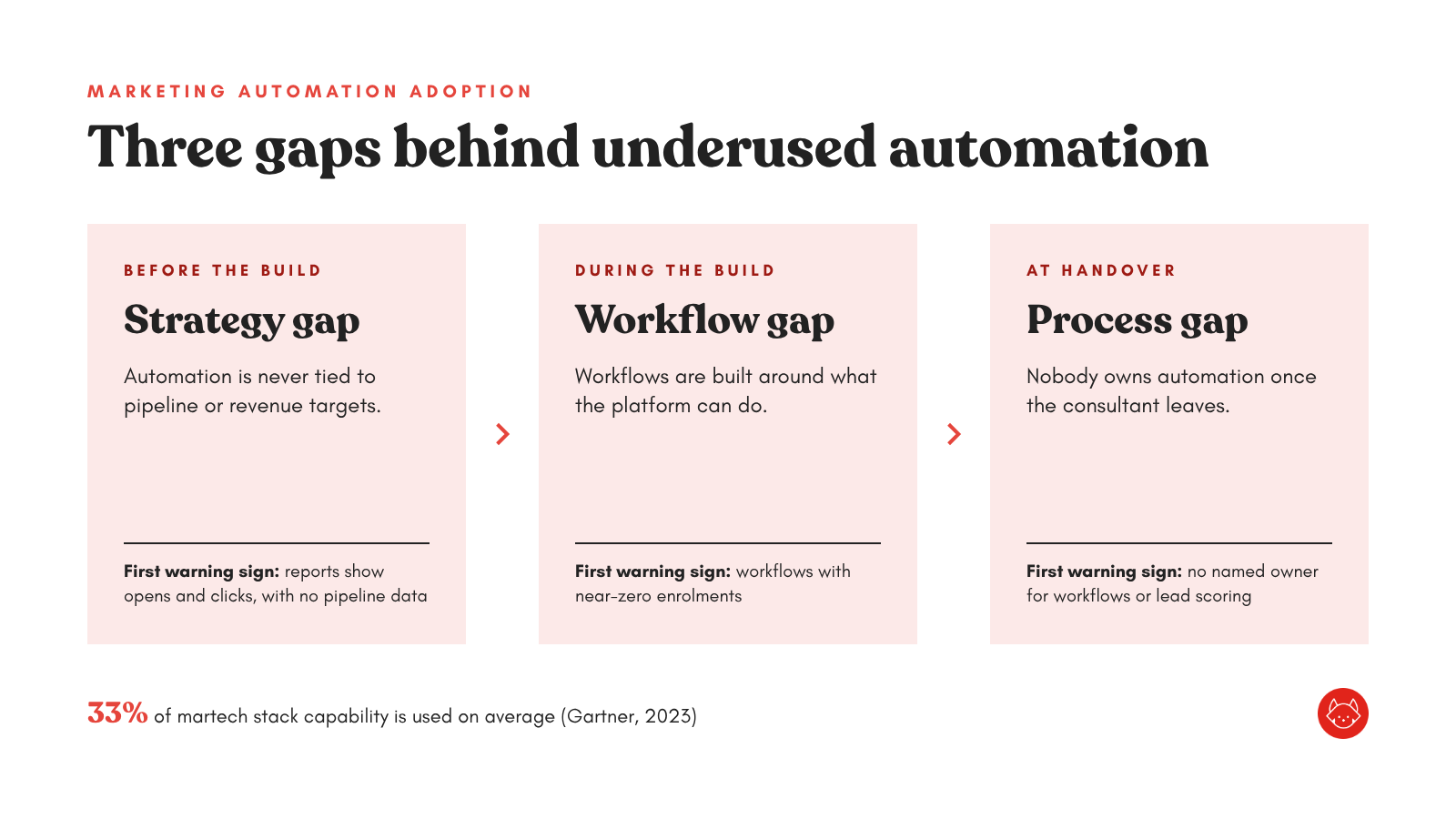
Underused automation usually traces back to one of three marketing automation adoption gaps. Each opens at a different point after implementation and needs a different fix:
| Gap | Where it starts | First warning sign |
| Workflow | During the build | Workflows with near-zero enrolments |
| Process | At handover | Nobody owns automation |
| Strategy | Before the build | Reports show opens and clicks, with no pipeline data |
Workflow Gaps
Workflow gaps appear when automation is designed around what the platform can do.
Picture a consultant who builds a 12-step nurture sequence, branching lead scoring, and five lifecycle workflows. Your team runs two campaigns a month and has never seen the logic behind any of it.
The result is automation nobody trusts enough to touch: people work around it, and manual processes creep back in.
Common signs of workflow gaps include:
- Dormant workflows with zero or near-zero enrolments months after launch
- Manual exports to send emails your automation should already handle
- Conflicting workflows firing on the same contacts
- Black-box logic that nobody can explain without opening the workflow
And capacity makes this worse.
A 2025 Manago AI survey of more than 150 marketing leaders found 47 per cent don’t have enough time to finish their tasks. Untangling a complex workflow loses to the next deadline every time.
Process Gaps
Process gaps start at handover.
The consultant delivers, runs one training session, and the engagement ends. Nobody inside the business is named as the owner of your marketing automation.
Without an owner, nothing gets reviewed, updated, or retired. Workflows go out of date as your offers, team, and sales process change.
Difficulty recruiting talent to drive adoption can be one of the biggest barriers to martech use.
In many Australian mid-sized businesses, “marketing ops” falls to a marketing manager who already has a full-time job.
Common signs of process gaps include:
- No documented owner for workflows, lists, or lead scoring
- One-off training that happened at go-live and never again
- Shoulder-tap onboarding, where new hires learn the system from whoever sits next to them
- Ad hoc changes made with no review process
Strategy Gaps
Strategy gaps sit underneath the other two.
Automation gets built to “nurture leads” or “save time”, with no link to pipeline targets or the sales handover.
Automation that isn’t measured against revenue struggles to earn budget or attention. The previously mentioned Manago survey found 40 per cent of marketing leaders find martech ROI hard to measure.
Common signs of strategy gaps include:
- Vanity reporting built on email opens and clicks, with no pipeline or revenue attribution
- Lead disputes, where sales and marketing disagree on what a qualified lead is
- Stale lifecycle stages that exist but never get updated
- No clear wins, so leadership can’t name one outcome automation delivered last quarter
Note: The three gaps compound. A strategy gap means nobody prioritises ownership. Without ownership, workflows drift until your team stops using them altogether.

5 Reasons Teams Underuse Marketing Automation Consulting (And How to Fix It)
How To Audit Your Own Marketing Automation Adoption Gap
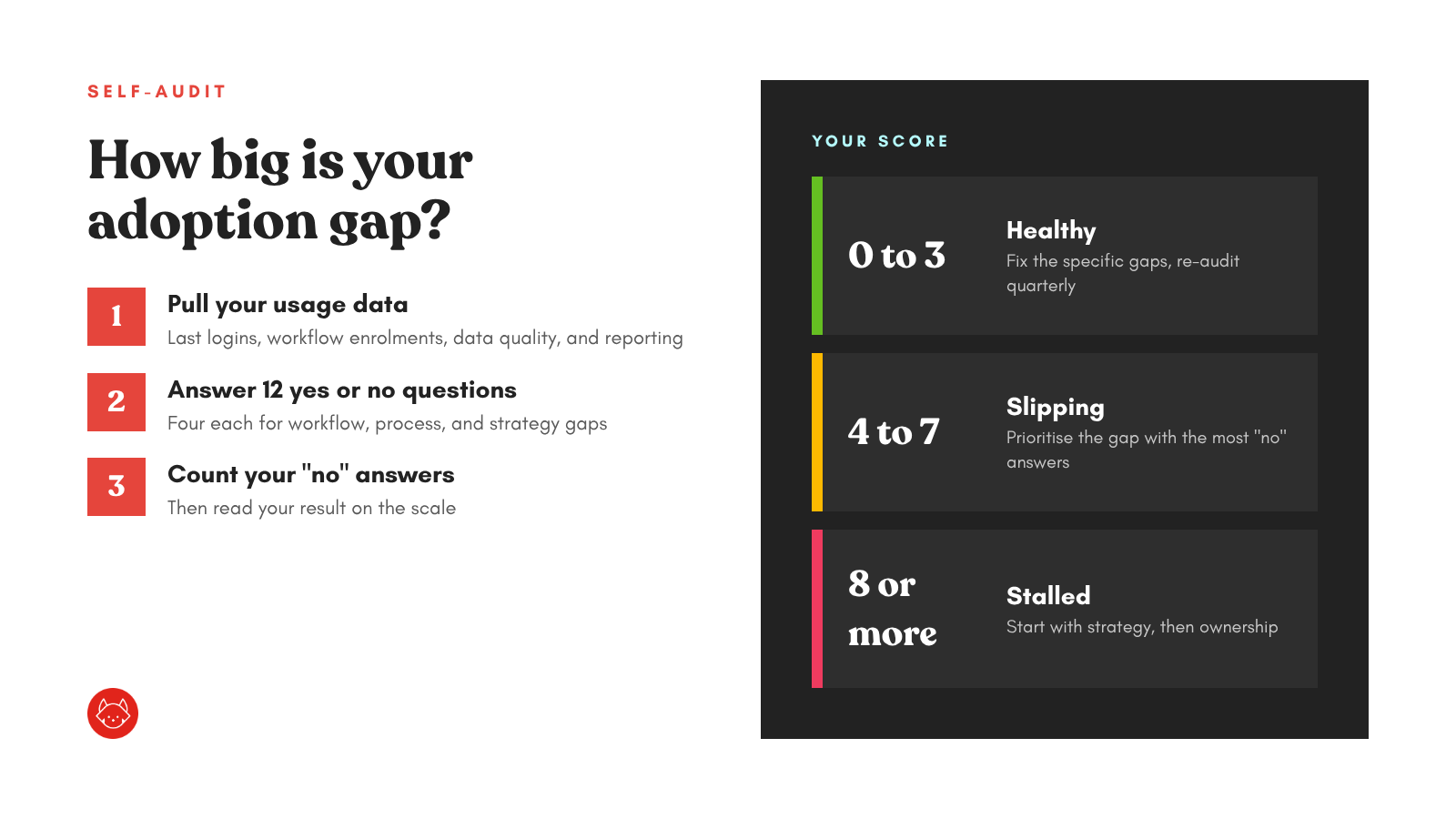
You can run this audit yourself as a focused version of a full HubSpot health check. You’ll need admin access to your marketing automation platform, last quarter’s marketing report, and about half a day.
The steps below use HubSpot, but most platforms have equivalent reports:
Step #1: Pull Your Usage Data
Start with evidence. Opinions on what’s “not working” vary by who you ask, and the data settles it quickly.
- Export your user list. In HubSpot, go to Settings > Users & Teams > Actions > Export all users. The export includes each user’s last login date, so you can see who has stopped logging in. You’ll need Super Admin permissions
- Review workflow performance. Open each active workflow’s details page and check the Performance tab for total and 7-day enrolments. Then open the Issues tab for errors nobody has fixed. This page needs a Professional or Enterprise subscription
- Check data quality. Go to Data Management > Data Quality. HubSpot flags duplicates, formatting issues, unused properties, and unused workflows in one view
- Open last quarter’s marketing report. Note whether it shows pipeline or revenue influenced by automation, or only email engagement
Step #2: Score Yourself Against The Three Gaps
Answer each question yes or no. Count your “no” answers:
Workflow Gaps
- Does every active workflow have enrolments in the last 30 days?
- Can your team explain what each workflow does without opening it?
- Have you retired workflows that no longer match your current offers?
- Is your team sending fewer one-off manual emails than it did six months ago?
Process Gaps
- Is one named person accountable for your marketing automation?
- Has your team had automation training since go-live?
- Do new hires get structured onboarding on your automation?
- Do workflow changes go through a review before going live?
Strategy Gaps
- Is each workflow tied to a measurable pipeline or revenue goal?
- Do sales and marketing share a written definition of a qualified lead?
- Are lifecycle stages updated automatically and kept accurate?
- Can leadership name one result automation delivered last quarter?
Step #3: Read Your Results
After going through each of the questions, tally everything up and figure out your next moves based on the table below:
| “No” answers | Adoption status | What to do next |
| 0 to 3 | Healthy | Fix the specific gaps and repeat this audit quarterly. |
| 4 to 7 | Slipping | Prioritise the gap with the most “no” answers. |
| 8 or more | Stalled | Start with strategy, because ownership and workflow fixes won’t stick without clear goals. |
Tip: Run this audit with someone from sales ops in the room. Sales sees the other end of the lead handover, and those blind spots often explain why marketing automation stalls.
A Framework For Fixing Marketing Automation Adoption
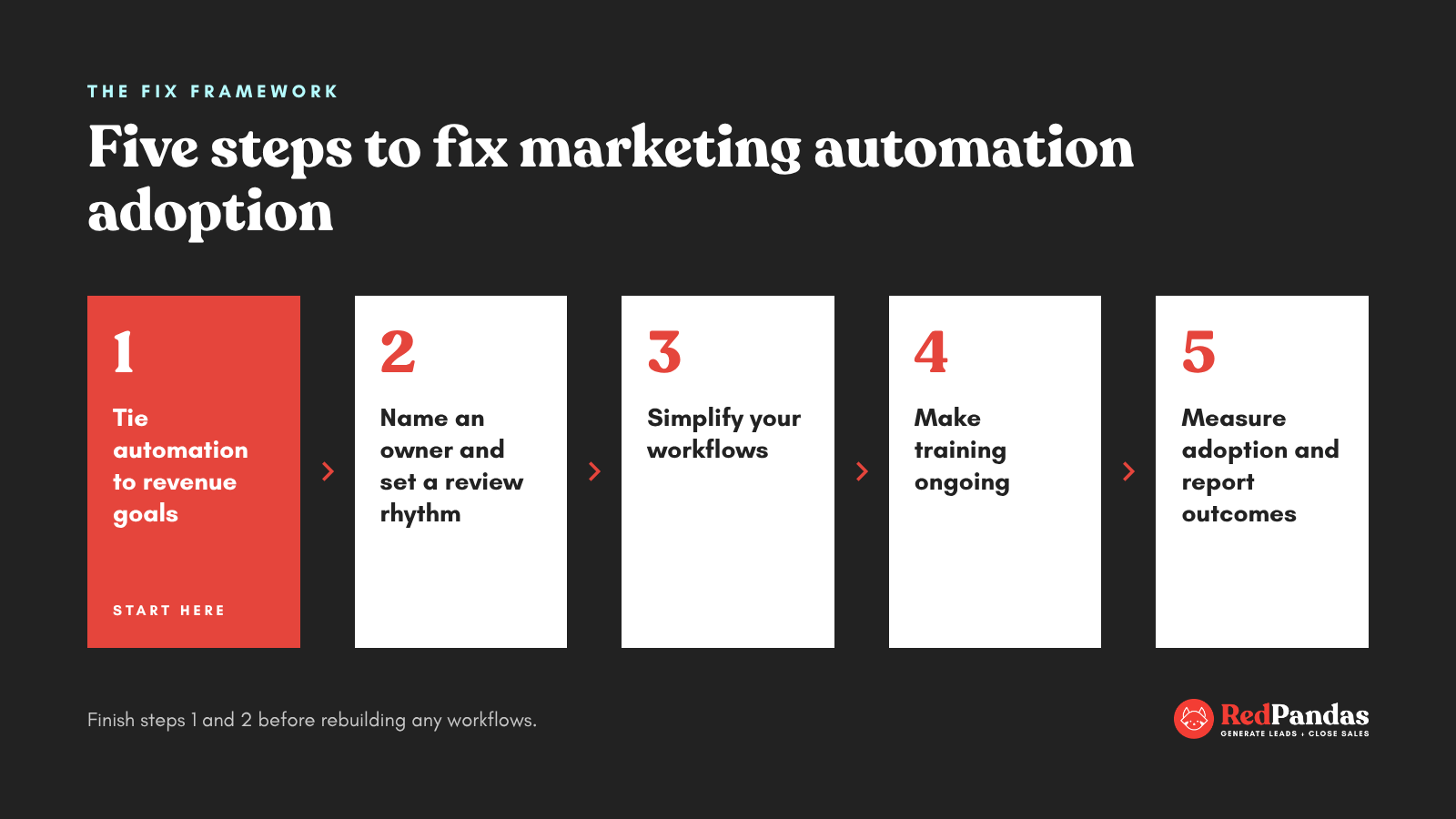
Once your audit shows where the gaps are, fix them in order. Strategy comes first, because every later step depends on knowing what your automation is for.
This is change management applied to your marketing automation, and it pays off:
Step #1: Tie Your Automation To Revenue Goals
Start by deciding what your automation needs to deliver.
- Agree on a lead definition with sales: Write down what makes a marketing qualified lead and a sales qualified lead, and get both teams to sign off
- Set two or three revenue goals: Examples include shortening time to first sales contact, lifting MQL-to-SQL conversion, or re-engaging closed-lost deals
- Map every workflow to one goal: Any workflow that doesn’t serve a goal gets flagged for retirement in Step 3
Step #2: Name An Owner And Set A Review Rhythm
Automation without an owner drifts. Give it one.
- Name one accountable owner: This person approves changes and reports on performance. They don’t need to build every workflow themselves
- Set a monthly workflow review: Check enrolments, errors, and goal alignment for each active workflow
- Create a simple change process: Requests go to the owner, get reviewed, and are documented before going live
- Adopt naming conventions: Consistent names and folders let anyone on your team find and understand a workflow quickly
Step #3: Simplify Your Workflows
Fewer workflows that people trust will outperform a large library nobody uses.
- Retire dormant workflows: Use your audit data and HubSpot’s Data Quality tool, which flags unused workflows
- Merge conflicting workflows: Remove overlaps so each contact receives one clear sequence
- Rebuild priority workflows with your team: Start with three to five tied to your step one goals, and have the people who run campaigns help design them
Step #4: Make Training Ongoing
One session at go-live won’t hold adoption. Build training into how your team works.
- Train on your own workflows: Walk your team through the automation they’ll actually use, beyond generic platform training
- Use free HubSpot Academy courses to build baseline skills, then fill gaps with role-specific sessions
- Document onboarding for new hires: A short guide to your workflows, naming conventions, and change process removes shoulder-tap learning
- Schedule quarterly refreshers whenever workflows, offers, or team members change
Step #5: Measure Adoption And Report Outcomes
Track adoption the same way you’d track any campaign.
- Usage: User last-login dates and active users each month
- Workflow health: Enrolments in the last 30 days and open workflow issues
- Business impact: Pipeline and revenue influenced by each workflow
- Audit score: Your “no” count from the self-assessment, re-run quarterly
Share the business impact numbers with leadership every quarter. Visible results keep budget, attention, and ownership in place.
Tip: Don’t try to fix everything at once. Finish steps one and two before rebuilding any workflows, or you’ll end up rebuilding them twice.
How RedPandas Digital Approaches Marketing Automation Adoption
RedPandas Digital, a HubSpot Diamond Solutions Partner based in Sydney, focuses on the stage this guide covers: post-implementation CRM optimisation, when your automation is built and your team needs to use it.
The agency’s HubSpot Optimisation Program follows the same order as the framework above:
| Phase | What happens | Gap it closes |
| 1. Strategic mapping and enablement | Customer journey mapping workshop, weekly coaching, Marketing Hub training, data clean-up, and segmentation | Strategy and process |
| 2. Automation and optimisation | Rebuilt pipelines, automated routing, new workflows, and custom dashboards | Workflow |
| 3. Reporting and insights | Activity reporting, deal-tracking and attribution reports, and team training based on test runs | Strategy (measurement) |
Coaching runs weekly throughout, so training happens alongside the rebuild and continues past handover.
Case study: m|devices
m|devices, an Australian business running HubSpot across sales, service, and marketing, was close to replacing the platform. Its problems may sound familiar to you:
- Manual processes for deal creation, follow-up tasks, and escalations
- Inconsistent campaign tracking, with website data disconnected from a single customer view
- Weak pipeline reporting, making revenue forecasting difficult
- Siloed teams, causing duplicate work and missed hand-offs
Over a three-month Optimisation Program, RedPandas mapped the customer journey, cleaned and segmented the data, and built more than 10 automation workflows across sales and service.
The team also set up custom dashboards and trained marketing and sales on their own portal.
The results:
- HubSpot licence retained after the business had considered replacing it
- More than 12 hours saved each week on reporting
- 4x faster customer response rates
- Full visibility of productivity, deals, and pipeline for leadership
- Consistent UTM tagging for reliable campaign tracking
Sam Chaisumdet, CEO of m|devices, said the RedPandas team “made a complex setup feel much more manageable.”
Read the full m|devices case study here.
Frequently Asked Questions: Marketing Automation Adoption
What causes marketing teams to underuse marketing automation consulting services?
Marketing teams underuse marketing automation consulting when three gaps open after implementation. Workflows don’t match how the team actually works, nobody owns automation once the consultant leaves, and campaigns aren’t tied to pipeline or revenue goals. Gartner’s 2023 survey found marketers use just 33% of their martech stack’s capability, down from 58% in 2020.
Why do marketing teams underuse automation tools?
Teams underuse automation tools when the setup feels too complex, training stops at go-live, and results aren’t visible. Gartner’s 2023 survey named sprawling tech ecosystems, weak data foundations, rigid governance, and difficulty hiring talent as the biggest barriers. Simplifying workflows and naming one accountable owner are usually the fastest first fixes.
How do you measure marketing automation adoption?
Measure marketing automation adoption across three areas: usage, workflow health, and business impact. Track active users and last-login dates, workflow enrolments over the last 30 days, open workflow errors, and the pipeline each workflow influences. Re-run a simple self-assessment every quarter to see whether adoption is improving or slipping.
What’s the difference between automation adoption and automation implementation?
Implementation is the build: configuring the platform, migrating data, and creating workflows. Adoption is what happens next, when your team consistently uses that automation to hit business goals. Many projects finish implementation on schedule and still struggle with adoption, because training, ownership, and reporting stop once the build is handed over.
How long does it take to fix marketing automation adoption?
Timelines depend on how many gaps your audit uncovers. Setting goals and naming an owner can happen within weeks, while rebuilding workflows and training your team takes longer. RedPandas Digital’s HubSpot Optimisation Program for m|devices ran over three months, covering strategy, automation, and reporting.
Do you need a consultant to fix marketing automation adoption?
Not always. Teams with a dedicated marketing ops owner and spare capacity can audit and fix adoption in-house. A consultant helps when gaps span strategy, process, and workflows at once, or when your team is short on time. Look for a HubSpot marketing automation agency offering ongoing coaching and training after any rebuild.
How do you get a marketing team to actually use HubSpot automation?
Start by linking each workflow to a revenue goal your team cares about. Then simplify to a handful of trusted workflows, train people on your own setup, and name one owner who reviews automation monthly.
What’s Next For Your Marketing Automation?
Underused automation is a fixable problem. Your platform, data, and workflows are already in place. Strategy, ownership, and ongoing training are what turn them into results.
Start with the self-assessment this week. Count your “no” answers, find your biggest gap, and work through the framework in order.
Your next renewal conversation gets much easier when you can show leadership exactly what automation delivered.

The Complete Guide to CRM Adoption Problems in 2026 (And How to Fix Them)
About RedPandas Digital
This article was written by the team at RedPandas Digital, a HubSpot Diamond Partner based in Sydney, Australia, and one of only four HubSpot-accredited Diamond partners in the Asia-Pacific region.
RedPandas has implemented and optimised HubSpot for businesses across construction, healthcare, legal, education, and professional services. Learn more in this HubSpot partner page.
About the Author


Get the best content marketing insights right in your inbox!
Subscribe to our Newsletter and get marketing insights delivered to your inbox every week.