









The One HubSpot Tool That Can Instantly Improve Your Marketing ROI

Stop me if this sounds familiar.
You’re deep in HubSpot reports, trying to make sense of what actually moved the needle last quarter. You ran campaigns. You sent emails. You published content.
But when your CMO asks about ROI, you hesitate… because you don’t really know what worked and what didn’t.
Most marketing managers use HubSpot, but only a fraction tap into the full power it offers.
And when results plateau, it’s tempting to chase new tools or blame external factors. But what if the answer isn’t out there… What if it’s already inside your HubSpot portal?
Having worked with hundreds of marketing teams, we’ve seen one tool consistently overlooked, yet capable of delivering instant clarity and measurable results: the Campaigns tool.
Not new. Not flashy. But transformative… when you use it right.
In this article, you’ll learn how to unlock the full potential of HubSpot’s Campaigns tool, understand exactly why it impacts your ROI, and how to get it working fast, without overhauling your entire setup.
The ROI Pressure Cooker
If you feel like you’re constantly being asked to “do more with less,” you’re not imagining it.
Marketing budgets are tight. Leadership wants results. And every campaign you run has to justify its existence, and fast.
Here you are juggling ten different initiatives, from paid ads to content to webinars, and the data lives in ten different places.
Even with HubSpot, it can feel like you’re flying blind when trying to connect the dots between effort and impact.
So when the question comes—“What’s actually working?”—you hesitate.
Not because you’re not doing the work, but because pulling it all together into a clear ROI story feels messy, manual, and never quite complete.
That’s the pressure cooker you’re living in.
And if you’re nodding along, you’re already halfway to the solution. Because the truth is, the tool that can help you answer that question with confidence is already sitting in your HubSpot account.
You just need to know how to use it.
Read: Does HubSpot Do Everything? A Comprehensive Guide on What HubSpot Can (and Can’t) Do


Does HubSpot Do Everything? A Comprehensive Guide on What HubSpot Can (and Can’t) Do
You’re Probably Overlooking This HubSpot Tool
It’s easy to assume you’re using HubSpot to its full potential. After all, you’ve set up workflows, built landing pages, and your email sequences are humming along.
But there’s one tool that most marketers either ignore or seriously underuse: the Campaigns tool.
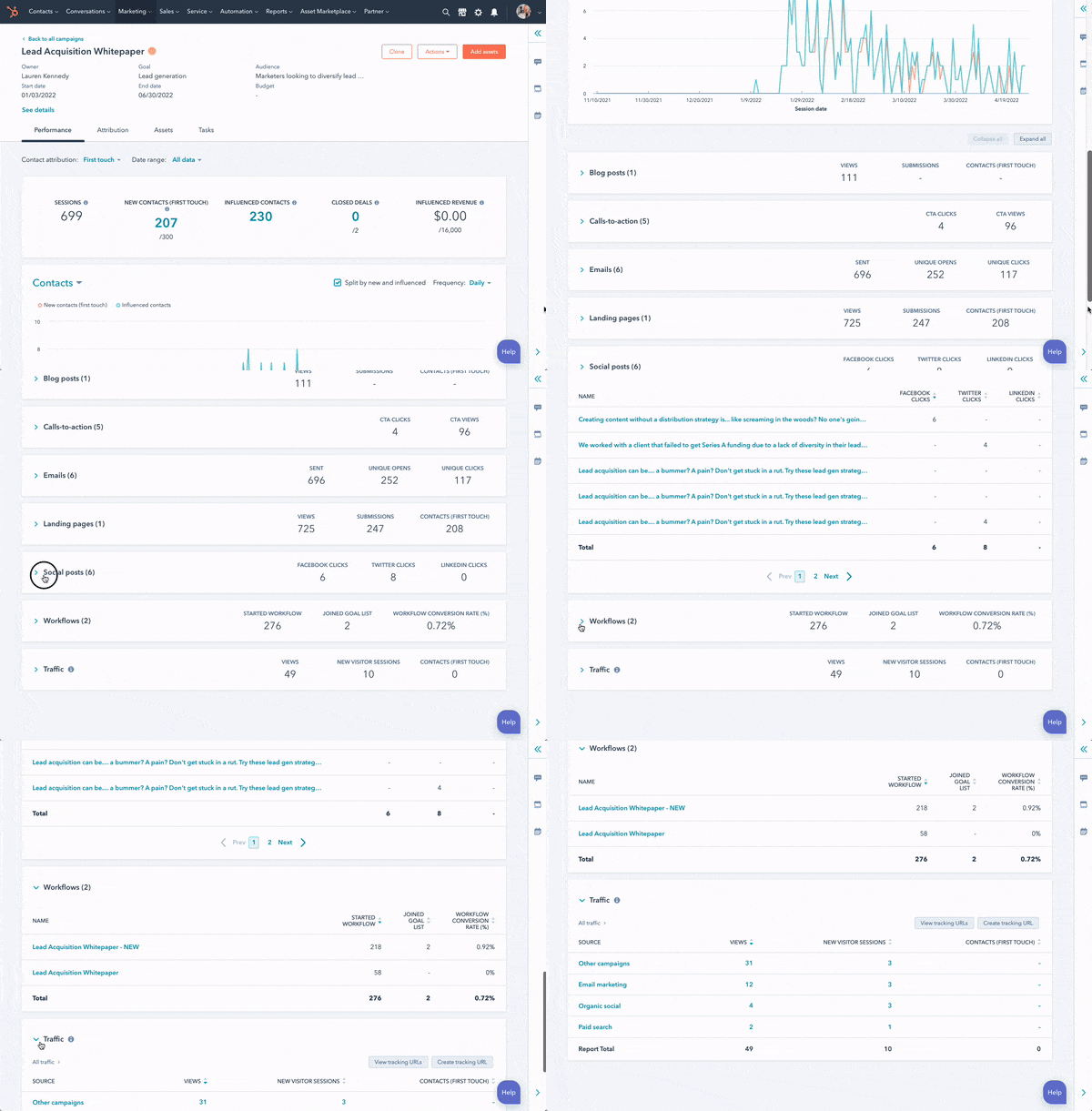
At first glance, it might seem like just a way to group assets together. But when used properly, it gives you a clear, centralised view of what’s working across channels.
It pulls together emails, landing pages, CTAs, social posts, and more so you can see performance in context, not isolation.
Most people skip it because it doesn’t feel urgent. It’s not a flashy feature. But the marketers who take it seriously consistently make better decisions, cut waste faster, and prove ROI without scrambling through a maze of reports.
If you’ve been relying on isolated metrics or toggling between tabs to build your performance picture, there’s a better way and you already have it.
What is HubSpot’s Campaigns Tool
The Campaigns tool is one of the most powerful and underutilised features inside HubSpot. It’s designed to do one simple but critical thing—connect all your marketing efforts under one umbrella so you can see what’s actually driving results.
Here’s how it works.
When you create a campaign in HubSpot, you assign assets to it. That includes emails, landing pages, CTAs, social posts, forms, workflows, and even ads.
Once connected, HubSpot pulls all the performance data into a single dashboard. This lets you track how each piece is performing, how they contribute to your overall goals, and where the gaps are.
Instead of guessing which email led to the most conversions or flipping between tools to calculate ROI, the Campaigns tool shows you the complete picture in one place. It helps you move from activity-based marketing to performance-driven marketing.
If you’ve ever felt unsure about what’s working or had to piece together results from different sources, this tool changes everything.
Why It’s a Gamechanger for ROI
When all your assets are tied to a campaign, you can clearly see what’s pulling its weight and what’s falling flat. Maybe your emails are getting great open rates, but the landing page they link to isn’t converting.
Or maybe a paid ad is driving traffic, but your form is underperforming. With this tool, you can spot those bottlenecks quickly and act on them.
It also helps you justify spend.
When your leadership team asks, “What did we get from this campaign?”, you’re not scrambling. You can show them performance by channel, conversion paths, and total influenced revenue, all in a single view.
Most importantly, it turns insights into actions. Instead of running campaigns based on gut feeling or incomplete data, you’re guided by real performance metrics tied to business outcomes.
That’s how you stop guessing and start improving ROI with confidence.
How to Use HubSpot’s Campaigns Tool
Firstly, before you start this process you’re going to want to make sure you have some marketing assets that are related to each other as part of a campaign.
For example, you might have a form and a landing page promoting an event, with corresponding marketing emails, social posts and ads marketing the event.
Have a think about what assets make sense to fit together, because as part of this process, you’ll be pulling together multiple marketing assets to calculate ROI.
Here’s how to create and use Campaigns in HubSpot:
- In your HubSpot Account, navigate to Marketing > Campaigns.
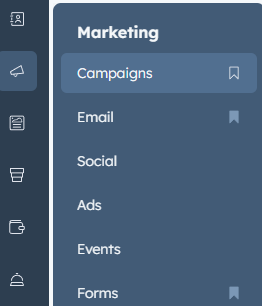
- Click ‘Create campaign’ in the upper right.

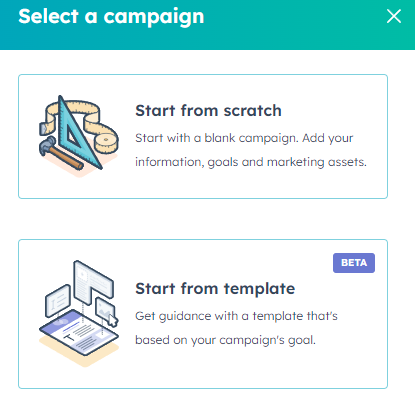
- You can either start from scratch or start from a template. In this case, select ‘start from scratch.’
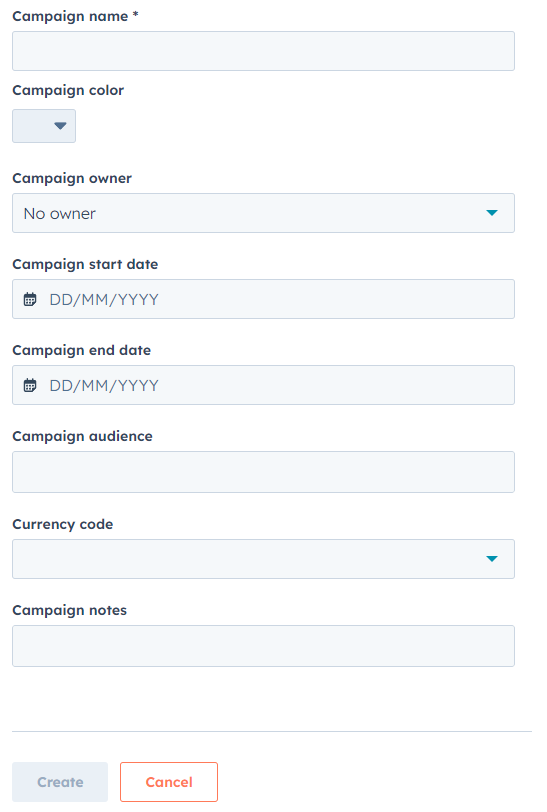
- Enter all of the details for your campaign. Note that you can actually edit this form within HubSpot in order to change which fields you need to fill out for each campaign, making it unique for your company.
- Select ‘Assets’ and then ‘Add assets.’
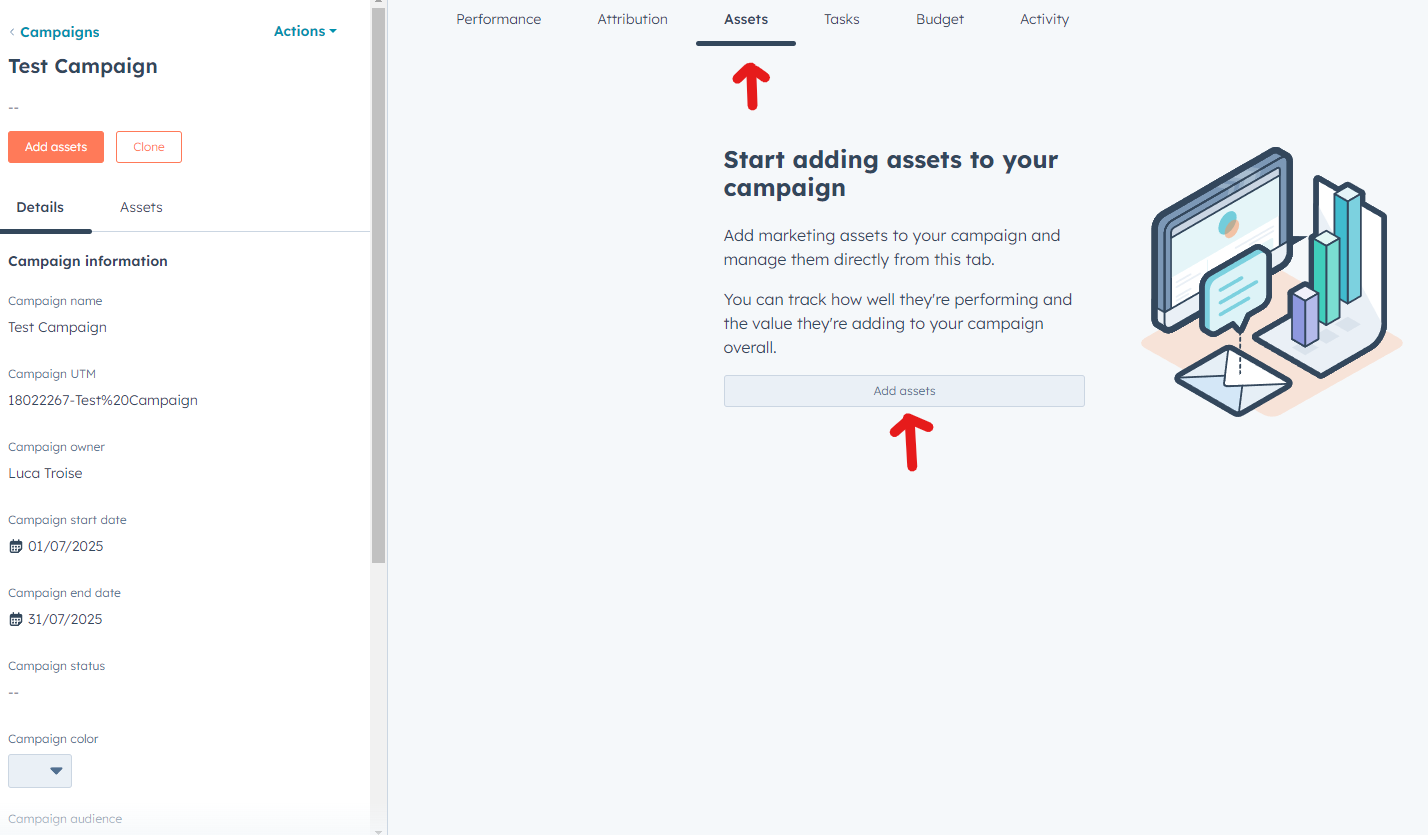
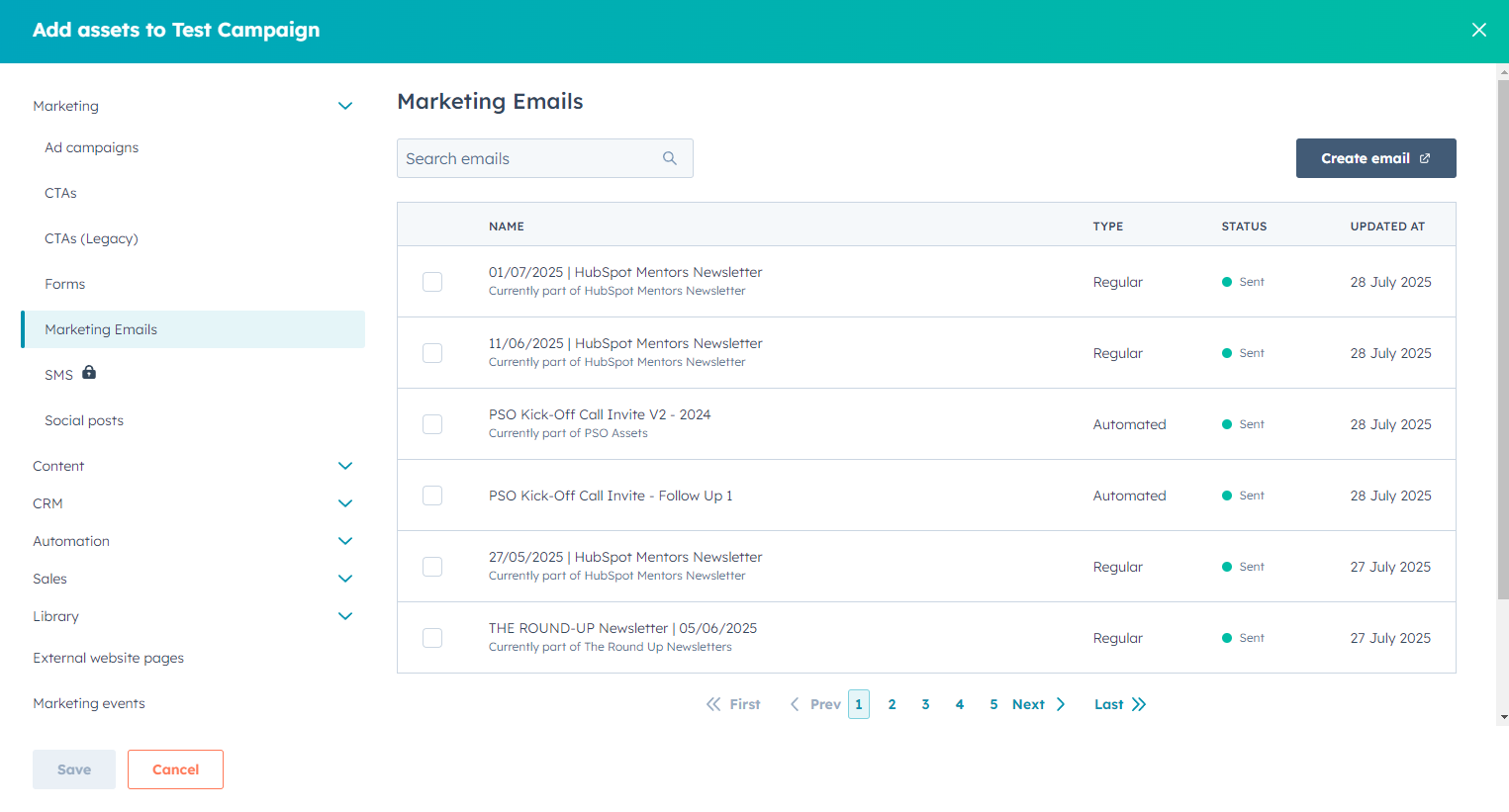
- Select emails, ads, CTAs, social posts, forms, workflows or any other assets that are associated with the campaign and save.
- Click on performance and select a date range. This will bring up the revenue that your campaign is generating as well as the total spend (if you’re running advertisements), giving you a crystal clear picture of ROI.
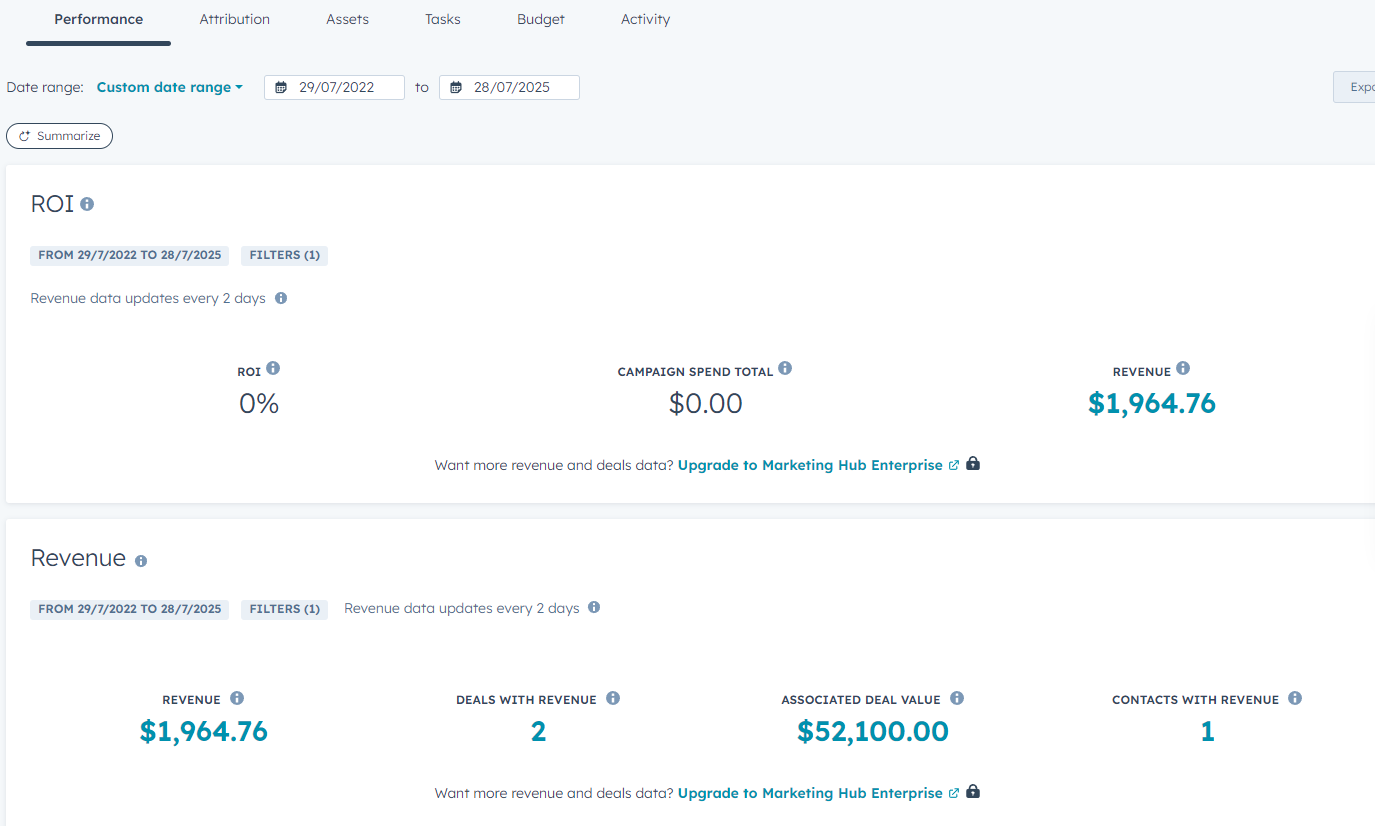
In this example, we’re using dummy data to simulate campaign performance. If you scroll down in the report, you’ll also be able to see performance and impact of every single asset that you added to the campaign.
With this method, you’ll be able to connect all of your marketing assets in one place and calculate return on investment far more easily.
FAQs on HubSpot’s Campaign Tool
Q: What exactly is the HubSpot Campaigns tool?
A: It’s a feature that lets you group related assets—emails, landing pages, CTAs, social posts, ads—into a single campaign so you can track their collective performance in one place.
Q: Is the Campaigns tool available on all HubSpot plans?
A: No, it’s available on HubSpot Marketing Pro and above. If you’re on a lower-tier plan, you won’t see the full functionality.
Q: How does this improve ROI?
A: It gives you visibility. By seeing how all your assets perform together, you can quickly spot what’s working, cut what’s not, and double down on what’s driving results.
Q: Does using the Campaigns tool require technical setup?
A: Not at all. It’s a simple organisational tool—linking assets together takes minutes and requires no coding or setup.
Q: Can I retroactively assign assets to a campaign?
A: Yes. You can go back and link past emails, pages, or posts to a campaign to track historical performance.
Q: Will this help me report results to stakeholders?
A: Definitely. The Campaigns dashboard shows performance across channels, making it much easier to present ROI clearly to leadership.
Final Thoughts + Next Step
You don’t need another tool to improve your marketing ROI. You just need to use the one you already have properly..
HubSpot’s Campaigns tool isn’t flashy, but it’s powerful. It gives you the clarity to see what’s working, the confidence to make better decisions, and the proof to back up your results.
That’s what real ROI improvement looks like.
If you’ve been guessing, toggling between tabs, or piecing together reports manually, it’s time to stop. Start using the Campaigns tool on your next initiative. Link your assets, monitor performance in one place, and use the insights to optimise as you go.
Next, learn about the best 5 HubSpot features to use in your HubSpot portal.
About the Author





Get the best content marketing insights right in your inbox!
Subscribe to our Newsletter and get marketing insights delivered to your inbox every week.