









HubSpot vs. Avoma vs. Fathom: What Should You Use for Meeting Notes on HubSpot?

Key Takeaways
- HubSpot’s native notetaker suits teams already on Sales Hub Professional or Enterprise who want zero extra logins
- Avoma suits growing teams that need coaching, talk-time analysis and pipeline-wide visibility, from around AUD $27 per seat per month
- Fathom suits budget-conscious teams after fast, low-effort summaries, backed by a genuinely usable free plan
- None of the three tools fix a CRM on their own. The win comes from consistent notes flowing into HubSpot every time
- For most Australian teams under 20 people already on HubSpot, the native notetaker or Fathom will do the job without added cost
Quick Answer
HubSpot’s native notetaker suits small teams already on Sales Hub Professional or Enterprise who want everything under one login.
Avoma suits growing sales teams that need coaching, call analytics and a searchable training library, starting from around AUD $27 per seat.
Fathom fits lean, budget-conscious teams after fast, low-effort summaries, backed by a genuinely usable free plan.
For most Australian teams under 20 people already inside HubSpot, HubSpot’s own notetaker or Fathom will do the job without adding cost or complexity.
If you need help with figuring out how you can seamlessly incorporate the tool of your choice into your portal and learn how to maximise your sales workflow with HubSpot, RedPandas is here to help.
RedPandas’ experts can help you assess which option fits your setup today, what will scale with you tomorrow, and how to get everything working smoothly without adding complexity.


Get in touch for a free consultation call
Your rep just finished a strong sales call. Two days later, the HubSpot record shows three lines of notes and no next step.
That’s a CRM data problem.
At RedPandas, the team sees it often while cleaning up CRM portals for Australian businesses: most assumed a notetaker alone would fix it.
So, how do you get the right option for your portal?
Between HubSpot’s built-in notetaker, Avoma and Fathom, the right choice comes down to three things:
- How deep you need conversation analysis
- How tightly it must sync with HubSpot
- What you’ll pay per seat
HubSpot’s native tool suits teams that want zero extra logins. Avoma suits teams that want coaching data across the whole pipeline. Fathom suits lean teams on a tight budget.
This guide breaks down where each tool wins and where it falls short. Then it shows you how to pick the right one for your team in under ten minutes.
Why Are Meeting Notes Important?
Meeting notes decide whether your CRM reflects what actually happened on a call, or just that a call happened.
Meeting Notes Create Shared Context Across Teams
When notes are accurate, HubSpot becomes a timeline of every interaction, including the story behind each deal stage.
- Marketing sees true lead quality by reading the buyer’s actual pain points and objections
- Sales picks up where the last rep left off, without asking the buyer to repeat themselves
- Leadership gets forecasts grounded in real detail from every call
See more on sharing sales calls with your team to build this habit across your revenue team
Meeting Notes Drive Consistent Follow-Up
Most missed opportunities happen because a next step got written somewhere HubSpot never sees. A detailed notetaker helps you:
- Lock in next steps so they’re visible to everyone, instead of sitting in one rep’s notebook
- Trigger tasks and reminders that keep deals moving
- Reduce handover friction between marketing, sales and customer service
Meeting Notes Shape CRM Hygiene and Trust in the Data
Clean notes are what your automations, reports, and forecasting depend on. Thin or missing notes create three problems:
- Deal stages drift from reality, so the pipeline view loses trust
- Automation misfires, since workflows depend on data that was never logged
- Attribution conversations break down, since marketing can’t see what actually moved the buyer
Once you see meeting notes this way, the real question behind HubSpot, Avoma and Fathom is which tool delivers reliable insight into HubSpot with the least friction.

Why You Should Share Sales Calls With Your Team
HubSpot vs. Avoma vs. Fathom: Quick Comparison
| Tool | AUD pricing | Key features | Best for |
| HubSpot Notetaker | From ~$126/seat/mo (Sales Hub Pro, annual) to ~$210/seat/mo (Enterprise) | Auto-logs to CRM records, consistent summaries, zero extra login | Small teams already on Sales Hub Pro/Enterprise |
| Avoma | From ~$27/seat/mo (Startup) to ~$41/seat/mo (Organization), add-ons ~$41/seat/mo each | Call analytics, coaching library, deep HubSpot field sync | Growing sales teams needing coaching data |
| Fathom | Free tier available; Premium ~$22/user/mo, Team ~$21/user/mo, Business ~$35/user/mo | Fast setup, tidy summaries, hands-off HubSpot sync | Lean, budget-conscious teams |
What is HubSpot’s Meeting Notetaker?
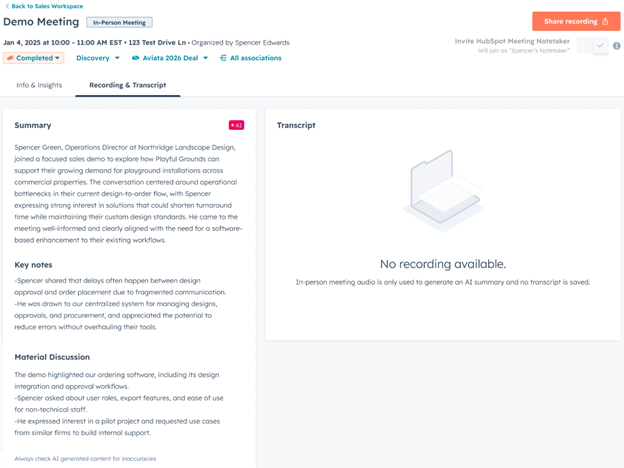
HubSpot’s meeting notetaker sits inside the platform your team already uses. It joins your calls, records them, and logs the summary straight onto the contact, company and deal record.
What It Does Well
- It attaches everything automatically. Recordings, transcripts and summaries land directly on the right record, with no manual upload
- It adds no new login. Your team stays inside HubSpot instead of learning a separate tool
- Summaries are consistent. Every call gets the same structured format: main points and next steps
- It keeps teams aligned. Marketing, sales and leadership read notes in the same place, in the same shape, every time
Where It Falls Short
- Summaries stay high-level. There is no talk-time analysis, coaching layer or trend tracking across reps
- No call library. You can’t tag moments, build playlists or turn calls into training material
- Tier-gated access. Only Sales Hub Professional and Enterprise seats include it, which changes the cost picture for larger teams
- Limited to logging. It records what happened on the call without analysing buyer behaviour across your pipeline
Pricing & Who It’s Right For
HubSpot’s notetaker is included with Sales Hub Professional, from roughly AUD $126 per seat per month billed annually or AUD $140 monthly, or Sales Hub Enterprise at roughly AUD $210 per seat per month. It isn’t available on Free or Starter.
For the full seat and add-on picture, see RedPandas’ breakdown of HubSpot cost and add-ons.
HubSpot’s notetaker suits your team when:
- You want everything inside one platform, with no extra steps
- Consistent summaries matter more than deep analysis
- Your team already sits on Sales Hub Professional or Enterprise
- You want cleaner CRM hygiene without changing how reps work
If your portal already pulls data from other tools, it’s worth checking how those connections hold up alongside a new notetaker. RedPandas’ guide to setting up HubSpot CRM integrations covers what to check first.

How can HubSpot help my business?
What is Avoma?
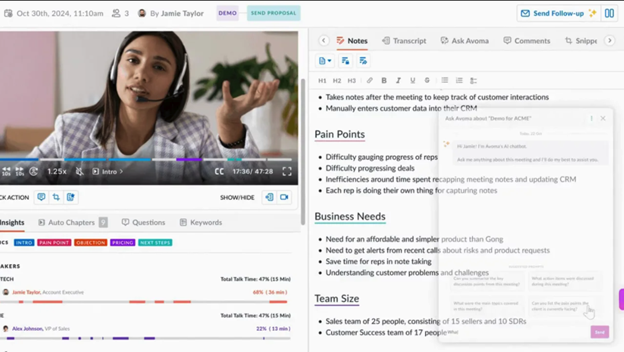
Avoma positions itself as “more than a meeting notetaker”. It analyses why a call went the way it did, not just what was said.
What It Does Well
- It breaks calls into structured insight. Summaries include chapters, themes and talking points, not just a transcript
- It builds a searchable call library. Tag moments, add bookmarks, and turn real calls into training material for new reps
- It gives leaders pipeline-wide visibility. Track keyword trends, talk ratios, objections and patterns across hundreds of calls
- HubSpot sync goes deep. Summaries, notes, action items, tasks and custom fields all push directly into HubSpot records
If coaching reps off real calls is the goal, pair this with RedPandas’ guide on giving feedback on sales calls and appointments to structure the review process itself.
Where It Falls Short
- Setup takes more effort. Templates, permissions and tagging structures need configuring before the tool matches your workflow
- Value depends on full adoption. Patchy use across the team means patchy insight
- It’s a separate system. Even with a strong HubSpot sync, it’s another login and another UI
- Cost climbs with add-ons. The coaching and analytics features that set Avoma apart sit behind paid add-ons
Pricing & Who It’s Right For
Avoma’s base plans run from roughly AUD $27 per seat per month to AUD $41 per seat per month Conversation Intelligence and Revenue Intelligence, the add-ons that unlock coaching and pipeline analytics, cost roughly AUD $41 per seat per month each on top.
Enterprise pricing is by custom quote. Figures are converted from Avoma’s published USD pricing and worth reconfirming at the live exchange rate before you budget.
Generally, Avoma suits your team when:
- You want coaching, pattern analysis and training tools built on real calls
- Your sales team is growing and needs consistency across conversations
- You need to understand why calls succeed or stall, not just what was said
- You’re investing in revenue operations and want pipeline-wide visibility
Here’s a guide from Avoma that shows you how to integrate it into your HubSpot portal.

Best Sales Strategies to Close More Deals Virtually
What is Fathom?
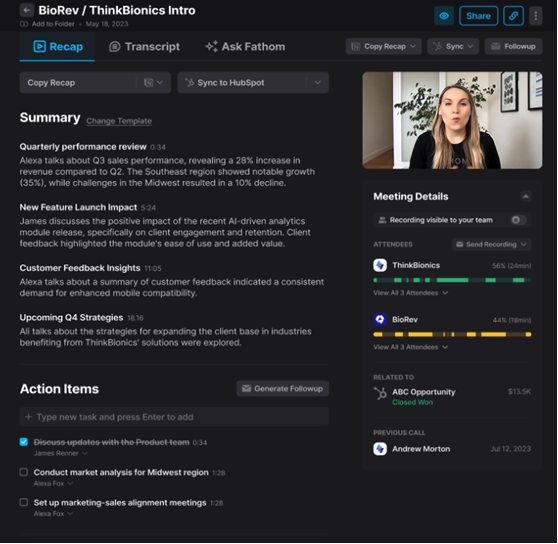
Fathom built its reputation on effortless recording: fast setup, clean summaries and a free plan most teams can start using in minutes.
What It Does Well
- It’s simple to adopt. Fathom joins Zoom, Google Meet or Teams calls automatically, with almost no setup and no training session needed
- Summaries are tidy for a lightweight tool. You get a clear breakdown of what was discussed, decisions made and next steps, without deep analysis
- HubSpot sync is hands-off. Once connected, summaries and action items push straight into the right records
- The free plan is genuinely usable. Recordings, summaries and basic HubSpot sync work without paying for every seat
Where It Falls Short
- No deep sales analysis. There’s no keyword tracking, talk-time metrics or trend analysis across reps
- Coaching features are limited. You can share clips, but can’t build structured training libraries or compare rep performance
- Still a separate tool. Fathom isn’t native to HubSpot, so it comes with its own logins and support
- Costs appear at scale. The free plan is generous, but storage, admin controls and team insights need a paid seat
Pricing & Who It’s Right For
Fathom’s free plan covers unlimited recording and transcription, with AI summaries capped at 5 calls per month.
Premium runs roughly AUD $22 per user per month, unlocking unlimited summaries. Team is roughly AUD $21 per user per month at a two-seat minimum, adding shared call libraries. Business is roughly AUD $35 per user per month at a 2-seat minimum, adding CRM field sync to HubSpot.
As with Avoma, these are AUD conversions from published USD pricing and worth reconfirming before you commit.
Fathom suits your team when:
- You want the simplest, fastest way to automate meeting summaries
- You don’t need deep analysis, just clean notes landing in HubSpot
- Budget is tight, or you’re still working out whether the full HubSpot stack is right for your business at this stage
- Your team prefers tools that stay out of the way rather than add features nobody asked for
Here’s a guide from Fathom that shows you how to integrate it into your HubSpot portal.

How to Provide Feedback on Sales Calls and Appointments
How to Choose the Best Option for Your Team in Under 10 Minutes
Answer each question honestly based on how your team works today, not how you’d like them to work:
| Question | Signal to look for | Best fit |
| Want everything inside HubSpot, no extra logins? | Reps get distracted juggling multiple tools | HubSpot Notetaker |
| Need deep call insights, not just summaries? | You can’t tell why some reps close more than others | Avoma |
| Is cost a bigger priority than stack simplicity? | Budget is tight or leadership is pushing back on new software | Fathom |
| Need coaching or structured call reviews? | No shared framework exists for improving rep skills | Avoma |
| Are CRM updates often missed or delayed? | Empty timelines or vague deal descriptions | HubSpot (mild gaps) or Avoma (recurring gaps) |
| Which video platform do you use most? | Mostly Zoom/Meet, or heavily reliant on Teams | All three cover Zoom/Meet; check Teams support first |
| How large is your team? | Early-stage, scaling fast, or established | 1-5: HubSpot or Fathom. 6-20: HubSpot or Avoma. 20+: Avoma |
The right match removes friction from your existing workflow. It isn’t the tool with the longest feature list.

Why Your Sales Team Thinks Your Leads Suck
Frequently Asked Questions: Meeting Notes for HubSpot
Is HubSpot’s meeting notetaker free?
No. HubSpot’s notetaker is included only with Sales Hub Professional (around AUD $126/seat/month) or Enterprise (around AUD $210/seat/month), not Free or Starter. It also requires HubSpot licences for meeting participants who need the summary or transcript. There’s no standalone free version of the built-in tool.
What’s the difference between Avoma and Fathom?
Avoma focuses on conversation intelligence: coaching, talk-time analysis and pipeline-wide call trends, with add-ons priced on top of its base plan. Fathom focuses on fast, low-effort summaries with a genuinely usable free tier. Avoma suits teams wanting deep analysis; Fathom suits teams wanting simple, quick notes.
Does Fathom sync with HubSpot?
Yes. Fathom pushes summaries, notes and action items directly into HubSpot records once connected. Structured CRM field sync, such as updating custom deal properties automatically, requires Fathom’s Business plan (around AUD $35/user/month). Lower tiers log to the timeline but don’t write to custom fields.
Which meeting notetaker is best for a small sales team?
For teams under six people already on HubSpot, the native notetaker or Fathom’s free plan usually covers it without adding cost. Avoma becomes worth the spend once you need coaching or call analytics across multiple reps, which small teams often don’t need yet.
Can I use HubSpot’s notetaker without Sales Hub Professional?
No. The notetaker’s transcript and summary features require Sales Hub Professional or Enterprise. Free and Starter tiers don’t include it. Teams on lower tiers needing automated notes should look at Fathom’s free plan or Avoma’s Startup tier instead.
Is Avoma worth it for a small business?
It depends on whether you need coaching and call analytics. Avoma’s base plan starts around AUD $27/seat/month, but the coaching features that differentiate it from a simple notetaker sit behind paid add-ons at roughly AUD $41/seat/month each, which can outweigh the benefit for very small teams.
Which Meeting Notes Tool Moves You Forward?
Meeting notes directly shape the quality of your HubSpot data, the strength of your follow-up, and how confidently you can make decisions.
And with the right tool in your stack, you can protect revenue that you’ve already worked hard to win.
Unfortunately, most teams overlook this part: every week you delay choosing a solution, more information slips through the cracks.
Acting sooner matters because the compound effect of good data starts the moment you fix the way conversations are captured.

Is HubSpot Right for My Business? Here’s How to Tell
About the Author
This article was written by the team at RedPandas Digital, a HubSpot Diamond Solutions Partner based in Sydney, Australia. RedPandas Digital has diagnosed and fixed CRM adoption and optimisation problems for Australian businesses across construction, healthcare, legal, education, and professional services.



Get the best content marketing insights right in your inbox!
Subscribe to our Newsletter and get marketing insights delivered to your inbox every week.