









What is HubSpot Buyer Intent? 5 Ways to Use It

Key Takeaways
- HubSpot Buyer Intent tracks real website behaviour, not just visits, so you can see which companies are actively researching your product, even if they haven’t reached out
- Setup takes four steps: install the tracking code, define your target markets, set your intent criteria, then monitor and refine
- You can use it to prioritise sales outreach, tailor content to where a lead is in their journey, automate follow-up workflows, sharpen marketing ROI, and align sales and marketing on the same data
- Proving ROI comes down to four metrics: lead conversion rates, sales cycle length, revenue attribution, and cost efficiency
- The more consistently you track and adjust your intent criteria, the more accurate and valuable your results become over time
Your sales team is chasing leads that never convert. Marketing swears the campaigns are working.
Sound familiar?
The problem usually isn’t lead volume. It’s that you can’t tell who’s actually ready to buy until they fill out a form, and by then, half the buying decision is already made.
Fortunately, HubSpot Buyer Intent fixes this.
It shows you which companies are researching your product right now, before they ever reach out.
As a HubSpot Diamond Partner, RedPandas Digital works with Australian businesses to turn features like this into an actual sales advantage, not just another dashboard nobody checks.
This guide covers what HubSpot Buyer Intent is, how it works, and five ways your team can use it to prioritise leads, personalise outreach, and prove marketing ROI.
Quick Answer
HubSpot’s Buyer Intent feature analyses real-time website activity, including page visits, time on page, and content downloads, to flag which companies are showing genuine buying signals, often before they’ve filled out a form or requested a demo.
You set it up in four steps: install the tracking code, define your target markets, set your intent criteria, then monitor and adjust as you go.
Sales teams using it report faster sales cycles and higher conversion rates, because reps spend their time on leads who’ve already shown real interest, not cold prospects.
If you’re already using HubSpot’s CRM or Marketing Hub, it’s the fastest way to turn your website traffic into a genuine lead-prioritisation system.
Need help figuring out how else you can maximise HubSpot for your business aside from using Buyer Intent? Get in touch with RedPandas’ experts for a free consultation and strategy session:


Book Your Free HubSpot Consultation With RedPandas’ Experts
What is the HubSpot Buyer Intent Feature?
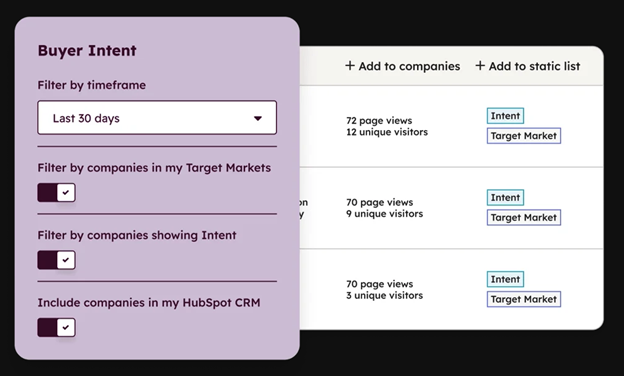
HubSpot Buyer Intent shows you which companies are actively researching your product, before they’ve filled out a form or booked a demo.
It combines your website’s visitor data with intent signals gathered across the web so you can spot serious buyers instead of guessing.
What Buyer Intent Does
Think of it like watching people browse a shop: some are killing time, others are checking price tags and reading the fine print because they’re close to buying.
HubSpot Buyer Intent tells you which visitors on your site fall into the second group, based on what they’ve actually done, not what they’ve told you.
It pulls from four signal types:
- Visitor intent: which companies are visiting your website and which pages they’re viewing, tracked through your HubSpot tracking code
- Research intent: which companies are researching topics related to your business across more than 200,000 third-party websites, not just your own
- Company news: signals like funding rounds, executive hires, and product launches that suggest a company is entering a buying cycle
- Contact-level signals: job changes and bounced emails within your existing contact database
When tracking starts, HubSpot automatically surfaces up to 30 days of historical signals, so you’re not starting from zero.
How HubSpot’s Buyer Intent Feature Works
Here’s how HubSpot Buyer Intent helps you connect the dots:
| Buyer Intent Feature | How It Works |
| Website Tracking | Tracks what visitors do on your own site. |
| Behavioural Data | Looks beyond page visits to which actions signal real intent, both on your site and across 200,000+ third-party sites. |
| Company News | Flags events suggesting a company is entering a buying cycle. |
| Contact-Level signals | Monitors changes within your existing contact database. |
| Enriched Company Information | Matches the visit to a database of companies, so you know who’s engaging, not just that someone visited. |
How to Set Up Buyer Intent in HubSpot
Getting started with HubSpot’s Buyer Intent is straightforward, especially if you’re already using HubSpot’s CRM or Marketing Hub. Here’s how to set it up:
Step #1: Install the Tracking Code
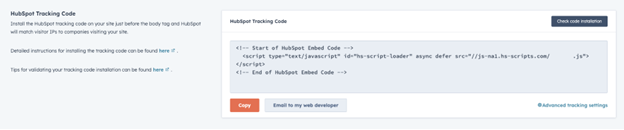
This lets HubSpot collect visitor data on your site. If you’re already using HubSpot’s CRM or Marketing Hub, you likely have this in place.
Simultaneously, you’ll also need to add your site domains and set tracking limits, so HubSpot knows exactly which properties to monitor.
Step #2: Define Your Target Markets
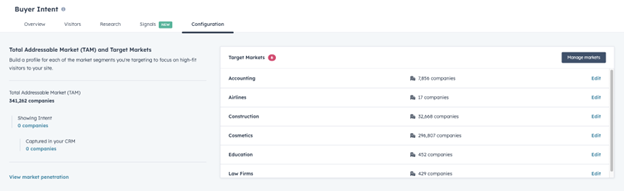
Set criteria like industry, company size, or location, so HubSpot focuses on the companies that matter to you.
Step #3: Set Visitor Intent Criteria

Choose the actions that signal real interest, such as repeat pricing page visits or content downloads.
Step #4: Add a Cookie Consent Banner and Assign Permissions.
HubSpot Buyer Intent needs cookie consent to run compliantly, and only Super Admins or users with Buyer Intent permissions can access it.
Buyer Intent is included on Starter+ plans across Marketing Hub, Sales Hub, Service Hub, Data Hub, and Content Hub, and on Professional+ for Revenue Hub.
Advanced functionality, like segment filtering, adding companies straight to your CRM, or viewing more than 20 companies at once, runs on HubSpot Credits, so check your usage before building a workflow around it.
But, HubSpot Buyer Intent is still in beta, so expect it to keep evolving.
For other underused features you’re probably not using yet, see our guide to 5 HubSpot features you can use to get more sales.
5 Ways You Can Use the HubSpot Buyer Intent Feature
You now know that HubSpot’s Buyer Intent feature is a powerful tool that helps you hone in on the leads most likely to convert… but how do you make the most of it?
To help you make the most out of this new feature, here are five ways you can use Buyer Intent to streamline your lead qualification process, boost marketing ROI, and align your teams for better efficiency:
| Way to Use It | What It Means for Your Team |
| 1. Prioritise Leads for Sales Outreach | Flag high-intent signals, like repeat pricing page visits or several brochure downloads, for immediate sales follow-up. |
| 2. Tailor Content for Specific Buyer Personas | Match content to each lead’s stage: educational content for awareness-stage visitors, case studies and social proof for consideration-stage leads. |
| 3. Integrate Intent Signals into Workflows | Trigger automatic sales alerts, personalised emails, or follow-up tasks the moment a lead hits a key engagement threshold. |
| 4. Improve Marketing ROI by Focusing on High-Intent Leads | Direct your marketing spend toward leads who’ve already shown interest, to maximise the return on every dollar. |
| 5. Align Sales and Marketing Teams with Better Data | Give sales and marketing the same intent data, so both teams make informed decisions and hand off leads smoothly. |
For a deeper look at turning these signals into automated follow-up, check out our guide on building a lead nurturing workflow in HubSpot that actually works.
Proving ROI with the HubSpot Buyer Intent Feature
HubSpot Buyer Intent’s biggest advantage is that it connects directly to revenue, not just website traffic. Here’s how to measure that impact and prove it’s worth the investment.
Connecting HubSpot Buyer Intent to Revenue Growth
HubSpot Buyer Intent drives revenue in three ways:
- Faster sales cycles. Reps skip early-stage nurturing and go straight to companies already deep in research, which shortens time-to-close. A lead who’s already read your case studies doesn’t need convincing from scratch
- Higher conversion rates. Leads flagged by Buyer Intent are already engaged with your site, so they’re more receptive when you reach out. Working warm leads instead of cold ones lifts your close rate without extra spend
- Better lead alignment across teams. Marketing and sales work off the same intent data instead of guessing independently. That shared view means smoother handoffs and fewer leads slipping through the gap between the two teams
Track these four metrics to know if HubSpot Buyer Intent is working:
| Metric | What It Shows You | Example |
| Lead Conversion Rates | Whether high-intent leads convert at a higher rate than unflagged leads | Outreach to Buyer Intent-flagged leads books more meetings than your standard cold list |
| Sales Cycle Length | Whether prioritising high-intent leads shortens your time to close | A typical 3-month sales cycle drops to 2 months once reps focus on flagged companies |
| Revenue Attribution | How much of your closed revenue traces back to Buyer Intent-flagged companies | 7 of 10 deals closed in a month came from flagged leads, that’s 70 per cent of revenue tied to Buyer Intent |
| Cost Efficiency | How much rep time you save by cutting unqualified outreach | 5 hours a week chasing cold leads becomes 5 hours a week converting warm ones instead |
These are illustrative examples, run your own before-and-after numbers to see the real impact for your business.
Buyer Intent isn’t a one-time setup. The more consistently you track and refine your intent criteria, the sharper your results get over time.
For more ways to stretch your existing subscription, see our guide to getting more ROI from HubSpot without spending more.

How to Get More ROI from HubSpot (without spending more)
Frequently Answered Questions: HubSpot Buyer Intent
What is HubSpot Buyer Intent?
It’s a HubSpot tool that analyses a visitor’s real-time behaviour on your website, such as pages viewed, time spent, and content downloaded, to identify which companies are showing genuine signals of being ready to buy. It works even before a visitor fills out a form or requests a demo, so you’re not relying on guesswork to qualify leads.
How does the HubSpot Buyer Intent feature work?
It monitors visitor actions like repeat visits to your pricing page, time spent on product pages, and content downloads, then flags the companies showing the strongest buying signals. This gives your sales and marketing teams a clear, data-backed view of who’s actually interested, rather than who simply landed on your site.
How do you set up Buyer Intent in HubSpot?
Setup involves four steps: install HubSpot’s tracking code on your website, define the target markets you want to monitor (by industry, company size, or location), set your intent criteria (like pricing page visits or content downloads), then monitor results and adjust your criteria over time. It’s available to businesses already using HubSpot’s CRM or Marketing Hub.
What counts as a buyer intent signal in HubSpot?
Common signals include multiple visits to your pricing page, extended time spent on a product page, and downloads of key content like case studies or whitepapers. You choose which of these actions matter most for your business when you set your intent criteria.
How can HubSpot Buyer Intent help you prioritise sales leads?
It flags leads who’ve shown high-intent behaviour, like repeated pricing page visits, so your sales team can focus on prospects who are genuinely close to a decision. This cuts down time wasted on low interest leads and speeds up your overall sales cycle.
Can HubSpot Buyer Intent help align your sales and marketing teams?
Yes. Because both teams see the same intent data, marketing can build content for where a lead actually is in their journey while sales knows exactly when to step in. That shared visibility reduces the disconnect that usually happens when teams work off separate data.
How do you measure the ROI of the HubSpot Buyer Intent feature?
Track four metrics: lead conversion rates among flagged leads, changes in your sales cycle length, revenue attribution back to Buyer Intent-flagged deals, and time saved by reps no longer chasing cold leads. Comparing these before and after adoption gives you a clear picture of its impact.
What’s the difference between HubSpot Buyer Intent and just tracking website visits?
Basic website tracking tells you someone visited your site; Buyer Intent tells you how seriously they’re considering buying. It layers behavioural criteria, like pricing page visits or content downloads, on top of raw traffic data so you can tell a curious browser from a genuine prospect.
Do you need a specific HubSpot plan to use Buyer Intent?
Availability depends on your HubSpot subscription, so it’s worth checking your current plan or speaking with your HubSpot partner to confirm access before you start setup. As a HubSpot Diamond Partner, RedPandas Digital can help you confirm eligibility and get it configured correctly the first time.
Is Buyer Intent the Next Step in Boosting Your Lead Generation with HubSpot?
If you’re still qualifying leads by gut feel, HubSpot Buyer Intent replaces the guesswork with real behavioural data. Identify who’s actually ready to buy, and put your effort where it counts.
That shift compounds fast: shorter sales cycles, better-qualified leads, sharper ROI, and marketing and sales finally working off the same data.
Getting started takes three steps:
- Define your target markets
- Set your intent criteria
- Start tracking the companies that matter most
The sooner it’s running, the sooner you’ll know which leads are actually worth your time.
To learn more about HubSpot’s Buyer Intent feature, check out our latest HubSpot Mentors Podcast episode, where we take a closer look at it:
About the Author




Get the best content marketing insights right in your inbox!
Subscribe to our Newsletter and get marketing insights delivered to your inbox every week.