









Can HubSpot’s SEO Tools Actually Drive Leads and Revenue?

Key Takeaways
- HubSpot’s SEO tools cover four core areas: on-page recommendations, topic-based content planning, keyword tracking, and CRM-linked reporting
- The standout advantage is tying SEO directly to contacts, deals, and revenue, not just traffic and rankings
- HubSpot’s biggest gaps are keyword discovery depth, technical SEO diagnostics at scale, backlink visibility, and competitive intelligence
- Simple, content-led sites with lean marketing teams get the most value from HubSpot’s SEO tools alone
- Competitive, technical, or backlink-dependent SEO strategies need HubSpot paired with a specialist tool like SEMrush or Ahrefs
- If HubSpot isn’t your primary CRM, its main SEO advantage, revenue-linked reporting, loses most of its value
- The right setup depends on whether you’re prioritising execution and reporting clarity, or deep competitive and technical analysis
If you’re using HubSpot, you’ve probably asked yourself this already: “Do we actually need another SEO tool… or should we just use what HubSpot gives us?”
On paper, HubSpot’s SEO tools might sound ideal because everything lives in one place.
Your content, your leads, your reporting, your HubSpot customer relationship management data, all tied together.
But here’s the detail most people ignore: SEO is deep. Proper keyword research, technical audits, and competitor analysis; these are the things that move rankings and traffic.
And that raises a fair concern: are HubSpot’s SEO tools genuinely powerful, or are they just “good enough” if you don’t look too closely?
This matters more than most teams admit.
If you rely too much on a limited toolset, you could risk stalling organic growth.
But if you overcomplicate your stack, you can end up with bloated costs, messy reporting, and no clear line from SEO activity to revenue.
In this article, you’ll learn about the real pros and cons of HubSpot’s SEO tools, where they genuinely help, where they fall short, and how to decide if they’re right for your business… or if you need something more alongside them.
Quick Answer
rather than competitive depth.
The strongest advantage is CRM-linked attribution: HubSpot’s multi-touch model credits 22.5 per cent of deal revenue each to the first interaction, lead creation, deal creation, and last interaction.
Use HubSpot’s SEO tools alone if your site is simple and your priority is proving pipeline impact. Pair them with a specialist platform like Semrush or Ahrefs if you’re in a competitive search space or need deep keyword and backlink analysis.
What are HubSpot SEO Tools?
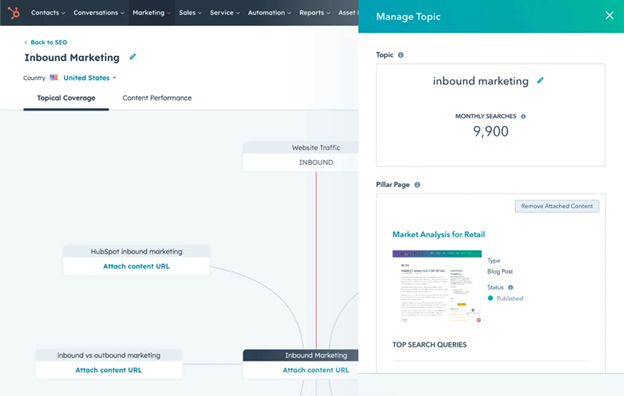
HubSpot’s SEO tools help your team make sharper content decisions and tie them back to revenue inside HubSpot. Think of them as your dashboard, not a full workshop: they flag what needs attention, what’s working, and what’s putting your rankings at risk.
Here’s what HubSpot actually gives you:
1. SEO Recommendations
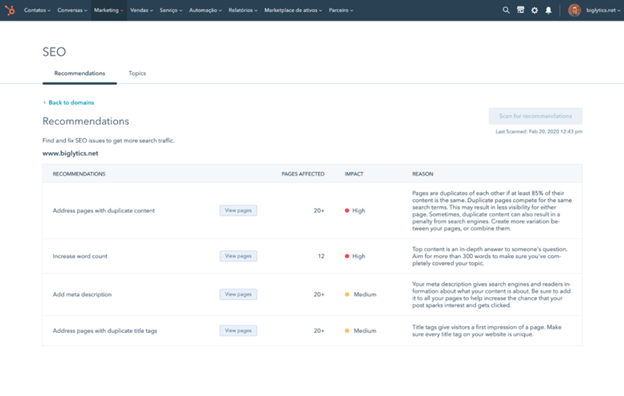
HubSpot SEO tools flag the practical, on-page issues that quietly hold content back: no specialist needed to catch them. This usually shows up in the form of reports and alerts that point out things like:
- Weak page titles and meta descriptions
- Poor header structure
- Missing image alt text
- Internal linking gaps
Most underperforming content fails on execution, not strategy. These recommendations keep standards high without requiring in-house SEO expertise.

HubSpot CMS vs WordPress CMS: Which is right for me?
2. Topic and Content Strategy Tools
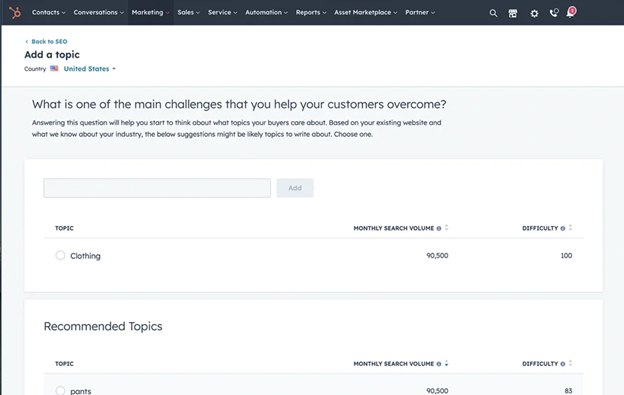
This is where HubSpot’s approach matters most.
Instead of chasing disconnected keywords, it organises your content around topic clusters that are themes search engines read as authoritative rather than scattered.
Building a cluster means:
- Choosing a core topic: the broad subject you want to own.
- Mapping supporting content back to it: each article addresses one angle, the way chapters build on a central subject.
- Assigning keywords intentionally: this reduces keyword cannibalisation, where your own pages compete against each other for the same term.
Sites built around topic clusters receive 3.2 times more AI citations than single-page competitors. HubSpot’s own research points the same way: the more a site’s pages interlink within a cluster, the better they tend to place in search results, with impressions rising alongside link volume.
But this structure has limits: it won’t surface every keyword gap in your market. What it does do is force a discipline most content teams are missing.

Why Your Blog Isn’t Ranking Even With HubSpot?
3. Keyword Tracking
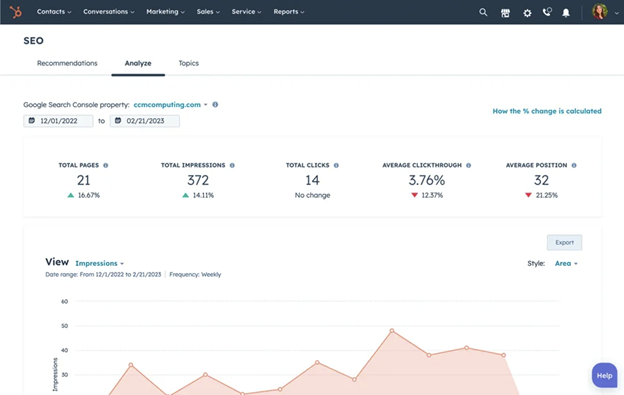
HubSpot’s SEO tools also track how your chosen keywords move over time.
This capability shows whether your target keywords are climbing or dropping, and how that lines up with traffic, conversions and leads. It won’t surface competitor gaps, backlink opportunities, or long-tail variations.
For teams reporting to leadership, HubSpot’s level of keyword tracking is often enough. It answers the question, “Is this working?” without drowning you in data that never gets acted on.
4. CRM-Linked Reporting
Generally, performance doesn’t stop at traffic or rankings with HubSpot’s SEO tools because it connects search performance to your customer relationship management platform. This means that you can follow the chain all the way through:
- Which pages attract organic visitors.
- Which visitors become contacts.
- Which contacts become qualified leads.
- Which deals can be influenced by organic search.
Most SEO tools stop at visibility. HubSpot carries the story forward into revenue.
And if you want to learn more about other tools on the CRM that can help improve online visibility, check out this guide on using HubSpot’s Website Grader for improving your SEO.
The Pros of HubSpot SEO Tools
HubSpot’s SEO strengths show up in the daily workload it takes off your team. Here’s how that plays out across four advantages:
| Advantage | The Problem It Solves | How HubSpot Delivers It |
| Clear prioritisation over SEO noise | Most tools flag hundreds of issues at once, so nothing feels urgent enough to fix first | Recommendations tie to specific pages in plain language, making them achievable even for non-technical marketers |
| SEO connected to leads and revenue | Traffic and rankings improve, but you struggle to show leadership how these two contribute to revenue | Organic visits link to pages, pages link to contacts, contacts link to deals: the full path from first visit to closed deal, even months later |
| Topic-led content planning | Keyword-by-keyword content creates scattered, competing pages over time | One core topic anchors your strategy, supporting content covers related questions, and internal linking happens by design |
| Fewer tools, fewer reporting arguments | Every extra platform adds another login, dataset, and explanation when numbers don’t match | Traffic, engagement, and conversion data live in one place instead of being reconciled manually across platforms |
HubSpot’s SEO tools win on usability, connection, and internal trust rather than technical depth.
If your biggest challenges are execution, alignment, and proving value, rather than advanced audits or niche technical insight, these strengths are worth investing in.
The payoff is smoother workflows, clearer reporting, and fewer stalled decisions.

Best HubSpot CMS Features for Marketers
The Cons of HubSpot SEO Tools
HubSpot’s SEO tools trade technical depth for usability and alignment. That trade-off works well early on, but strains once your SEO needs outgrow what the tool supports.
Here’s where the gaps show up:
| Disadvantage | What HubSpot Doesn’t Do | Practical Impact |
| Limited keyword research depth | No rich keyword expansion for long-tail or adjacent terms; search intent is simplified; competitor keyword gaps stay hidden | Fine early on, but leaves you guessing as competition increases |
| Surface-level technical SEO insight | Crawl behaviour at scale, page depth, JavaScript/rendering effects on indexation, and structural issues across hundreds of pages | Fine for small, simple sites; blind spots compound quietly on larger or older sites until rankings stall |
| Minimal backlink visibility | Link quality assessment, competitor link tracking, and diagnosing ranking drops from lost links | Can be the difference between steady growth and permanent second place in competitive industries |
| Weak competitive context | Why competitors outrank you, patterns in their content, or where they’re investing effort | You can feel productive without knowing if you’re catching up or falling behind |
Taken together, these drawbacks show a tool with a clear focus.
HubSpot executes SEO consistently and ties it to business outcomes, but it can fall short in helping you beat competitors in complex search environments.
If your priority is clarity, adoption, and tying effort to revenue, these limits may not affect you.
But if your priority is finding hidden opportunities, diagnosing technical drag, or winning aggressive keyword battles, relying on HubSpot alone creates blind spots that are hard to recover from later.
Understanding that distinction helps you use HubSpot SEO tools deliberately, for the problems it’s actually built to solve.

Why Businesses Fail at Lead Generation with HubSpot
Are HubSpot SEO Tools Enough for Your Needs?
Are HubSpot SEO Tools Enough for Your Needs?
Skip asking whether HubSpot is good at SEO. Ask what role you need SEO tools to play in your business. The setup below shows where you land once that’s clear.
Use HubSpot’s SEO tools alone if:
| Your situation | Why HubSpot SEO Tools Fit |
| You have a simple, content-led site | Few pages, clear structure: HubSpot’s on-page checks cover it without overengineering |
| Content is your main growth lever | Planning, optimisation, and publishing sit in one workflow |
| You need to tie SEO to leads and revenue | Performance tracks from page view to contact to deal without stitching reports together |
| Your team has no SEO specialist | Guidance and prioritisation beat overwhelming datasets for generalist teams |
Add a specialist SEO tool like SEMRush or Ahrefs if:
| Your situation | Why HubSpot SEO tools fall short |
| Competitive search space | No deep insight into where or why rivals are winning |
| Keyword discovery drives growth | Limited keyword expansion, intent analysis, and opportunity sizing |
| Backlinks matter to your rankings | No meaningful backlink analysis, leaving a blind spot in authority-building |
| Technically complex site | Surfaces basic issues only, not deeper crawl or structural problems |
Skip HubSpot for SEO if:
| Your situation | Why you should skip HubSpot SEO tools |
| HubSpot isn’t your main CRM | The biggest SEO advantage, CRM-linked reporting, needs HubSpot as your system of record |
| SEO is enterprise-scale or highly technical | Built for simplicity and alignment, which limits it at scale |
| You’d upgrade tiers purely for SEO access | Paying for unused platform features rarely makes sense when specialist tools solve it directly |

How to Set Up a Knowledge Base in HubSpot (The Basics)
Frequently Asked Questions: HubSpot SEO Tools
What are HubSpot’s SEO tools?
HubSpot’s SEO tools include on-page recommendations, topic cluster planning, keyword tracking, and CRM-linked reporting. They flag common on-page issues, help you organise content around core topics, monitor keyword rankings over time, and connect that performance to contacts, deals, and revenue inside HubSpot’s CRM.
Can HubSpot’s SEO tools actually drive leads and revenue?
Yes, mainly through reporting rather than rankings alone. Because SEO performance lives inside HubSpot’s CRM, you can trace the path from organic visitor to contact to closed deal. HubSpot’s multi-touch attribution model even credits 22.5% of deal revenue to the first interaction, lead creation, deal creation, and last interaction.
Does HubSpot replace tools like Semrush or Ahrefs?
No. HubSpot handles on-page recommendations, topic planning, keyword tracking, and CRM-linked reporting well, but it offers limited keyword discovery, shallow technical SEO diagnostics, and minimal backlink visibility. Specialist platforms like Semrush or Ahrefs cover those gaps, particularly for competitive industries or larger, technically complex websites.
What are the main limitations of HubSpot’s SEO tools?
HubSpot’s SEO tools fall short on keyword research depth, technical SEO diagnostics, backlink visibility, and competitive analysis. They won’t uncover long-tail keyword opportunities, diagnose crawl or indexation issues at scale, assess link quality, or show why competitors outrank you. These gaps matter most for larger or highly competitive websites.
Is HubSpot good for technical SEO?
Not exactly. HubSpot covers basic technical SEO well, including missing metadata, weak header structure, and internal linking gaps. It won’t diagnose deeper issues like crawl behaviour at scale, JavaScript rendering problems, or structural issues affecting hundreds of pages. Larger or older sites typically need a dedicated technical SEO tool alongside it.
Do I need a separate SEO tool if I already use HubSpot?
It depends on your priorities. If your site is simple, content-led, and success means proving revenue impact, HubSpot’s SEO tools alone are usually enough. If you’re in a competitive search space or need deep keyword, technical, or backlink analysis, pair HubSpot with a specialist tool like SEMrush or Ahrefs.
Can HubSpot’s SEO tools help with backlinks?
Not meaningfully. HubSpot treats backlinks as a background factor rather than an active area of optimisation, so you can’t assess link quality, track competitor links, or diagnose ranking drops caused by lost links. Businesses in competitive indu
Do Australian businesses need a separate SEO tool alongside HubSpot?
It depends on how competitive your market is. Australian businesses running simple, content-led sites often find HubSpot’s SEO tools sufficient for execution and revenue reporting. Businesses competing in crowded local or national search categories usually need a specialist tool like Semrush or Ahrefs for deeper keyword and competitor insight.
Should You Use HubSpot’s SEO Tools?
HubSpot’s SEO tools won’t magically fix poor strategy or replace specialist expertise. But when they’re used with the right expectations, they can remove a very real bottleneck: the gap between marketing effort and commercial impact.
That gap is where SEO often loses internal trust and budget because of:
- Slow content momentum
- Unclear reporting
- Leadership questioning value
- Sales disengaging from “marketing leads”
Your next step doesn’t need to be complicated:
- If you’re already deep into HubSpot customer relationship management and struggling to show how SEO supports revenue, start by tightening how you use HubSpot’s existing SEO and reporting features
- If organic growth is a priority and competition is tough, understand and accept that HubSpot works best alongside a specialist SEO tool
- If you’re unsure where the gaps actually are, that’s your signal to pause before adding more tools
If you need help figuring out how you can use HubSpot and its SEO tools to improve your leads and revenue figures this year, get in touch with us to schedule a free consultation call.

What Does HubSpot Do? (The Ultimate 2026 Guide)
About This Article
This article was written by the team at RedPandas Digital, a HubSpot Diamond Solutions Partner based in Sydney, Australia. RedPandas has implemented HubSpot for 150+ Australian businesses across B2B services, SaaS, higher education, and professional services. View our HubSpot partner profile here.




Get the best content marketing insights right in your inbox!
Subscribe to our Newsletter and get marketing insights delivered to your inbox every week.