









6 HubSpot Email Marketing Templates That Actually Convert in 2026

Key Takeaways
- Match the email type to the job. Use Regular emails for one-off newsletters, Automated emails inside workflows, and Blog/RSS for content digests
- “Email blast” is marketer slang, not a HubSpot label. HubSpot’s actual sending methods are Regular, Automated, and Blog/RSS
- Automation drives real revenue for HubSpot email marketing. Automated workflows generate 23% of marketing-sourced revenue in the median B2B program, per HubSpot’s 2026 State of Marketing report
- Templates should serve structure over decoration. Mobile rendering, personalisation tokens, and a single clear CTA outperform an elaborate design every time
- Automation requires Marketing Hub Professional. Pricing starts from around AUD $1,380 a month for Australian businesses, plus GST and contact tier increases
- B2B benchmarks sit lower than blended averages. Expect open rates in the low 20s to mid-30s, and treat CTR and CTOR as more reliable signals than open rate alone
- Breeze AI supports HubSpot email marketing, but doesn’t replace review. Use it for subject lines and first drafts, then verify accuracy before sending
Most HubSpot email marketing programmes run at a fraction of their potential.
Teams pick a template because it looks polished, hit send, and call it a campaign. But, at the same time, automation sits inside the same portal untouched, month after month.
That underperformance almost always traces back to two things inside HubSpot: template choice and email type.
As a HubSpot Diamond Partner, RedPandas Digital has rebuilt HubSpot email templates and automation for ANZ B2B accounts for years. The same fix comes up often: the wrong email type paired with a template designed purely for appearance.
This guide breaks down which HubSpot email templates perform best for newsletters in 2026.
In this article, you’ll learn the real difference between a regular marketing email and what most marketers call an email blast. Then you’ll see how automation works without needing a dedicated ops team.
Quick Answer
HubSpot email marketing performs best in 2026 when you match the email type to the job and skip over-engineered templates.
Use HubSpot’s built-in drag-and-drop templates for newsletters, since they stay easy to maintain without needing custom code. Send one-off newsletters as Regular emails, and use Automated emails only inside workflows triggered by contact behaviour.
Marketing Hub Professional, priced from around AUD $1,380 a month, is the tier that actually unlocks meaningful automation.
What Is HubSpot Email Marketing?
HubSpot email marketing is the set of tools inside Marketing Hub for creating, sending, and automating emails to your contacts. It sits inside the same platform as your CRM, so every send connects back to a contact record.
Getting HubSpot email marketing right starts with picking the correct email type.
HubSpot gives you three sending methods, and choosing the wrong one is the most common setup mistake RedPandas sees during account audits.
Regular vs Automated vs Blog/RSS
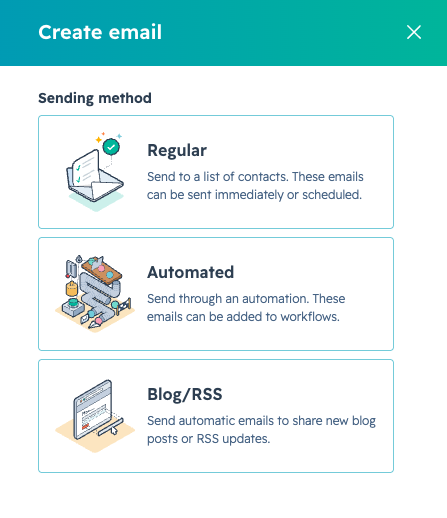
When you create a marketing email in HubSpot, you can choose from one of these three sending methods:
| Method | Description |
| Regular Email | A single email sent or scheduled to specific contacts or segments. Use this for a one-off newsletter, an announcement, or a promotion with a fixed send date |
| Automated Email | Created and saved for use inside a workflow, rather than sent on its own. This option only appears on Marketing Hub Professional or Enterprise accounts. Use it for welcome sequences, lead nurture flows, or anything triggered by a contact’s behaviour. |
| Blog/RSS Email | Generated automatically whenever you publish new content to your blog or RSS feed. This is the easiest way to run a content digest without manual sends. |
Your choice between these three shapes how the rest of your HubSpot email marketing setup works, from templates through to reporting.


Best HubSpot Use Cases By Industry
6 Types of HubSpot Email Marketing Templates
HubSpot’s drag-and-drop editor organises templates by use case, including event, newsletter, and engagement templates, among others. Here’s a closer look at the main categories your HubSpot email marketing strategy can be built on:
1. Newsletter Templates
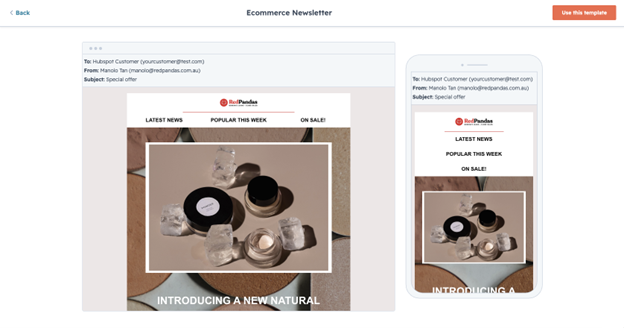
Newsletter templates suit recurring content sends, roundups, and company updates. These are the templates most ANZ B2B teams reach for first when building out HubSpot email marketing.
They work best as Regular emails sent on a fixed schedule, weekly or monthly. Keep the layout consistent issue to issue, since familiarity builds open rates over time.
2. Welcome And Onboarding Templates
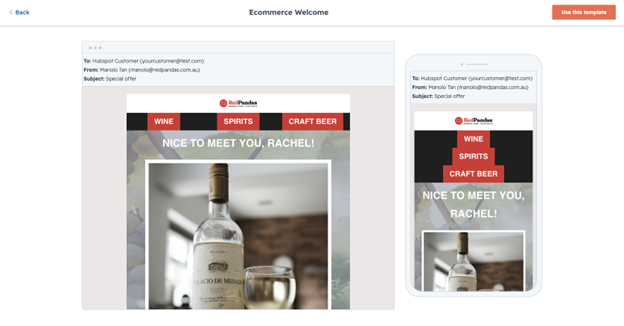
Welcome templates introduce new subscribers, leads, or customers to your business. First impressions matter here more than almost anywhere else in HubSpot email marketing.
These typically live inside an Automated workflow rather than a one-off send, triggered the moment a contact fills out a form or converts. A short three-to-five email onboarding series consistently outperforms a single welcome email.
3. Promotional Templates
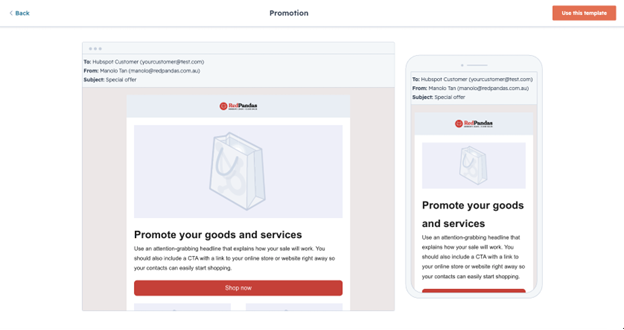
Promotional templates push a specific offer, discount, or limited-time announcement. Unlike a newsletter’s softer, informational tone, these templates favour urgency and a single bold CTA.
Send these as Regular emails tied to a clear expiry date. Overusing promotional templates in your HubSpot email marketing calendar trains contacts to expect discounts, so use them sparingly.
4. Event And Webinar Templates
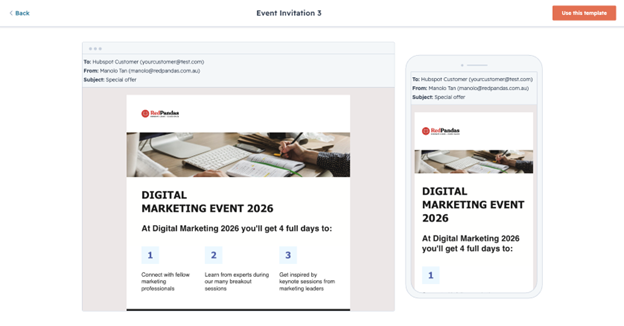
Event templates cover invitations, reminders, and follow-ups for webinars or in-person events.
HubSpot doesn’t run webinars natively, so these templates typically connect to an integration like Zoom or GoToWebinar, syncing registration and attendance data back to the contact record.
Workflows can automatically register a contact for an upcoming webinar based on form submission or list membership. That means your HubSpot email marketing follow-up sequence can trigger differently depending on whether a contact attended or missed the session.
Want to learn more about how you can improve your B2B marketing strategy using events? Check out this podcast episode on how to use webinars to generate significantly more money in just 30 days.
5. Re-Engagement Templates
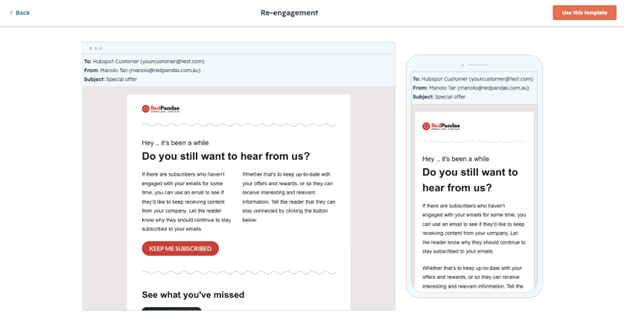
Re-engagement templates target contacts who’ve gone quiet, aiming to win back attention before they go cold in your database.
These usually run as a short Automated series, triggered when a contact hasn’t opened or clicked an email within a set period.
A strong re-engagement template asks directly whether the contact still wants to hear from you. This protects your sender reputation and keeps your HubSpot email marketing list genuinely engaged rather than just large.
6. Product Update Templates
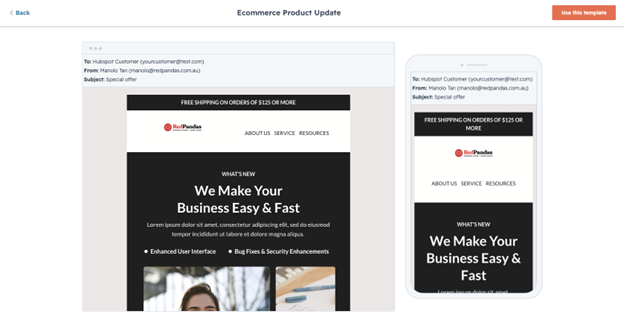
Product update templates announce new features, releases, or changes to existing customers. These work well for keeping customers informed about new products or updated versions of what they already use.
These can run as Regular sends for major announcements, or as Automated emails triggered by a customer’s product usage or lifecycle stage.
Either way, tie the update back to a benefit the customer cares about, not just a changelog.
If you want to learn more about building successful HubSpot email marketing campaigns, check out this episode of HubSpot Mentors:
HubSpot Marketing Automation Email: Workflows, Triggers, and Breeze AI
Automation is where HubSpot email marketing earns its budget. This is the layer that sends the right email at the right moment, without anyone in your team clicking send.
Every automated email in HubSpot email marketing runs inside a workflow. To build one, you navigate to Automation, then Workflows, and add an email action to the sequence.
Common Triggers for HubSpot Email Marketing Automation
A workflow only fires once a trigger condition is met. The most common triggers your team will use include:
- A contact submitting a specific form
- A contact joining or leaving a list or segment
- A contact property changing, such as lifecycle stage
- A deal moving to a new pipeline stage
- A contact visiting a specific page on your site
Each trigger starts a different type of HubSpot marketing automation email. Form submissions suit welcome sequences, while deal stage changes suit sales handoff nurture emails.
Where Breeze AI Fits Into HubSpot Email Marketing Automation
Breeze, HubSpot’s native AI, has a genuine role inside HubSpot email marketing automation, though it works best as a drafting assistant rather than an autopilot.
Inside a workflow’s email action, Breeze can generate a heading or a full paragraph directly from a written prompt. This speeds up building nurture sequences with several emails at once.
Breeze can also generate subject lines and preview text for a marketing email based on that email’s existing content. This is useful for A/B testing subject line variants without writing five versions by hand.
One detail matters here: HubSpot’s own guidance recommends proofreading AI-generated content and verifying any statistics or facts before publishing.
You’ll need to treat Breeze as a drafting tool, with a human reviewing tone and accuracy before anything sends.
Advanced Breeze features for automated HubSpot email marketing sit behind Marketing Hub Professional or Enterprise, the same tier required to build automated emails and workflows in the first place.
Want to learn how else HubSpot’s AI tool can fit into your workflow? Here’s an article on how to use HubSpot Breeze AI for marketing, sales, and customer service.
HubSpot Email Marketing Benchmarks for 2026
Knowing what “good” looks like keeps your HubSpot email marketing reporting honest. Chasing the wrong benchmark wastes budget on the wrong fix.
Open Rate, CTR, and CTOR Benchmarks for HubSpot Email Marketing
Most B2B marketing emails in 2026 average an open rate between the low 20s and mid-30s. If your HubSpot reports show below 20 per cent, that’s worth investigating for domain reputation or audience relevance issues.
Typical B2B click-through rates range from two to six per cent, with newsletters trending toward the lower end of that range. Gated content and nurture emails tend to perform closer to the higher end.
Click-to-open rate is the most useful health check for HubSpot email marketing content quality. A CTOR between 20 and 30 per cent signals strong alignment between your subject line and your content, while anything under ten per cent suggests a mismatch.
Expect email-to-pipeline conversion rates of roughly one to three per cent for most B2B HubSpot email marketing programmes.
Why Open Rate Alone Misleads Your HubSpot Email Marketing Reporting
Apple’s Mail Privacy Protection distorts open rate data industry-wide, and this affects every HubSpot email marketing account. MPP preloads email content and images for Apple Mail users, registering an open even when the recipient never actually opens the message.
This is why click-through rate and CTOR matter more than open rate for judging HubSpot email marketing performance, especially because opens can look healthy while genuine engagement stays flat.
Keep unsubscribe rates in view too.
A healthy benchmark sits around 0.1 to 0.3 per cent per campaign, and anything consistently above 0.5 per cent signals a content or frequency problem worth addressing in your HubSpot email marketing calendar.
HubSpot Email Marketing Pricing in AUD: Which Tier Do You Need?
Automation is the deciding factor in HubSpot email marketing pricing. Your tier determines whether workflows and automated emails are even available to you.
Free and Starter: Where HubSpot Email Marketing Automation Stops
HubSpot’s free tier includes basic CRM, limited email sends, live chat, and forms. It’s a genuine starting point, but HubSpot branding appears on every email you send.
Starter removes that branding, increases send limits, and adds basic workflows, priced per seat.
Even here, though, full HubSpot email marketing automation stays out of reach.
Automated emails inside workflows are only available on Marketing Hub Professional or Enterprise accounts. If your business needs behaviour-triggered nurture sequences, Starter won’t get you there.
Marketing Hub Professional: The AUD Cost of HubSpot Email Marketing Automation
Marketing Hub Professional is priced at AUD $1,380 a month, including three core seats. This is the tier where genuine HubSpot email marketing automation, custom reporting, and A/B testing all switch on.
Additional contacts on Professional are sold in increments of 5,000, at approximately AUD $390 per increment per month: budget for this if your contact list is growing quickly.
For larger ANZ organisations, Enterprise runs from roughly AUD $5,000 to AUD $15,000 or more per month, unlocking:
- Predictive lead scoring
- Custom objects
- Multi-touch attribution reporting
One Australian-specific detail worth budgeting for: HubSpot’s published prices are generally quoted before Australia’s ten per cent GST, which is added at checkout for Australian accounts.
Confirm this against your quote before signing.
For most ANZ mid-market businesses running HubSpot email marketing at real scale, Professional is the tier that makes automation, templates, and reporting work together properly.

Best HubSpot Marketing Reports (with Beginner and Advanced examples)
FAQ: HubSpot Email Marketing Questions Answered
Which HubSpot email templates work best for newsletters in 2026?
HubSpot’s built-in drag-and-drop newsletter templates work best for most 2026 newsletters, since they render cleanly on mobile and support personalisation tokens. Choose a template with one clear CTA rather than multiple competing buttons. Custom-coded templates only make sense once your HubSpot email marketing programme scales past what the standard editor supports.
What’s the difference between a HubSpot email blast and a regular marketing email, and when should I use each?
A regular email is a one-off HubSpot email marketing send to a segment or list, ideal for newsletters and announcements. An automated email lives inside a workflow, triggered by contact behaviour such as a form submission. Email blast is marketer shorthand for a one-off regular send. HubSpot’s official labels are Regular, Automated, and Blog/RSS.
Do I need Marketing Hub Professional to automate HubSpot email marketing?
Yes. Automated emails inside workflows are only available on Marketing Hub Professional or Enterprise accounts, priced from around AUD $1,380 a month in Australia for Professional. Starter and Free tiers support Regular and Blog/RSS sends, plus basic workflows, but full HubSpot email marketing automation stays locked until you upgrade to Professional.
What is a good open rate for HubSpot email marketing in B2B?
Most B2B HubSpot email marketing campaigns see open rates between the low 20s and mid-30s in 2026. Anything below 20 per cent is worth investigating for domain reputation or list quality issues. Treat open rate cautiously though, since Apple’s Mail Privacy Protection inflates the numbers by preloading images for many recipients.
Can I use Breeze AI to write HubSpot email marketing content?
Yes. Breeze, HubSpot’s native AI, can generate subject lines, preview text, headings, and full paragraphs directly inside the email editor or a workflow’s email action. HubSpot recommends proofreading AI-generated content and verifying any statistics before publishing, so treat Breeze as a drafting assistant rather than a final-copy tool.
How much does HubSpot email marketing cost in Australia?
HubSpot email marketing starts free, with basic sends and HubSpot branding included. Starter removes branding and adds send limits, priced per seat. Marketing Hub Professional, the tier needed for automation, runs from around AUD $1,380 a month including three seats, plus GST and any additional contact tiers.
What triggers a HubSpot marketing automation email?
Common triggers include a contact submitting a form, joining or leaving a list, a property changing such as lifecycle stage, a deal moving pipeline stages, or a contact visiting a specific page. Each trigger starts a different workflow, letting HubSpot email marketing automation send the right message at the right moment.
Is HubSpot email marketing better than Mailchimp for B2B newsletters?
For B2B newsletters tied to a sales pipeline, HubSpot email marketing has an advantage because every send connects directly to CRM contact records and deal stages. Mailchimp suits simpler, email-only needs at a lower cost. Choose HubSpot when your team needs automation, lead scoring, and sales visibility alongside newsletters.
Making HubSpot Email Marketing Work for Your Business
HubSpot email marketing rewards businesses that get the fundamentals right before chasing advanced automation.
The right template, the correct email type, and a workflow triggered by genuine contact behaviour matter more than any single feature.
Most HubSpot email marketing setups underperform for the same reason. Teams treat every send as a manual regular email, skip automation entirely, and never move past a generic template built for looks rather than clicks.
Fixing that doesn’t require a rebuild from scratch. It usually means:
- Auditing your current templates
- Mapping out two or three workflows worth automating
- Confirming your Marketing Hub tier actually supports what your team wants to do
Start with these three steps, and you’ll be able to maximise HubSpot email marketing to generate more leads and close more sales.
The experts at RedPandas Digital work through this exact process with ANZ businesses every week, from portal audits through to full campaign builds.
If your HubSpot email marketing setup needs a second look, get in touch with our growth experts for a free consultation and assessment of what’s working and what isn’t.

Book Your Free Consultation With RedPandas’ HubSpot Experts
About the Author
This article was written by the team at RedPandas Digital, a HubSpot Diamond Solutions Partner based in Sydney, Australia. RedPandas is one of a small number of agencies accredited under HubSpot’s Partnered Scale Onboarding programme, and has delivered results including a 49.8% revenue increase and 378% lead growth within five months for an Australian client.
About the Author




Get the best content marketing insights right in your inbox!
Subscribe to our Newsletter and get marketing insights delivered to your inbox every week.