









How Can You Improve HubSpot Marketing Email Open Rates? 5 Tips That Work
Key Takeaways
- A good HubSpot marketing email open rate for B2B senders sits between 20% and 30%, with anything above 35% considered strong
- Apple Mail Privacy Protection inflates roughly half of tracked opens, so pair open rate with click-through rate for an accurate read
- Five specific changes lift HubSpot marketing email performance: send-time optimisation, AI-assisted subject lines, sending to engaged contacts first, regular list cleaning, and personalisation beyond first names
- HubSpot CRM email and HubSpot marketing email are measured in separate analytics suites. Know which one your open rate report is actually showing you
- Email integration affects one-to-one sales email, not your bulk HubSpot marketing email deliverability. Domain authentication is the bigger lever there
- Send limits scale with your contact tier: Free CRM allows 2,000 emails per month, Starter – 5X contacts; Professional – 10X; and Enterprise – 20X
- Australian Spam Act compliance requires consent, clear business identification, and a functional unsubscribe option processed within 5 business days
Here’s a shocker: HubSpot marketing email open rates might be lower than they look… Or, rather, lower than they should be.
See, HubSpot’s own 2025 benchmarking puts the average open rate across industries at 42.35 per cent.
But that number comes with a catch: Apple’s Mail Privacy Protection preloads emails automatically for Apple Mail users.
In fact, one study of over 80,000 accounts found open rates rose by 18 points within six months of this change taking effect.
So if your numbers sit below that average, the problem might not be you. But if leadership wants answers, you still need a plan… And this article lays it out.
RedPandas Digital is a HubSpot Diamond Solutions Partner based in Sydney. Our team configures Marketing Hub sends inside client portals every week, and we see the same pattern across mid-market businesses in Australia and New Zealand.
This guide walks you through five specific changes you can make to your HubSpot marketing email setup this month. Every tip is something you can configure inside your portal today, without a bigger budget or a full rebuild.
Quick Answer
A good HubSpot marketing email open rate typically falls between 20 per cent and 30 per cent for B2B sends, with anything above 35 per cent considered strong.
Segmenting your list, using AI-assisted send-time optimisation, and cleaning inactive contacts are the fastest ways to move the needle.
Apple Mail Privacy Protection inflates raw open rate figures, so treat open rate as a directional signal rather than an exact measure.
What Is a HubSpot Marketing Email?
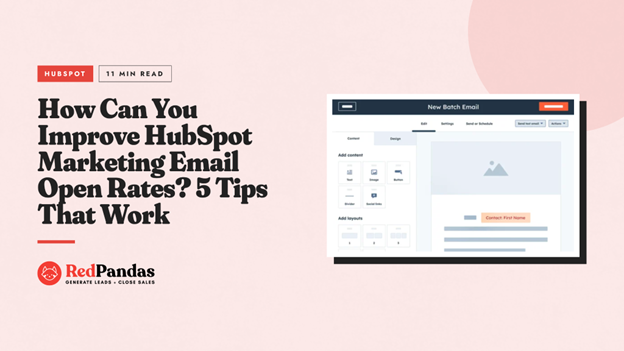
A HubSpot marketing email is a bulk email you build inside HubSpot’s Marketing Email tool.
You send it to a list, a segment, or a workflow, rather than to one contact at a time.
This is different from the one-to-one emails your sales team sends through HubSpot’s CRM.
You’ll find the HubSpot marketing email tool inside Marketing Hub, though a limited version comes with the free CRM too.
Free CRM accounts get up to 2,000 marketing email sends per month, with the only drawback being that every email carries HubSpot branding. Upgrading to a paid Marketing Hub tier removes that branding and increases your sending volume.
Types of HubSpot Marketing Email
HubSpot groups marketing emails into four types inside the email editor.
- Regular: A one-off send to a specific list or segment. Use this for newsletters, promotions, or announcements
- Automated: Built and saved for use inside a workflow. This option is only available on Marketing Hub Professional or Enterprise
- Blog/RSS: Sends automatically to your subscribers whenever you publish new content to your blog or RSS feed
- A/B test: Tests two versions of the same email against a sample of your recipients, then sends the better-performing version to everyone else
Most of the open rate advice in this guide applies to Regular and Automated marketing emails.
These are the sends most Australian businesses use for newsletters, lead nurture, and campaign promotions.
HubSpot Marketing Email vs HubSpot CRM Email
Your HubSpot marketing email tool handles bulk sends to lists and segments. HubSpot’s CRM email, connected through Gmail or Outlook, handles one-to-one outreach with tracking and templates instead.
Both count towards your open rate reporting differently.


How to Align Your Sales and Marketing Teams Using HubSpot
What’s a Good HubSpot Marketing Email Open Rate?
Most Australian B2B senders should aim for a HubSpot marketing email open rate between 20 per cent and 30 per cent. Rates above 35 per cent suggest strong list health and relevant content.
HubSpot’s own cross-industry data puts the average open rate at 42.35 per cent. B2B benchmarks typically sit lower, in the range of 15 per cent to 30 per cent, reflecting crowded corporate inboxes and stricter spam filtering.
Open rate performance also depends heavily on who you’re emailing. Cold contacts open at lower rates than warm leads or existing customers.
HubSpot Marketing Email Open Rates by Contact Type
| Contact relationship | Typical open rate range |
| Cold or new contacts | 15 to 18% |
| Warm leads | 25 to 30% |
| Existing customers | 35 to 40% |
If your HubSpot marketing email list blends all three groups into one send, your blended average will sit somewhere in the middle. Segmenting by lifecycle stage gives you a clearer read on what’s actually working.
Why Your Open Rate Number Might Be Misleading
Apple Mail Privacy Protection now affects roughly half of all tracked email opens. It preloads your email content automatically, registering an “open” whether or not a person actually reads it.
This means your reported open rate can look healthier than real engagement. Pair open rate with click-through rate and reply rate to get a fuller picture of how your HubSpot marketing email campaigns are actually performing.
Generally, a HubSpot marketing email open rate consistently below 15 per cent is worth investigating. This usually points to list quality issues, poor segmentation, or a deliverability problem rather than a subject line problem alone.
5 Tips to Improve HubSpot Marketing Email Open Rates
These five changes are specific to HubSpot’s platform. You can action most of them this week, directly inside your portal:
Tip #1: Turn On HubSpot Marketing Email Send-Time Optimisation
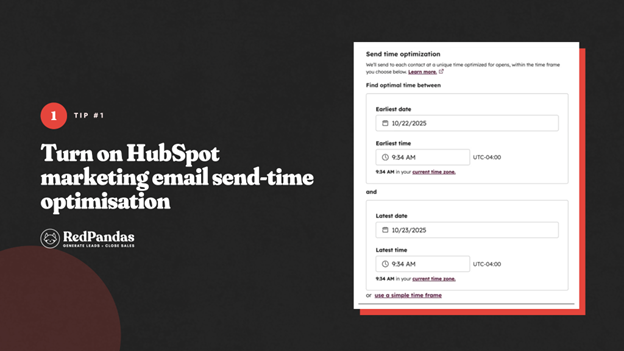
HubSpot can analyse each contact’s past engagement and send your HubSpot marketing email at the time they’re most likely to open it.
This tip works at the individual level, not just a population average.
Reported improvements vary by source: some reports put the lift at five to ten per cent, while others report 15 to 23 per cent.
So, treat this as a meaningful but variable gain rather than a guaranteed number.
Note: Send-time optimisation needs engagement history to work well. New contacts default to your audience’s average send time until HubSpot has enough data on them.
Tip #2: Use HubSpot’s AI Subject Line Generator, Then Edit It Yourself
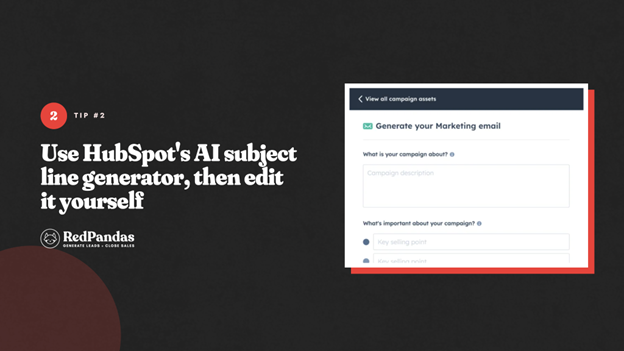
HubSpot’s Campaign Assistant includes an AI subject line generator built into the marketing email editor.
Basically, it lets you describe your campaign, then drafts subject line options based on what you put in for you to refine.
You can regenerate suggestions up to five more times per email before you need to start a fresh draft. Treat the output as a strong first pass, not a finished subject line.
Some brands using AI-generated subject lines alongside A/B testing have reported higher open rates and more useful test results. Run your own A/B test before rolling a new subject line style out to your full list.
But HubSpot’s AI doesn’t just help with drafting more subject lines… Here are many other ways you can use HubSpot Breeze AI for marketing, sales, and customer service.
Tip #3: Send to Your Most Engaged HubSpot Marketing Email Contacts First
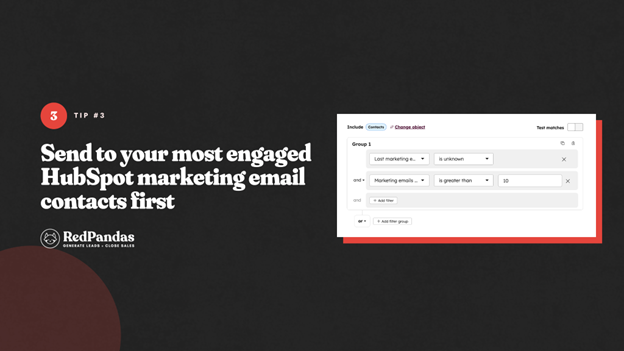
HubSpot Marketing Hub Enterprise includes an engagement scoring feature. It ranks contacts by:
- Total opens
- Time since their last engagement
- How recently they clicked
Sending your HubSpot marketing email to more engaged contacts first can help improve your open rates, click rates, and sender reputation all at once. If you’re not on Enterprise, you can approximate this by building lists filtered on last email open date and recent website activity.
And if you want to improve your HubSpot marketing emails even more, check out this article on the common email segmentation mistakes most brands make and how to avoid them.
Tip #4: Clean Your HubSpot Marketing Email List and Protect Deliverability
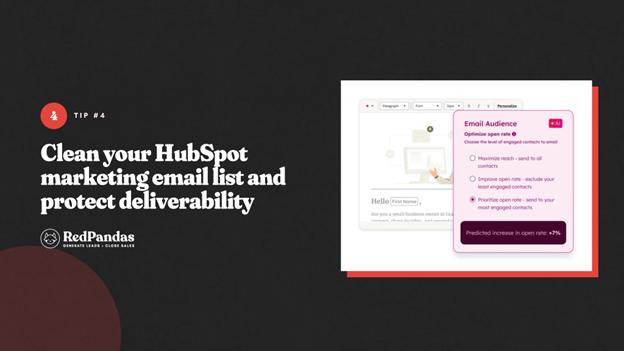
A smaller, engaged list consistently outperforms a larger, stale one. Hard bounces, spam traps, and long-unengaged contacts can drag your sender reputation down for every contact on your list, not just themselves.
You can avoid hampering your deliverability by reviewing your HubSpot list health quarterly. It also helps to pair this with removing hard bounces immediately and suppressing contacts who haven’t opened an email in six to 12 months.
This also keeps you aligned with Australia’s consent requirements under the Spam Act.
Tip #5: Personalise Beyond the First Name
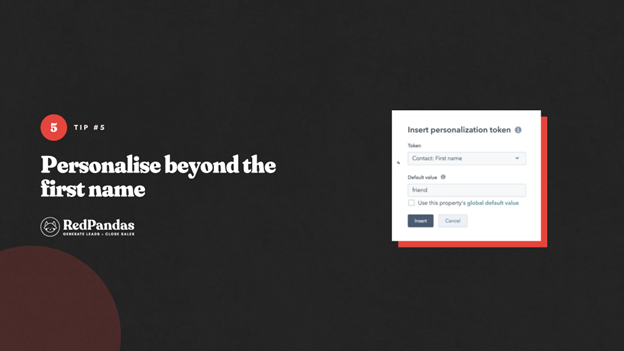
Here’s what most guides won’t tell you: basic personalisation tokens in HubSpot are only the starting point.
See, including a recipient’s first name or company name in your subject line or preview text can lift open rates by 20 per cent or more.
HubSpot’s smart content lets you go further, showing different content blocks based on lifecycle stage, industry, or past behaviour. You can use CRM properties you’re already capturing here instead of building new custom fields from scratch.
Staying Compliant: Spam Act Basics for Australian HubSpot Marketing Email
Every HubSpot marketing email you send to Australian contacts needs to comply with the Spam Act 2003. This applies regardless of your open rate goals, and non-compliance risks penalties from the ACMA.
What the Spam Act Requires
The Spam Act 2003 governs commercial electronic messages sent to Australian recipients. Three requirements apply to every HubSpot marketing email:
- Consent. You need express or inferred consent before sending. Inferred consent generally requires an existing business relationship relevant to the message.
- Identification. Your email must clearly identify your business name and contact details.
- Unsubscribe. You must include a functional, free unsubscribe option that works for at least 30 days, and process requests within 5 business days.
How HubSpot Marketing Email Handles Compliance
HubSpot builds most of these requirements into its default email footer. Every marketing email includes a subscription preferences link, and HubSpot tracks consent status per contact at the subscription-type level.
The key detail here is that subscription types let you segment consent properly.
Instead of using a single blanket subscription, you can set up separate types such as newsletter, product updates, and event invitations.
This means a contact unsubscribing from your newsletter doesn’t automatically lose access to content they still want.
Imported contacts don’t get subscribed to your HubSpot marketing email sends automatically. If subscription status is missing, HubSpot blocks the send rather than risking non-compliant delivery.
Common Setup Mistakes to Avoid
- Removing footer compliance elements. Custom footer modules can accidentally strip the required unsubscribe link. Check custom templates carefully before publishing
- Using one subscription type for everything. This forces contacts to unsubscribe from all your content just to opt out of one type
- Assuming imported lists are compliant. Always confirm consent and map subscription status correctly during any list import
Getting this right protects your sender reputation as well as your compliance position.
A clean, properly consented list is also one of the strongest levers for improving your HubSpot marketing email open rate, since engaged, consenting contacts are the ones most likely to open.

How To Conduct A/B Testing in HubSpot for Better Campaign Performance
Frequently Asked Questions: HubSpot Marketing Email Open Rates
How can I improve my email open rates using HubSpot?
Improve your open rates by segmenting contacts by engagement, enabling AI-powered send-time optimisation, using HubSpot’s AI subject line generator, cleaning inactive contacts regularly, and personalising subject lines beyond first names. These five changes typically lift performance within a few campaign sends, without needing a larger budget or a full rebuild.
What is a good open rate for HubSpot marketing email?
A good HubSpot marketing email open rate for B2B senders typically falls between 20 per cent and 30 per cent, with anything above 35 per cent considered strong. Apple Mail Privacy Protection inflates raw figures for roughly half of recipients, so treat open rate as a directional signal and pair it with click-through rate for a fuller picture.
What is a HubSpot marketing email?
A HubSpot marketing email is a bulk email built in HubSpot’s Marketing Email tool and sent to a list, segment, or workflow of contacts. It differs from one-to-one CRM email and includes four types: Regular, Automated, Blog/RSS, and A/B test emails.
How many emails can I send with HubSpot?
Free HubSpot CRM accounts can send up to 2,000 marketing emails per month. Paid Marketing Hub plans use a multiplier of your contact tier: 5x on Starter, 10x on Professional, and 20x on Enterprise. For example, 2,000 contacts on Professional allows 20,000 marketing emails monthly.
What’s the difference between HubSpot CRM email marketing and Marketing Hub email?
HubSpot CRM email marketing refers to one-to-one emails sent through your connected Gmail or Outlook inbox, tracked individually per contact. HubSpot Marketing Hub email is built for bulk sends to lists, segments, and workflows, with segmentation, A/B testing, and automated workflows unavailable in CRM-only email.
Does Apple Mail Privacy Protection affect HubSpot open rates?
Yes. Apple Mail Privacy Protection preloads email content automatically for Apple Mail users, registering an open whether or not someone actually reads the email. This affects roughly half of tracked opens across HubSpot accounts, so pair open rate with click-through rate for a more accurate campaign assessment.
Can I use send-time optimisation on HubSpot marketing email?
Yes. HubSpot’s send-time optimisation analyses each contact’s past engagement and sends your marketing email when they’re individually most likely to open it. Reported improvements vary by source, typically between 5% and 23%, though new contacts default to your audience average until HubSpot gathers enough engagement history.
Do I need consent to send a HubSpot marketing email to Australian contacts?
Yes. Australia’s Spam Act 2003 requires express or inferred consent before sending commercial electronic messages, including HubSpot marketing email. You must also identify your business clearly and provide a functional unsubscribe option that works for at least 30 days, with requests processed within 5 business days.
What happens if I exceed my HubSpot marketing email send limit?
Exceeding your monthly HubSpot marketing email limit queues remaining campaigns until your next billing cycle resets. Exceeding your contact tier blocks sends to contacts above that limit specifically, rather than blocking your entire account. Resolve this by suppressing inactive contacts or upgrading your contact tier.
Turning Your HubSpot Marketing Email Open Rate Around
Your HubSpot marketing email open rate is a metric you can move with a handful of specific, platform-native changes.
From here, you can start with the basics covered in this guide:
- Turn on send-time optimisation
- Use HubSpot’s AI subject line generator as a starting point
- Prioritise your most engaged contacts first
- Clean your list regularly and confirm your sending domain is properly authenticated
These steps alone resolve most of the deliverability issues that quietly drag open rates down.
Keep Apple Mail Privacy Protection in mind whenever you review your numbers. A slightly lower open rate than you’d like doesn’t always mean your campaign underperformed. It often just means your reporting needs more context.
None of these changes requires a bigger budget or a full rebuild of your email program. They’re adjustments you can make inside your HubSpot portal this week.
If you’d like a second set of eyes on your HubSpot marketing email setup, RedPandas’ HubSpot experts are here to help. Get in touch with our specialists for a free consultation through the link below:

Get in Touch With RedPandas’ HubSpot Experts
About the Author
This article was written by the team at RedPandas Digital, a HubSpot Diamond Solutions Partner based in Sydney, Australia. RedPandas is one of a small number of agencies accredited under HubSpot’s Partnered Scale Onboarding programme, and has delivered results including a 49.8% revenue increase and 378% lead growth within five months for an Australian client.
About the Author




Get the best content marketing insights right in your inbox!
Subscribe to our Newsletter and get marketing insights delivered to your inbox every week.