









Building a 5-Touch Follow-Up Sequence in HubSpot for Construction Sales Automation

Home buyers take 6 to 12 months from first enquiry to contract. Most residential builders give up after two or three follow-up attempts.
That gap is where revenue disappears.
Only two to five per cent of residential build leads convert into buyers under typical builder sales processes.
But most builders still take 24 to 48 hours to follow up.
Do the math on your own pipeline, and the cost becomes hard to ignore.
If your average contract value is $450,000 and you’re letting five leads a month go cold after a single touchpoint, you’re probably dealing with a follow-up problem.
See, 80 per cent of sales require five or more follow-ups. The problem, though, is that the average salesperson stops after just two.
In residential construction, where a buyer might spend five or six months researching before they’re ready for a serious conversation, that drop-off is particularly costly.
This is where construction sales automation that’s done properly in a platform like HubSpot changes the outcome.
A well-built 5-touch sequence keeps your brand present and your communication professional across the entire research window.
All without your sales team having to remember who to call and when.
In this article, you’ll get a complete, practical blueprint for building that sequence: what each touch should say, which channel to use, how to time each one, and how to map the whole cadence inside HubSpot.
The 5-Touch Follow-Up Sequence: What to Say, When, and On What Channel
A residential build buyer is making a decision that will take months, and a cadence that burns out in a week treats them like a product purchase. Each touch has a defined channel, timing, and job to do.
Here’s the full sequence at a glance:
| Touch | Timing | Channel | Purpose |
| 1 | Within 5 to 15 mins of enquiry | SMS | Confirm receipt, open the door |
| 2 | Same day, 2 to 4 hours later | Deliver substance, set a next step | |
| 3 | Days 1 to 12 | Phone call + SMS fallback | Qualify, build rapport |
| 4 | Day 14 to 18 | Add value, stay top of mind | |
| 5 | Day 35 to 45 | SMS or email | Re-engage or reset |
A note on touch five: 80 per cent of sales need five or more follow-ups, and a residential build buyer’s window runs six to twelve months. So, five touches is the floor here, not the target.
If a genuinely interested buyer is still quiet after Touch 5, extend the cadence with further call attempts and another re-engagement touch rather than closing the file.
Touch 1: Immediate SMS, Within 5 to 15 Minutes of Enquiry
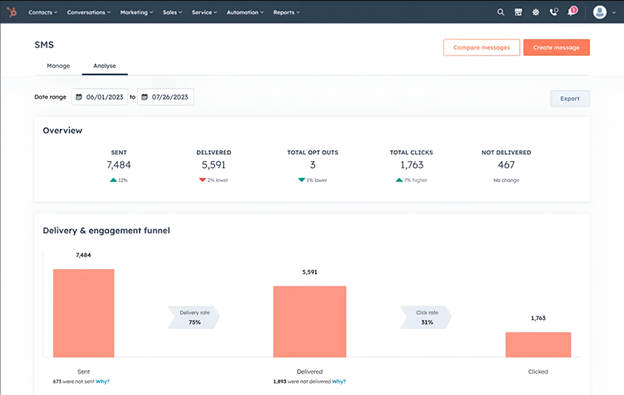
Speed is the single biggest variable in whether a new lead converts.
Firms that make contact within the first hour are roughly seven times more likely to qualify a lead than firms that wait just one more hour, and around sixty times more likely than firms that wait a full day, according to Harvard Business Review’s analysis of 1.25 million sales leads.
The first touch has one job: get a real person on the phone as fast as possible, with SMS working alongside the call rather than instead of it.
What to Write
Keep the message under 160 characters. Use the prospect’s first name, introduce yourself by first name and company, confirm you received the enquiry, and invite a call or reply.
Here are two sample templates you can use for your SMS strategy:
| Client Type | Message Template |
| New Build | “Hi [First Name], it’s [Your Name] from [Company]. Thanks for enquiring about your new home. I’ll give you a quick call from this number in the next few minutes.” |
| KDR | “Hi [First Name], it’s [Your Name] from [Company]. Thanks for getting in touch about your knock-down rebuild. I’ll give you a quick call from this number in the next few minutes.” |
And here’s how the first hour actually runs:
| Time | Action | Where it lives |
| 0 to 2 mins | Automated SMS naming the consultant and flagging the incoming call | Workflow |
| 0 to 2 mins | Automated acknowledgement email with booking link | Workflow |
| 5 to 10 mins | Call attempt 1 | Task, assigned owner |
| Same day, +3 hrs | Call attempt 2 if no answer | Task |
| Same day, +4 hrs | Substantive email, sent only if no conversation has happened yet | Sequence |

How Do I Build a Lead Nurturing Workflow in HubSpot That Actually Works?
Touch 2: Same-Day Email, 2 to 4 Hours After Enquiry
The SMS confirmed you exist, and this email gives the prospect something to work with.
Home and building services enjoy an email open rate of around 34 per cent, notably higher than average.
A follow-up sent within hours of an enquiry, while the prospect is still in research mode, has a strong chance of being read.
For new build leads, give an honest picture of the journey from initial consultation through to practical completion.
ANZ buyers have lived through significant builder insolvencies; specifically, 2,975 construction companies entered insolvency in the 2023–24 financial year. And a brief, transparent paragraph about how you communicate through the build does more for trust than a list of inclusions.
For KDR leads, acknowledge the timeline honestly: a full KDR in Australia typically takes 12 to 24 months from first plans to handover. Glossing over that complexity separates you from the builders who downplay it to get the lead over the line.
Keep the email to three short paragraphs: acknowledge the enquiry, share one relevant insight for their project type, and include one clear call to action with a Calendly or HubSpot meetings link.

How to Grow a Home Building Company | Episode 142
Touch 3: Phone Call Attempts, Days 1 to 12
Residential buyers aren’t sitting at a desk waiting for your call.
Most are more reachable outside standard business hours: evenings and weekends, when they’re not juggling a home-buying decision around their own workday.
By now the prospect has had two call attempts and an SMS. Each further call arrives with context, which is meaningfully different from a cold call.
72 per cent of sales calls never reach a human. One attempt means fewer than a third of your leads ever speak to anyone.
Continue the cadence with four more attempts. Vary the time of day and the day of the week:
- Attempt 3: the next business day.
- Attempt 4: day three.
- Attempt 5: day seven, paired with a short check-in SMS.
- Attempt 6: day 12.
If a call goes to voicemail, leave a 20 to 30-second message, then send an SMS straight after. The voicemail sets the context, and the SMS gives them the easiest way to reply.
Residential buyers aren’t sitting at a desk waiting for your call. Most are more reachable in the evenings and on weekends, away from work.
Keep the sequence’s automated email send window from eight to five on business days. Let your consultants’ call attempts range wider, to match when buyers are actually free.
The goal with any of these calls is qualification, not closing. Four questions tell you almost everything you need:
- Do they have land confirmed, or are they still looking?
- Have they spoken to a lender or mortgage broker yet?
- What’s their rough timeline: six months or two years?
- Is there a KDR feasibility question they need answered first?
Touch 4: Value Email on Days 14 to 18
Two weeks gives the prospect breathing room while keeping you on their radar.
By now, they may have spoken to other builders and are in comparison mode.
The email that earns attention here needs to give them something genuinely useful: a resource that helps them make a better decision, regardless of who they choose.
For new build leads, something like a one-page guide on how to read a fixed-price contract or what to ask about addresses exactly what ANZ buyers are anxious about amid the wave of builder insolvencies.
For KDR leads, a feasibility checklist covering soil testing, demolition costs, and council zoning, including ResCode requirements around setbacks and wall heights, demonstrates the specificity that a generic builder brochure never could.
Keep the email body short: two to three sentences of context, the resource link, and one CTA.
Use a subject line that leads with the benefit; for example: “Questions to ask any builder before you sign” or “Is your block right for a KDR? Here’s how to find out.”


HubSpot Sequences Best Practices
Touch 5: Re-Engagement SMS or Email on Days 35 to 45
By week five, you’ve probably made four considered contacts; so, this is the time to resist the urge to mark the lead as dead.
Home buyers usually take six to 12 months from first enquiry to contract: a quiet lead at week five is entirely within the normal research window.
It’s important to remember that they probably haven’t said no; they’re still deciding.
A re-engagement SMS can cut through inbox noise at this stage because 90 per cent of messages are read within three minutes of delivery. And a short, human-sounding text lands differently than a formatted sales email: it reads less like a system and more like a person checking in.
Here’s a re-engagement SMS template you can use:
“Hi [First Name], it’s [Your Name] from [Company]. Just checking in, no pressure at all.
If you’re still working through your [new build/KDR] plans, happy to answer any questions. Or if your timing has shifted, just let me know. [Your Number]”
After Touch 5, unresponsive contacts move into a long-term nurture workflow; separate from the sequence, sending light-touch content every six to eight weeks.
A lead who goes quiet at week five and re-enquires at month seven is worth just as much as one who replied to Touch 2.

Are Paid Ads Worth It When Marketing for Construction Companies?
Building Construction Sales Automation in HubSpot: Sequences, Workflows, Enrolment, and Personalisation
Many builders either use sequences for everything or workflows for everything, and both approaches create gaps.
HubSpot Workflows handle the trigger layer:
- Detecting the new enquiry, or the trigger.
- Sending the immediate Touch 1 SMS via your integrated SMS tool.
- Tagging the contact with their lead type: New Build or KDR.
- Assigning the contact to the right sales consultant.
- Enrolling the contact into the correct sequence.
HubSpot Sequences handle the personal outreach layer:
- Touch 2: the same-day intro email.
- Touch 3: the call task reminder, with voicemail/SMS fallback.
- Touch 4: the value email.
- Touch 5: the re-engagement email.
Understanding this split matters because it determines where you build each step, how it behaves, and where it can break.
A workflow that fires incorrectly can spam contacts, and a sequence that sends from the wrong inbox looks unprofessional. Getting the architecture right from the beginning saves you from fixing it later.
For SMS, HubSpot’s native functionality is designed for marketing rather than one-to-one sales outreach.
The practical solution is a third-party integration, like Salesmsg or Sakari, which lets you:
- Trigger automated SMS through HubSpot workflows.
- Send from a consultant’s dedicated number.
- Log all activity back to the contact timeline.
Both are available through the HubSpot App Marketplace, and both support Australian numbers.
Building the Enrolment Workflow on HubSpot for Construction Sales Automation
The enrolment workflow connects an inbound enquiry to the sequence. Without it, every new lead requires a consultant to manually enrol the contact, which defeats the purpose of construction sales automation entirely.
Here’s a baseline structure you can follow for your construction sales automation strategy:
| Type of Sequence Step | Set-Up |
| Trigger | Form submission, with each lead source added as an OR trigger |
| Action | Set contact property Lead Type: New Build, KDR or Undecided |
| Action | Round-robin contact assignment |
| Action | Short delay to allow ownership to apply |
| Action | Send SMS from the assigned owner’s number, branched by lead type |
| Action | Send acknowledgement email |
| Action | Create call task for the assigned owner, due immediately |
| Action | Enrol in the correct sequence |

Does Your Portal Need Work? Here’s How to Do a HubSpot Health Check
This workflow runs entirely in the background. Once it’s live and tested, every new enquiry gets the same immediate, structured response regardless of which form or page it came from.
Building the Sequence
With the workflow in place, the sequence itself handles the remaining four touches.
In HubSpot, navigate to Sales > Sequences and click Create Sequence.
Build two separate sequences with the same step structure but different email content: one for new build leads, one for KDR.
Here’s the full sequence structure:
| Step | Action Type | Content Focus | Delay |
| 1 | Automated email, skipped if Call Attempt 2 was logged as connected | Substantive email: acknowledge enquiry, outline process, one CTA | ~4 hrs after enrolment |
| 2 | Call task (Attempt 3) | Qualify: land, finance, timeline | 1 business day after Step 1 |
| 3 | Call task (Attempt 4) | Qualify, second attempt | 2 business days after Step 2 |
| 4 | SMS + call task (Attempt 5) | Short check-in text, then qualify | 4 calendar days after Step 3 |
| 5 | Call task (Attempt 6) | Final qualification attempt | 5 calendar days after Step 4 |
| 6 | Automated email | Value email: one useful resource by project type | 2 business days after Step 5 |
| 7 | Automated email | Re-engagement: low-pressure check-in | 15 business days after Step 6 |
Key sequence settings to implement here are as follows:
- Toggle “Execute steps on business days only” to on
- Set the email send window to 8 am to 5 pm local time
- Confirm three unenrolment triggers are active: a contact replies to any email, a contact replies via your SMS tool’s reply property, and a contact books a meeting
- Set the workflow so the automated SMS and acknowledgement email fire at any hour, including evenings and weekends. Only the human call task should respect business hours. A Friday 7 pm enquiry still gets an instant SMS and email, with the first live call attempt made the next business morning rather than the following Wednesday
Personalising for New Build vs KDR Leads
New build and KDR buyers ask fundamentally different questions.
A new build buyer wants to understand your process, inclusions, and track record. A KDR buyer wants to know whether their block is feasible, what demolition involves, and how long the whole process takes.
Sending the same email to both produces content that’s probably useful to neither.
Within each sequence, the tokens that carry the most weight for a residential builder are:
- {{contact.firstname}}: personalises the salutation in every touch.
- {{owner.first_name}}: ensures each email is signed off by the assigned consultant’s name, not a generic company identity.
- {{contact.phone}}: included in the email footer so the prospect always has a direct number to call or text without hunting for it.
- Custom properties you create, such as a Suburb field or Project Timeline field, captured on your enquiry form. These let the consultant reference the prospect’s specific location or timeframe in the email body, which makes the message feel far more relevant than a generic intro.
One limitation: unlike marketing emails, sequence templates do not support default values for personalisation tokens. If {{contact.firstname}} is blank for a contact, the email renders with an empty first name.
Make the first name a mandatory field on your enquiry form to eliminate this risk.
But project type isn’t the only signal worth branching on.
A buyer with land settled and finance pre-approved is ready to move faster than someone still eight months from breaking ground.
If your enquiry form captures fields like land status or finance status, use them to branch the cadence itself, not just the email copy. A ready-to-go buyer might skip straight to a same-day call and a shorter overall sequence, while an early-stage buyer follows the full cadence.
This is a natural next step once your New Build and KDR sequences are live and performing.
If you want to learn more strategies to keep your lead generation strategy strong year-round, check out this article on how to market your home builder company during seasonal downturns.
FAQ: HubSpot for Construction Sales Automation
What is construction sales automation for home builders?
Construction sales automation is the use of CRM tools, such as HubSpot sequences and workflows, to systematise follow-up after a residential build enquiry. Instead of relying on consultants to manually track who to contact and when, construction sales automation ensures every lead receives a consistent, timed cadence of touches across SMS, email, and call reminders.
How many follow-up touches does a residential build lead need?
Research shows 80 per cent of sales require five or more follow-up contacts, yet the average salesperson stops after two. In residential construction, where buyers typically take 6 to 12 months from first enquiry to contract, a 5-touch sequence spread over 6 to 8 weeks gives your team sufficient coverage without overwhelming the prospect.
What channels should a construction sales automation sequence use?
An effective cadence combines three channels: SMS for immediacy, given its 98 per cent open rate, email for depth and content delivery, and phone for qualification and relationship-building. SMS is the strongest first-touch channel. Email performs well for value-led content at later touches. The phone call is where qualification happens, and the discovery meeting is booked.
What is the difference between a new build and a KDR follow-up sequence in HubSpot?
New build buyers focus on floor plans, inclusions, and build timelines. KDR buyers need to understand site feasibility, demolition costs, council approvals, and a timeline that commonly runs 12 to 24 months from planning to handover. Building two separate sequences in HubSpot for each buyer type allows messaging to be personalised without manual editing at enrolment.
How do you measure whether a HubSpot construction sales automation sequence is working?
Track five metrics: time to first call attempt, call connect rate, average call attempts per lead, reply rate, and meeting rate. A healthy reply rate can still hide a slow start. If your first call attempt regularly lands hours after enquiry, fast-moving buyers are choosing a competitor before your qualification call happens.
Get Ahead With Construction Sales Automation
The residential construction market in Australia is under real pressure.
ASIC recorded 3,490 construction company insolvencies in the 2024–25 financial year, up from 2,975 the year before, and residential construction costs grew 3.4 per cent over the 12 months to December 2024. In that environment, builders who survive and grow are the ones who convert the leads they already have, rather than relying on volume to compensate for a broken follow-up process.
A 5-touch HubSpot sequence built around the construction buyer’s actual research timeline does three things for your business:
- It can keep your brand visible across the six to 12-month window between first enquiry and contract.
- It can remove dependence on individual consultants remembering who to call and when.
- It can create a measurable, repeatable system that shows you where leads are dropping off so you can fix it.
The construction sales automation cadence in this article is calibrated to the pace of a residential build buyer, not a generic sales cycle. Builders with a documented sales process reported markups of 26.5 per cent in new homes versus 21 per cent for those without one.
That five-point margin gap, applied across a full year of contracts, is substantial… And the sequence is the process.
Setting it up once and maintaining it properly is the operational discipline that separates builders who grow predictably from those who chase leads reactively.
If you want to see how this kind of construction sales automation system performs inside your own pipeline, or if your HubSpot setup needs a structured audit before you build, get in touch with our HubSpot experts for a free consultation.
We work specifically with residential builders across Australia and New Zealand to build and optimise the systems that turn enquiries into signed contracts.
Get In Touch With a Growth Specialist



Get the best content marketing insights right in your inbox!
Subscribe to our Newsletter and get marketing insights delivered to your inbox every week.