









What’s New in HubSpot: The Complete Spring Spotlight 2026 Roundup
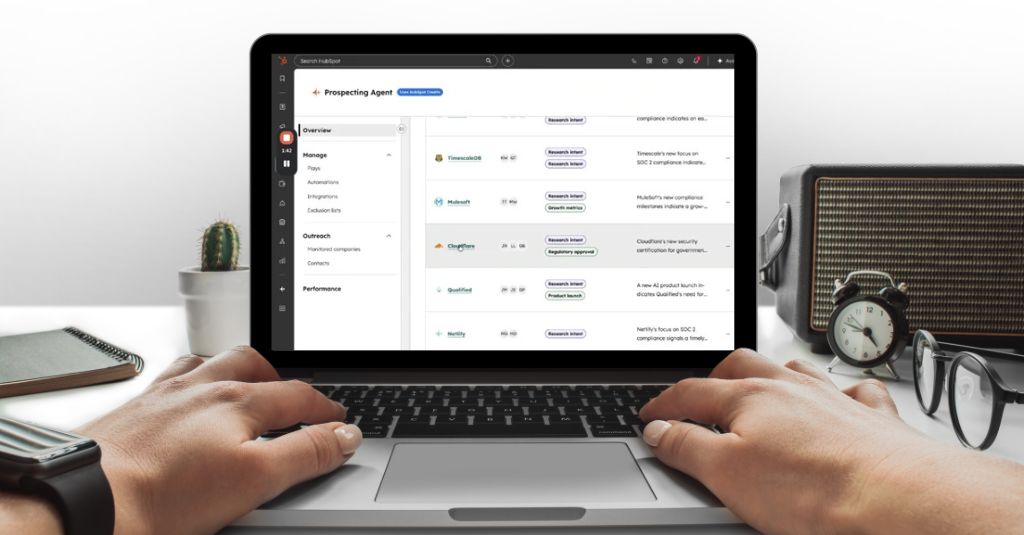
HubSpot Spotlight 2026 lands on April 14, and the three launches below could change how you generate leads, book meetings, and run customer support.
- A brand new tool that tracks how your business appears inside AI search engines like ChatGPT and Perplexity.
- A fully rebuilt sales prospecting agent that books meetings on your behalf.
- A repriced customer service agent that now charges you only when it actually resolves something.
Alongside those, there are meaningful updates across Sales Hub and Breeze that are worth knowing about, too.
For this update, HubSpot’s moved away from the 200-feature update dump and made a deliberate shift toward fewer, higher-impact launches built around one central idea: measurable outcomes over shiny new tools.
What’s dropping this month touches multiple areas that can directly affect your revenue and how you pull more ROI out of your HubSpot Portal, like:
- How buyers find you.
- How your sales team fills its pipeline.
- How your support function scales without adding headcount.
As a HubSpot Diamond Partner, RedPandas received a confidential early briefing on everything launching at Spring Spotlight 2026. And in this article, you’ll get a comprehensive breakdown of what’s new, what actually matters, and what you should do about it.
Don’t Have Time to Read the Full Article? Use Our AI Summariser
Copy and paste this prompt to ask your LLM everything about HubSpot’s new update:

Not sure how to use this? Copy the prompt above, open your preferred AI tool, paste it in, and hit send.
Your AI will do the rest. And once it’s done, you can ask it questions about any of the updates.
HubSpot AEO: The Biggest New Launch from HubSpot Spotlight 2026
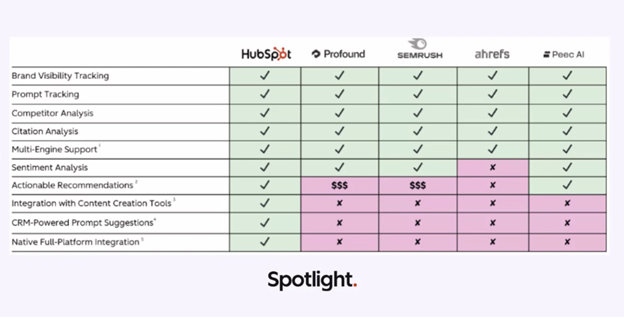
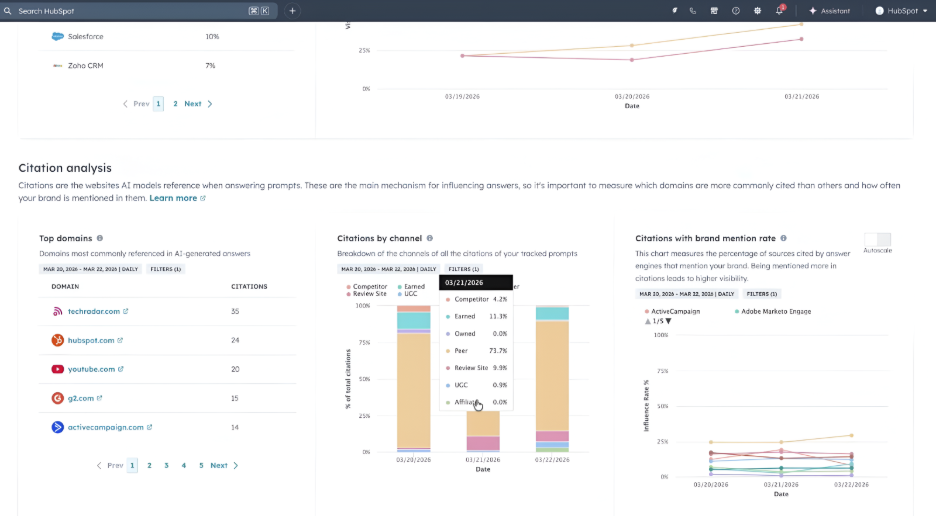
This tool tracks how your brand appears when AI platforms answer questions your buyers are asking, then tells you what content to create to improve your visibility.
Did you know that AI referral traffic converts at 3X the rate of traditional organic visitors? In fact, according to a study by Conductor, ChatGPT drives 87.4 per cent of all AI referral traffic.
Most businesses have zero visibility into how AI platforms describe them.
Your brand could be mentioned positively, negatively, inconsistently, or not at all… And you probably don’t know which.
That’s why in October 2025, HubSpot acquired XFunnel: one of the first platforms purpose-built to help businesses monitor their presence across AI answer engines.
And instead of bolting it on as a separate tool, HubSpot Spotlight 2026 integrates it directly into Marketing Hub.
That means your AEO data lives in the same platform as your CRM, your content, and your campaigns. The insights are powered by your actual customer data, not generic industry benchmarks.
What’s Inside the HubSpot AEO Tool?
| Feature | What it Does | The Benefit |
| Brand Visibility Score | Shows the percentage of tracked prompts where your brand appears across AI engines, tracked over time. | Gives you a baseline and trend line for how discoverable your brand is in AI search: the equivalent of a rankings overview for traditional SEO. |
| Sentiment Analysis | Scores the tone AI platforms use when describing your brand across three layers: General sentiment. Contextual sentiment: how it varies by topic or use case. Source-based sentiment: the credibility of sources shaping that characterisation. | Knowing you appear is only half the picture. Knowing whether AI describes you positively, neutrally, or negatively, and why, tells you where your reputation is at risk. |
| Share of Voice | Tracks how often your brand appears in AI responses relative to competitors in the same category. | Helps you understand whether you’re gaining or losing ground against competitors in the channels your buyers increasingly use for research. |
| Prompt Tracking | Monitors specific buyer questions against AI engines daily. Prompts are generated using your HubSpot CRM data, particularly your ICP, audience, and product details. Same prompts are categorised by buyer journey stages like awareness, consideration, and decision. | Prompts based on your actual CRM data are more accurate than generic guesses. Categorising by journey stage tells you whether your brand is showing up early in research or only at the decision point. |
| Citation Analysis | Identifies which websites AI platforms reference when your brand is mentioned, including: Content type. Domain authority. Channel. | If you know which types of sources AI relies on when talking about your brand, you can know exactly where to publish next to shift the narrative. |
| Recommendations Tab | Generates a prioritised action plan with full content briefs, including: Suggested title. Target audience. Relevant keywords. The rationale behind each recommendation | Turns AEO from a monitoring exercise into an execution plan. Your team can get specific content assignments based on what will actually move your visibility score. |
Prompt limits vary by plan: Marketing Hub Professional supports up to 50 tracked prompts, and Marketing Hub Enterprise supports up to 100.


How to Rank in AI Search With HubSpot’s New AEO Website Grader Tool
What Makes HubSpot’s New AEO Tool from HubSpot Spotlight 2026 Different
Three things set HubSpot’s AEO tool apart from standalone options:
- Your CRM data informs the prompts from day one: HubSpot pulls from your existing audience data, ICP definitions, and deal history to generate prompts that reflect what your actual buyers care about.
- You can act on recommendations without leaving HubSpot: When the tool tells you to create content, you can publish a blog post, draft an email, or schedule a social post directly inside the platform.
- It’s already included if you’re on Marketing Hub Pro or Enterprise: You’re not adding another monthly SaaS bill to track AI visibility; it’s part of what you’re already paying for.
The HubSpot AEO tool consolidates AI visibility measurement and content planning into the platform you’re already running.
And the fact that it’s included in your existing Marketing Hub plan, if you already have one, makes it one of the more straightforward wins in this release.
Sales Hub: The Prospecting Agent Overhaul
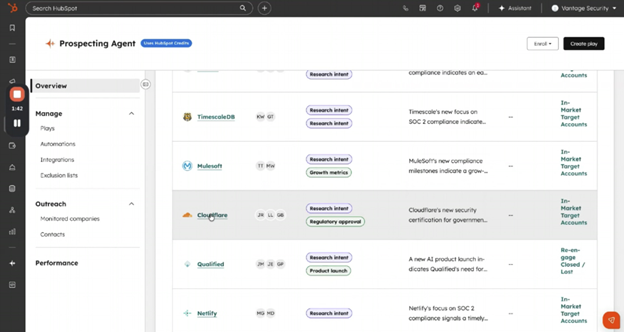
This tool showcased in HubSpot Spotlight 2026 automatically identifies high-intent accounts, prioritises outreach based on buying signals, and books meetings on your behalf, but now with outcome-based pricing.
Some of its features include:
- You only pay when the agent recommends a qualified lead for outreach, at $1 per qualified lead.
- Signal-driven prioritisation surfaces accounts showing actual buying intent.
- Eliminates the guesswork of which prospects to contact first.
- A 28-day free trial eases financial risk.
HubSpot has rebuilt the Prospecting Agent around two major upgrades:
- Signal-Driven Account Prioritisation analyses behavioural data across your CRM and external sources to score accounts based on likelihood to buy. It surfaces prospects who are actively showing intent, not just prospects who match your ICP on paper.
- Outcome-Based Pricing means you pay $1 per qualified lead the agent recommends for outreach, instead of a recurring monthly charge per enrolled contact. If the agent doesn’t surface a lead worth contacting, you don’t pay.
How Signal-Driven Prioritisation Works
| Signal Type | What It Tracks | The Benefit |
| Engagement Signals | Email opens, link clicks, content downloads, website visits, form submissions. | Shows which accounts are actively consuming your content and how frequently they’re engaging. |
| Intent Signals | Product page visits, pricing page views, demo requests, competitor comparison searches. | Indicates prospects researching solutions in your category and evaluating options. |
| Fit Signals | Company size, industry, revenue, tech stack, and job titles of engaged contacts. | Confirms whether the account matches your ICP and has budget authority. |
| Timing Signals | Funding announcements, leadership changes, tech stack changes, and hiring patterns. | Identifies moments when buying urgency increases or budgets open up. |
| Relationship Signals | Past interactions, previous deals, existing contacts, referral connections. | Prioritises warm accounts over cold outreach based on relationship history. |
The agent aggregates these signals into a priority score, then recommends which accounts your team should contact first.
The New Pricing Model
- Old model: Recurring monthly charge per enrolled contact regardless of whether the agent surfaced anyone worth reaching out to.
- New model: $1 per qualified lead recommended for outreach. No charge if the agent doesn’t identify a lead that meets your criteria.
Both the Prospecting Agent and Customer Agent now include a 28-day free trial.


What is HubSpot’s AI Prospecting Tool and How Does It Work?
HubSpot, through this Sales Hub update, now argues that outcome-based pricing only works if the agent actually delivers.
The company is positioning Smart CRM context as the reason the agent can make that guarantee: the more deeply it’s connected to your data, the more reliably it can surface the right lead at the right time.
Sales Hub: Meeting Notes + Smart Deal Progression
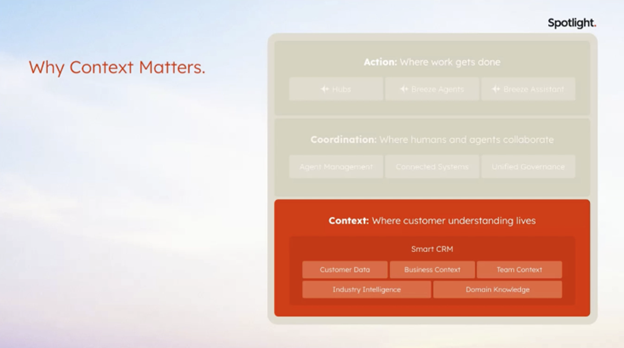
This tool analyses meeting transcripts and your full account history after every call, then suggests CRM updates, drafts follow-up emails, and surfaces next steps.
This:
- Eliminates post-meeting admin work.
- Connects to your entire relationship history, not just the most recent call.
- Ensures CRM data stays current without manual entry.
- Automatically generates contextual follow-up emails based on what was discussed.
After every call, Smart Deal Progression pulls from:
- The meeting transcript.
- Previous call notes and recordings.
- Email history with the account.
- Deal stage and pipeline position.
- Contact and company records.
It uses that context to generate three outputs:
- Suggested CRM field updates: Recommended changes to deal stage, close date, contact roles, or custom properties based on what was discussed.
- Draft follow-up emails: Contextual messages that reference specific points from the call and move the deal forward.
- Recommended next steps: Actions for your rep to take, like scheduling a demo, sending pricing, or looping in a decision-maker.
What Makes HubSpot’s Smart Deal Progression & Meeting Notes Different?
Most meeting intelligence tools transcribe calls and summarise what was said.
Smart Deal Progression goes further by connecting the current call to everything else you know about the account, then turning that into actionable CRM updates and next steps.
Your reps aren’t manually updating fields or writing follow-up emails from scratch. The system does it based on the conversation that just happened.

Best Practices for HubSpot Deals
The value of the Meeting Notes and Smart Deal Progression updates is less about any single feature and more about the compound effect.
A rep who finishes a call, gets a transcript-cited action item list, converts those to tasks in one click, approves a follow-up email that already references the last three conversations, and has their CRM updated automatically.
And the two features that allow all of these things to happen, based on HubSpot’s internal benchmarks, can help save your reps 20 to 30 minutes of admin on a single call.
Service Hub: Customer Agent Updates
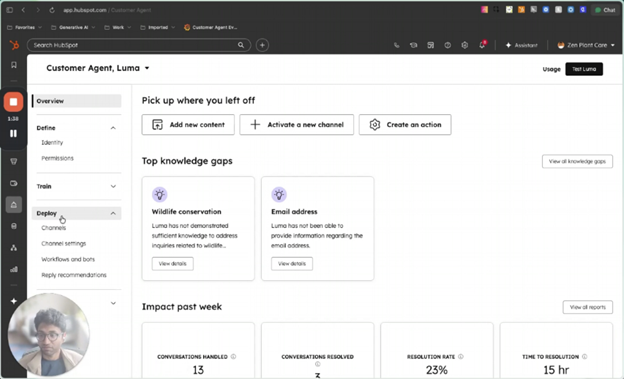
This handles customer support conversations autonomously, now with outcome-based pricing, deployment controls, and multi-brand support.
Some key things to note:
- You only pay when the agent resolves a conversation, at $0.50 per resolution.
- Working hours controls and percentage rollouts let you test safely.
- Multi-brand support means one agent can handle multiple product lines.
- Sentiment-based handoff triggers escalate frustrated customers to human reps automatically.
Customer Agent Feature Breakdown
The HubSpot Spotlight 2026 updates focus on three areas: pricing, deployment control, and capabilities. Here’s a quick rundown of the changes:
| Feature | What It Does | The Benefit |
| Outcome-Based Pricing | Charges $0.50 per resolved conversation. No charge if unresolved. | Aligns cost directly with value. You pay only when the agent successfully handles a customer query. |
| Working Hours Controls | Restricts agent activity to specific hours or days. | Lets you deploy the agent during high-volume periods and route to human reps outside those windows. |
| Percentage Rollouts | Gradually increases the percentage of conversations the agent handles. | Allows you to test performance on a small sample before scaling to full deployment. |
| Workflow-Based Deployment | Routes conversations to the agent based on customer segment, issue type, or account tier. | Ensures the agent only handles queries it’s equipped to resolve, avoiding frustration on complex cases. |
| Email Ignore Lists | Excludes specific email addresses or domains from agent interaction. | Protects VIP accounts or high-value customers from automated responses. |
| Email Testing Previews | Shows how the agent will respond to sample queries before going live. | Lets you verify tone, accuracy, and completeness before deploying to real customers. |
| Multi-Brand Support | Handles conversations across multiple product lines or brands from one account. | Eliminates the need to configure separate agents for each brand you support. |
| Sentiment-Based Handoff | Detects frustration or negative sentiment and escalates to a human rep automatically. | Prevents the agent from making a bad situation worse by attempting to resolve an already upset customer. |
| CSV and XLS File Ingestion | Accepts uploaded spreadsheets as knowledge sources for the agent. | Allows you to feed product specs, pricing tables, or internal documentation directly into the agent’s knowledge base. |
| Video Upload Support | Processes video files as knowledge sources. | Lets you train the agent on product demos, tutorials, or recorded training sessions. |
| Inline Citations | Includes sources in agent responses, showing which knowledge base article or document informed the answer. | Builds customer trust and makes it easier to verify accuracy or correct outdated information. |
The 28-day free trial applies to the Customer Agent as well.
Customer Agent’s pricing model now directly ties cost to value delivered.
The deployment controls mean you can start small and measure before committing, and the quality improvements mean the agent is better equipped to handle a wider range of queries without escalating unnecessarily.
HubSpot Breeze Assistant Updates After HubSpot Spotlight 2026
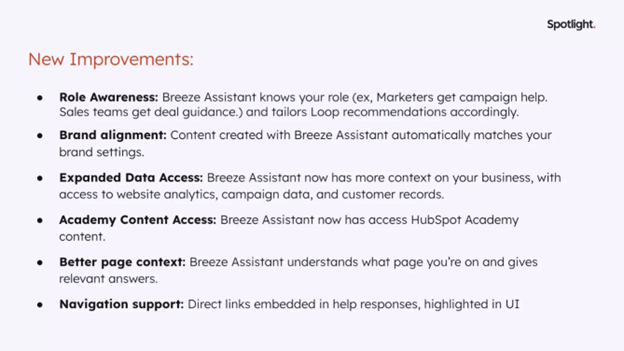
This provides role-aware, page-aware assistance tailored to what you’re working on, with direct access to HubSpot Academy content and an overhauled prompt library.
Some key things to note:
- Responses adapt based on whether you’re a marketer, salesperson, or service rep.
- Guidance changes based on the page or task you’re working on.
- Brand settings integration ensures content output aligns with your voice automatically.
- Shareable team prompts standardise how your team uses the assistant.
Breeze Assistant Feature Breakdown
The HubSpot Spotlight 2026 Breeze Assistant updates focus on contextual intelligence and team collaboration.
| Feature | What It Does | The Benefit |
| Role-Aware Responses | Tailors output based on whether you’re a marketer, salesperson, or service rep. | Eliminates generic advice and delivers suggestions relevant to your actual function and goals. |
| Page-Aware Guidance | Adjusts recommendations based on the page or task you’re working on. | Surfaces the right help at the right time instead of forcing you to describe your context in every prompt. |
| Brand Settings Integration | Auto-applies your brand voice, tone, and style guidelines to generated content. | Ensures consistency across all AI-generated output without manual editing or repeated instructions. |
| HubSpot Academy Access | Pulls answers directly from HubSpot Academy content inside the assistant. | Gives you immediate access to platform documentation and best practices without switching tabs. |
| Richer CRM and Campaign Data Context | Uses deeper context from your CRM records, deal history, and campaign performance. | Delivers more accurate and actionable recommendations based on your actual business data. |
| Overhauled Prompt Library | Lets you save, organise, and share prompts across your team. | Standardises how your team uses the assistant and eliminates repetitive prompt writing. |

How to Use HubSpot Breeze AI for Marketing, Sales and Customer Service
The Breeze Assistant updates in this release are incremental on their own.
Together, they shift how the assistant functions across your whole team.
The goal HubSpot is moving toward is an assistant that behaves less like a general-purpose chatbot and more like a well-briefed colleague; one that:
- Knows your role.
- Knows your data.
- Knows your brand.
- Knows what you’re currently working on.
The HubSpot Spotlight 2026 takes a meaningful step in that direction.
Frequently Asked Questions: HubSpot Spotlight 2026 Updates
What are the main HubSpot updates in HubSpot Spotlight 2026?
The main HubSpot updates in HubSpot Spotlight 2026 are:
- A new AEO tool for tracking brand visibility in AI search engines.
- A rebuilt Prospecting Agent with signal-driven account prioritisation and outcome-based pricing.
- Smart Deal Progression for automated post-meeting CRM updates.
- An overhauled Customer Agent with new deployment controls and multi-brand support.
- Role-aware upgrades to Breeze Assistant across all hubs.
When do the HubSpot HubSpot Spotlight 2026 updates go live?
The HubSpot HubSpot Spotlight 2026 updates go live on 14 April 2026.
This includes the AEO tool in Marketing Hub, Signal-Driven Account Prioritisation for the Prospecting Agent in public beta, and the new outcome-based pricing for both the Prospecting Agent and Customer Agent.
What is HubSpot AEO and what does it do?
HubSpot AEO is a tool inside Marketing Hub that tracks how your brand appears in AI search platforms like ChatGPT, Perplexity, and Gemini.
It gives you a Brand Visibility Score, sentiment analysis, share of voice against competitors, citation analysis, and a prioritised content recommendations tab, all powered by your CRM data.
How much does HubSpot AEO cost?
HubSpot AEO is included in Marketing Hub Professional and Enterprise plans.
A standalone free AEO Grader is also available with no account required, giving you a one-time scored snapshot of your brand’s AI visibility.
What changed with HubSpot Prospecting Agent pricing?
HubSpot updated Prospecting Agent pricing to an outcome-based model effective 14 April 2026.
Instead of a recurring monthly charge per enrolled contact, you now pay $1 per qualified lead recommended for outreach. Both the Prospecting Agent and Customer Agent now include a 28-day free trial.
What is HubSpot’s outcome-based pricing for AI agents?
HubSpot’s outcome-based pricing means you only pay when an AI agent completes a task successfully.
From 14 April 2026, the Customer Agent is priced at $0.50 per resolved conversation and the Prospecting Agent at $1 per qualified lead recommended for outreach.
What Should You Do Next?
You now know more about HubSpot Spotlight 2026 than most HubSpot users will when the launch goes live on April 14th.
The harder question is where to start, because not everything here is equally relevant to every business.
Here’s a simple way to think about it:
- If your biggest problem is lead generation: The Prospecting Agent overhaul and outcome-based pricing are worth your immediate attention. Run it against a defined segment and measure what it surfaces before deciding whether to scale.
- If your biggest problem is marketing ROI clarity: The AEO tool is the place to start. Run the free AEO Grader on your brand today. It takes five minutes and gives you a scored baseline across ChatGPT, Perplexity, and Gemini before you’ve spent a dollar.
- If your biggest problem is service efficiency or support costs: The Customer Agent pricing change means the conversation about deployment has fundamentally changed. Use the 28-day free trial to get it running on a contained set of queries and let the resolution data make the argument internally.
- If you’re wondering whether your reps are walking out of meetings into productive next steps or into a pile of admin: The Smart Deal Progression update is worth turning on this month. It’s available now, costs nothing extra at the Pro tier, and the time it saves compounds across every call your team runs.
The window to get ahead of competitors on these updates may not last for long.
In fact, most of your competitors are probably going to act on these new releases within a few days or weeks.
And the ones that move in the first few weeks are those that build a head start that’s difficult to close.
If you want help working out which of these updates is most relevant to your business, or you want a hand implementing any part of the HubSpot Spotlight 2026 launch inside your HubSpot portal, get in touch with the RedPandas team for a free consultation.

Does Your Portal Need Work? Here’s How to Do a HubSpot Health Check
About the Author





Get the best content marketing insights right in your inbox!
Subscribe to our Newsletter and get marketing insights delivered to your inbox every week.