









Are You Making These 6 Mistakes With Your HubSpot Sequences?

Key Takeaways
- Enrollment and unenrollment rules control who gets removed and when. Check whether unenrollment applies at the contact or company level in the Automation tab
- Personalisation tokens go blank without a default value. Set a fallback value for every token before enrolling a list into a HubSpot sequence
- Sending behaviour drives spam placement. Stay within HubSpot’s daily limits, authenticate your domain, and ramp new inboxes gradually
- Cadence and timing matter as much as messaging. Aim for 8 to 12 touches, spaced 2 to 3 days apart early on and 4 to 5 days apart later
- Workflows and sequences can collide. A contact can only sit in one sequence at a time, so define clear ownership between marketing automation and sales outreach
- Contact type doesn’t limit sequence eligibility. Non-marketing contacts can still receive HubSpot sequence emails, so there’s no need to inflate your marketing contact tier just to keep sequencing someone
At first, HubSpot sequences were supposed to fix your team’s follow-up problem.
But a few weeks after launch, the numbers tell a different story.
Reps are still chasing leads by hand. Contacts drop out of sequences overnight for reasons nobody can pin down.
You’ve rechecked the enrollment settings. You’ve re-read the personalisation tokens twice.
So why are your HubSpot sequences still not making a difference in your follow-up strategy?
As a HubSpot Diamond Partner, RedPandas has built and rebuilt Sales Hub sequences for B2B and SaaS clients across Australia. The mistakes behind stalled sequences almost always sit in the same six places.
This article walks through each one, why it happens, and exactly how to fix it in your own portal.
For the broader playbook on getting sequences right from the start, see our HubSpot sequences best practices guide.
Quick Answer
Underperforming HubSpot sequences usually trace back to one of six fixable mistakes:
- Broken enrollment or unenrollment rules
- Missing personalisation data
- Spam-triggering content
- Poor cadence timing
- Workflow conflicts
- Wrong contact types
Most HubSpot sequences fail at the first two, since HubSpot blocks or drops enrollment for reasons like bounced addresses, blocked domains, and unsubscribes before a single email is sent.
By fixing these six settings in order, most RedPandas clients see reply rates on their HubSpot sequences recover within one to two weeks.
If you’d rather have someone confirm the fix before you touch a live sequence, that’s exactly the kind of audit RedPandas runs as a HubSpot Diamond Partner. Get in touch through the link below for a free consultation, and we’ll work through this same checklist on your portal together:

Get In Touch With RedPandas’ HubSpot Experts
Mistake #1: Your HubSpot Sequences Enrollment and Unenrollment Rules Are Misconfigured
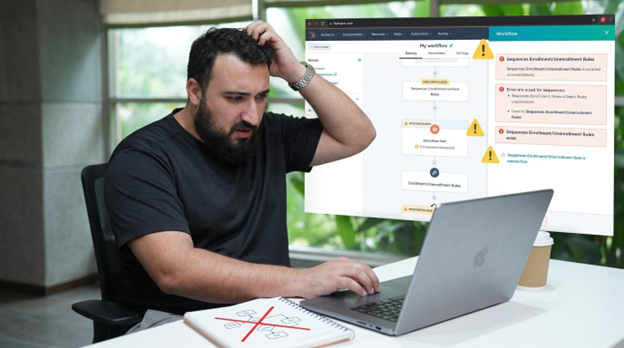
HubSpot sequences unenrol contacts automatically once certain triggers fire.
In the Automation tab of each sequence, two toggles control this:
- Unenrolling a contact when they reply
- Unenrolling a contact when they book a meeting.
Both default to on. For each toggle, you also need to choose whether that unenrollment applies to “the contact” or “all contacts at the company”.
If the company-level option is switched on and one person at a target account replies, HubSpot pulls every other contact at that company out of the sequence… Even if they’ve never opened an email.
Sales teams working with enterprise accounts often flag this as a broken sequence when the setting is working exactly as configured.
Contacts can also fail to enrol in HubSpot sequences in the first place. HubSpot blocks enrollment for reasons that never show up in your open or reply metrics:
- A bounced or blocked email address
- A contact who previously marked an email as spam
- An account that’s hit its daily sending limit
- A personal inbox that’s silently disconnected from HubSpot
- A contact already enrolled in another active sequence
How to Fix Enrolment Issues With Your HubSpot Sequences
Open the sequence, go to the Automation tab, and check both unenrollment toggles.
Decide deliberately whether you want individual or company-level unenrollment. For account-based selling, contact-level is usually the safer default.
Then check why specific contacts didn’t enrol. HubSpot flags the exact reason, whether it’s bounced, blocked, unsubscribed, or rate-limited, against each failed enrollment.
Reconnect your personal inbox if it shows as disconnected and confirm your account hasn’t hit its daily sending cap before assuming your HubSpot sequences themselves are broken.
Mistake #2: Your HubSpot Sequences Send with Broken or Blank Personalisation Tokens
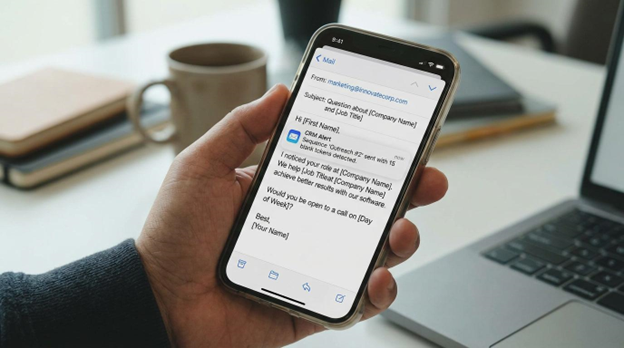
Personalisation tokens pull data straight from the contact record: first name, company, job title, and whatever other property you’ve inserted.
If that property is empty on the contact record and no fallback value has been set, HubSpot shows the token as blank rather than skipping it or filling in a guess.
This usually slips through testing because whoever builds the HubSpot sequence tests it on their own contact record, or a colleague’s, and those records are already filled in. The gap only shows up once real prospects that often have incomplete records start receiving the sequence.
How to Fix Broken Personalisation in HubSpot Sequences
Before you enrol a list into a HubSpot sequence, check how complete the properties are that your tokens rely on.
A quick list or report filtered by “First name is unknown” shows you the size of the problem.
Then set a default value for every token you use. You can either:
- Set this globally under your account’s Personalisation settings
- Override it on a single token by unchecking “use this property’s global default value” and typing your own fallback text
Finally, test-send your HubSpot sequence to a contact record you’ve deliberately left incomplete, not just your own inbox. That’s the only way to see what your prospects will actually see.
Mistake #3: Your HubSpot Sequences Are Triggering Spam Filters
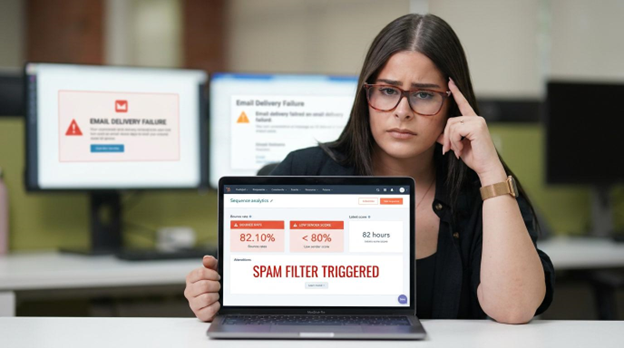
Inbox providers watch how a sending account behaves over time.
A new or freshly reconnected inbox that suddenly sends at full volume looks exactly like a compromised account to Gmail or Microsoft, even when a real person is behind every message.
HubSpot puts its own ceiling on this.
Sales Hub Professional seats can send up to 500 sequence emails a day, and Enterprise seats up to 1,000.
If you’re still deciding which seat you need, we’ve broken down Sales Pro vs Sales Starter and how to know when you’ve outgrown Sales Hub Starter altogether.
Your actual email provider caps you further underneath that: Gmail free accounts allow 350 emails a day, while Google Workspace and Microsoft 365 accounts allow 1,000.
Sending close to either ceiling from a brand-new inbox is a fast route to a spam folder.
HubSpot also calculates a sender score for every sequence, based on its reply and bounce rates once it’s logged at least 100 ended enrollments. HubSpot considers a reply rate between seven and 13 per cent and a bounce rate under three per cent healthy.
Fall outside either range and inbox providers start treating your HubSpot sequences as suspicious, often before you’ve spotted a problem yourself.
How to Fix Spam Issues in HubSpot Sequences
Authenticate your sending domain with SPF and DKIM records before running high-volume HubSpot sequences.
Ramp new or reconnected inboxes up gradually over the first couple of weeks instead of sending at your full daily limit immediately. Clean out hard-bounced addresses on a regular schedule, since bounce rate feeds directly into your sequence’s sender score.
Watch reply rate as your earliest warning sign. A HubSpot sequence dipping below seven per cent is worth a deliverability check straight away.
Mistake #4: Your HubSpot Sequences Are Timed Wrong
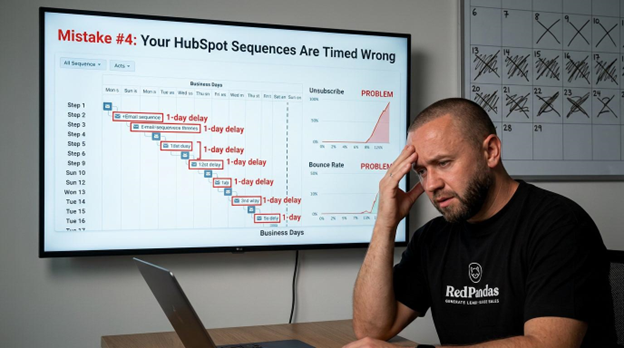
A HubSpot sequence with the right message can still fail purely on timing.
Too many touches too close together reads as pressure. Too few touches, spaced too far apart, let the prospect forget who you are.
HubSpot’s own guidance recommends eight to 12 touchpoints for most B2B sequences: ten to 12 steps for cold outreach where you’re building awareness from nothing, and 6 to 8 for warmer leads or event follow-up.
Sequences built with 15 or 20 steps at daily intervals tend to fatigue prospects and inflate the bounce and unsubscribe rates that feed your sender score.
Spacing matters as much as step count. HubSpot recommends touches two to three days apart for the first two weeks, then stretching to four to five days apart after that.
Sending on Monday mornings or late on a Friday also tends to underperform, since prospects are either catching up on a backlog or already checked out for the weekend.
There’s a settings-level trap here too.
By default, HubSpot sequences only send on business days, and the delay you set between steps counts business days, not calendar days.
A “three-day delay” set on a Thursday will land the next email the following Wednesday, not Sunday, which can quietly stretch your cadence further than you planned.
For more on getting the tone and timing right on individual touches, see our guide to the art of the perfect sales follow-up.
How to Fix Cadence Timing in HubSpot Sequences
Match your step count to the lead type. Use ten to 12 steps for cold prospects and six to eight for warm ones, rather than running every list through the same template.
Space early touches two to three days apart, then widen the gap to four to five days as the sequence goes on.
Check the “Execute steps on business days only” toggle in the sequence’s Settings tab so your delays land where you expect.
Use the Automated email send window to let HubSpot pick the best send time from your prospects’ past open behaviour, instead of hardcoding a single send hour for the whole sequence.
Mistake #5: Your HubSpot Sequences Are Colliding with Active Workflows

A contact can only sit in one HubSpot sequence at a time.
Most teams don’t find that out until a rep tries to manually add someone to a workflow they’re already enrolled in, and nothing happens.
It’s crucial to consider that HubSpot enforces a single-sequence rule per contact: if a workflow has already placed someone in a sequence, a rep’s attempt to enrol that same contact in a different one is silently skipped rather than queued or flagged.
Automating sequence enrollment and unenrollment from a workflow is an Enterprise-only feature. Professional accounts don’t have it, so teams often try to recreate the same logic by hand using the sequence’s own Automation tab.
The problem here is that the two systems end up with slightly different rules for the same contact.
Even without a direct enrollment conflict, a marketing workflow and a sales sequence can run on the same contact at once.
A lifecycle-stage nurture email and a rep’s personal sequence email can land in the same inbox the same day, undercutting the one-to-one tone a sequence is meant to have.
A deal stage change from a workflow also doesn’t automatically pause a running sequence. That only happens if someone has built it as a trigger in the Automation tab.
Send limits create a second failure point here too.
If a workflow tries to enrol a contact into a HubSpot sequence and the sending user has already hit their daily cap, HubSpot skips that enrollment instead of holding it for later.
How to Fix Workflow Conflicts in HubSpot Sequences
Decide, in writing, which lifecycle stage marks the handoff from marketing workflows to sales sequences, and unenrol contacts from nurture workflows the moment they cross it.
Don’t let both systems claim the same contact indefinitely.
If you’re on Enterprise and automating enrollment through workflows, avoid broad criteria like “create date is today,” avoid enrolling more than 100 contacts in one go, and avoid automating enrollment for freshly imported cold lists.
Build a deal-stage or meeting-booked unenrolment trigger into each sequence’s Automation tab so a sequence stops the moment a deal moves without needing a person to catch it.

How to Set Up HubSpot Workflows
M1istake #6: Your HubSpot Sequences Are Enrolling the Wrong Contact Type
Some HubSpot sequences cost more than they should.
But, unlike what most expect, it’s not because the sequence itself is expensive. Instead, it’s because of who’s sitting in your database as a “marketing contact”… Even if it’s for no real reason.
HubSpot sequences send through a separate “One-to-One” email subscription type, distinct from the marketing email subscription.
Marketing contact status only governs marketing emails and ad tools, so it has no bearing on whether someone can be enrolled in a sequence.
That distinction gets missed constantly.
Sales and RevOps teams often assume that setting a contact to non-marketing cuts off all communication, so they keep prospects marked as marketing contacts purely to preserve the ability to sequence them later.
Every one of those contacts counts toward your marketing contact tier and the bill that comes with it, for a permission the contact never needed in the first place.
The mistake also runs the other way.
A contact who unsubscribes from marketing emails hasn’t necessarily opted out of the One-to-One subscription type that HubSpot sequences actually check.
Assuming an unsubscribe covers everything, without checking that specific subscription, risks either:
- Skipping a contact who’s still fair game for sales outreach
- Sequencing someone who explicitly opted out of one-to-one contact
For the full rundown on keeping this list clean, see our guide on how to manage your HubSpot marketing contacts, or download our HubSpot pricing guide if you want to see exactly what each tier costs.
How to Fix Contact Type Mistakes in HubSpot Sequences
Set contacts to non-marketing whenever they don’t need marketing emails or ads, and stop keeping them as marketing contacts just to keep sequencing them. Sequences don’t require marketing status at all.
Before enrolling a list into a HubSpot sequence, check the contact’s One-to-One subscription status specifically, not just their marketing email subscription.
Then, audit your marketing contact list periodically for anyone who’s only there because someone assumed sequences needed it. You can move them to non-marketing to stop unnecessary tier creep after.
Frequently Asked Questions: HubSpot Sequences
What common mistakes should I avoid when using HubSpot sequences?
Most HubSpot sequence problems fall into six categories: misconfigured enrollment or unenrollment rules, personalisation tokens with no default value, spam-triggering sending patterns, wrong cadence timing, conflicts with active workflows, and incorrect contact type. These are also common contributors to why businesses fail at lead generation with HubSpot, more broadly.
Why is my HubSpot sequence not sending emails?
A HubSpot sequence usually stops sending because of a blocked or bounced contact email address, a disconnected personal inbox, or a daily sending limit that’s already been hit. Sales Hub Professional seats can send up to 500 sequence emails a day and Enterprise seats up to 1,000, and any enrollment attempted after that cap prompts you to choose a different send day.
Why do contacts keep getting unenrolled from my HubSpot sequence?
HubSpot automatically unenrolls a contact from a sequence when they reply, book a meeting through a sequence email, unsubscribe, or bounce. If the “unenroll contacts from the same company” setting is switched on for either trigger, one person’s reply can remove every other contact at that company too.
How many emails can I send per day with HubSpot sequences?
Your daily limit depends on both your HubSpot seat and your email provider. Sales Hub Professional seats cap sequence sending at 500 emails a day and Enterprise seats at 1,000, while your provider adds its own ceiling underneath that: 350 a day for Gmail free accounts and 1,000 a day for Google Workspace or Microsoft 365.
Can non-marketing contacts receive HubSpot sequence emails?
Yes. HubSpot sequences send through a separate “One-to-One” email subscription type, not the marketing email subscription, so marketing contact status has no bearing on sequence eligibility. Keeping a contact marked as marketing purely to preserve sequencing rights only adds unnecessary cost to your marketing contact tier.
How many steps should HubSpot sales sequences have?
HubSpot recommends 8 to 12 touchpoints for most B2B sequences: 10 to 12 steps for cold outreach where you’re building awareness from scratch, and 6 to 8 steps for warmer leads or event follow-up. Space early touches 2 to 3 days apart, then widen the gap to 4 to 5 days as the sequence continues.
Do HubSpot sequences send on weekends?
HubSpot sequences send on business days only by default. You can switch off the “Execute steps on business days only” toggle in the sequence’s Settings tab to allow weekend sending, and the delay you set between steps counts business days rather than calendar days unless you do.
What is a good reply rate for HubSpot sequences?
HubSpot treats a reply rate between 7% and 13% as healthy for a sequence, alongside a bounce rate under 3%. These two metrics feed directly into the sequence’s sender score, which HubSpot calculates once a sequence has logged at least 100 ended enrollments.
Fix Your HubSpot Sequences Before They Ruin Your Reputation
Every day a broken setting runs unnoticed inside your HubSpot sequences, it’s quietly shaping how HubSpot and your prospects’ inboxes see you.
A sender score doesn’t reset overnight, and a prospect who got a blank first name or a spam-folder email doesn’t forget that first impression just because the next one’s better.
Here’s the encouraging part: none of the six fixes in this article take more than an afternoon.
Flip a toggle, set a default value, test-send to a messy contact record, and you’ll typically see movement in reply rates within your next send cycle.

Does Your Portal Need Work? Here’s How to Do a HubSpot Health Check
About the Author
This article was written by the team at RedPandas Digital, a HubSpot Diamond Solutions Partner based in Sydney, Australia. RedPandas is one of a small number of agencies accredited under HubSpot’s Partnered Scale Onboarding programme, and has delivered results including a 49.8% revenue increase and 378% lead growth within five months for an Australian client.
About the Author




Get the best content marketing insights right in your inbox!
Subscribe to our Newsletter and get marketing insights delivered to your inbox every week.