









HubSpot Leads vs. HubSpot Deals: What’s the Difference?

Picture this: Someone submits an enquiry in HubSpot.
A deal gets created instantly because that’s what your team has always done. And suddenly, that “opportunity” sits in your pipeline for days or weeks before you even know what they want.
And while that deal sits there doing nothing, your reporting quietly breaks behind the scenes.
Your time-to-close jumps. Your forecast drifts. And your pipeline looks full… but half of it isn’t real.
This is the exact moment where most teams start asking:
“Why does HubSpot separate leads and deals, and how are we supposed to use them properly?”
You’ve got Contacts in one place, a Lead Pipeline in another, and then Deals in a completely different workspace that tracks commercial value.
And because these areas look similar but behave differently, it’s incredibly easy for teams to blur the lines between them.
In this article, you’ll learn the real difference between leads and deals in HubSpot, how the Lead Pipeline works, why it exists, and how using both correctly makes a difference when you’re trying to grow revenue.
What Are HubSpot “Leads”?
If the word “lead” feels confusing in HubSpot, you’re not imagining it.
For years, a “lead” simply meant a contact who showed interest. But with HubSpot’s newer Lead Object, the definition shifted into something more practical and useful for sales teams trying to separate noise from real opportunities.
In HubSpot, a lead is a contact who needs qualification before you confirm if they’re a genuine opportunity or not.
And the CRM now gives you a dedicated place for that qualification work: the Lead Pipeline, which lives inside the Lead Object.
Think of the Lead Pipeline as a waiting room in a doctor’s office: everyone in the waiting room is a contact, but not everyone is ready to see the specialist.
Some people will be sent straight through, some need a quick check, and others will be sent home.
The Lead Pipeline exists for that exact “sorting” moment.


HubSpot Lead Object What You Need to Know
So, what belongs in the Lead Pipeline?
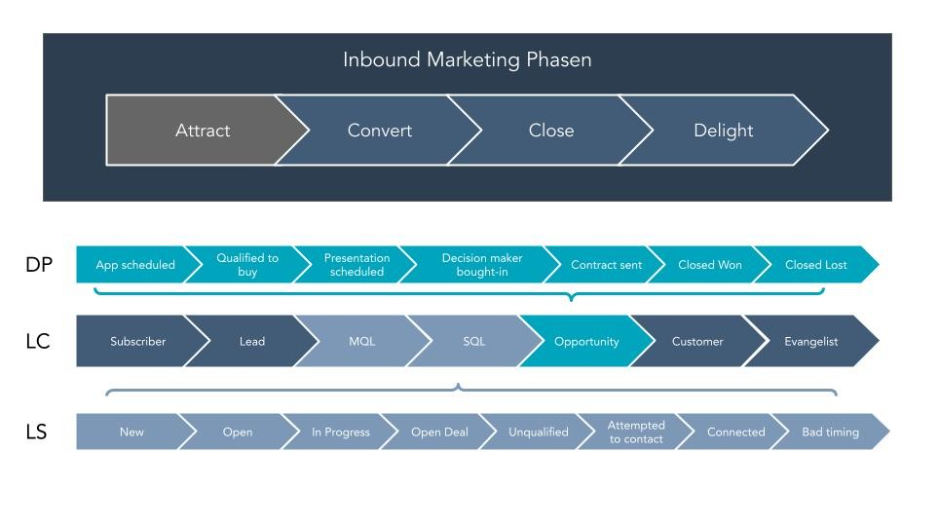
Before we get into the specifics, it helps to anchor this with a simple rule:
If you don’t know enough to decide whether someone is worth pursuing, they belong in the Lead Pipeline.
These are the kinds of enquiries that should enter the Lead Pipeline:
- New website enquiries who you know almost nothing about.
- Contacts from events or webinars.
- Form submissions without clear intent (like “Download Our Guide”).
- Early-stage questions or general enquiries.
- People who haven’t confirmed a budget, fit, or need.
In other words, anything that hasn’t earned the right to become a deal yet.
If your sales team still can’t answer basic qualifying questions like “What do they want?” or “What’s the potential value?”, then the Lead Pipeline is where that discovery work should happen.
Why does the Lead Pipeline need its own stages?
It’s important to remember what this pipeline is designed for: speed, clarity, and quick sorting.
This means that the Lead Pipeline isn’t a full sales pipeline, it’s a pre-pipeline.
That’s why its stages are deliberately minimal:
- New: The contact’s just landed; no action yet.
- Attempting: Your team is trying to reach them and gather information.
- Qualified: You now know enough to say, “Yes, this is worth opening a deal.”
- Not Now: They’re not a fit, not ready, or not worth pursuing today.
These stages help you maintain momentum without skipping important steps. They also prevent your actual sales pipeline from filling up with unqualified enquiries that stall, skew your metrics, and waste your team’s time.


How Can You Track Where Your Leads Come From in HubSpot?
Here’s the part most businesses misunderstand: All leads are contacts, but not all contacts should become leads.
Contacts are everyone. Leads are the people you’re actively qualifying. And only once they’re qualified should they become deals.
This simple separation stops your deal pipeline from becoming a database packed with random form fills, half-formed opportunities, and “maybe someday” conversations.
A clean lead qualification process gives you cleaner pipeline data, more accurate forecasts, and far fewer internal arguments about “lead quality” vs “sales follow-up.”
And that’s exactly why HubSpot built the Lead Object in the first place.
What Are HubSpot “Deals”?
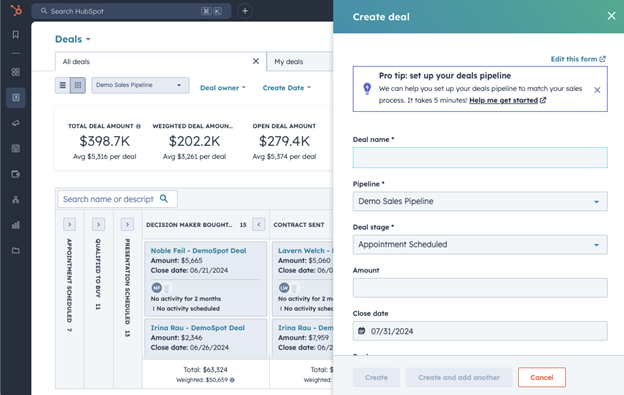
If the Lead Pipeline is where you’re figuring out whether someone’s worth your team’s time, the Deal Pipeline is where you’re managing actual revenue opportunities.
The difference between the two is subtle in theory, but enormous in practice.
And getting this part right is what prevents your reporting, forecasting, and decision-making from falling apart.
Think of it this way: a lead is an unopened envelope, and a deal is the contract inside it.
You don’t treat an unopened envelope like a signed agreement, and you definitely don’t start forecasting revenue from it.
Deals work the same way: you only create one when you finally know what’s inside.
A Deal Exists to Track Real Commercial Opportunity
A deal should only be created once you have enough information to attach a potential dollar value to an opportunity.
Before then, you’re working with assumptions. But after that moment, you’re working with an opportunity.
Here are the signs that a lead could be worth qualifying as a deal:
- You’ve had a conversation that confirms their need for your offer.
- You know roughly what they’re interested in.
- You understand whether they fit your ideal customer profile or not.
- You have enough detail to estimate value or propose pricing.
Watching out for these key indicators will give you a clear mark of whether someone has shifted from curiosity to commercial intent or not. And by moving someone from lead to deal, you’re past figuring out whether they’d buy your product or not and are now focused on closing a sale.

Best Practices for HubSpot Deals
Why Creating Deals Too Early Breaks Your Reporting (and Punishes Your Sales Team)
Many teams create a deal the moment a form is submitted. On the surface, this feels efficient: “We have an enquiry, let’s track it.”
But this one habit is what could corrupt your data more than anything else.
When you create a deal too early, you immediately start the clock on that opportunity. But qualification might take days or even weeks.
Take this situation, for example:
- Someone submits a form on Sunday.
- They disappear for a week.
- You finally reach them.
- Only then, after they respond, do you learn enough to decide it’s a real opportunity.
But if this deal’s been sitting in your pipeline this whole time, that could mean that your:
- Time-to-close skyrockets.
- Pipeline ageing looks terrible.
- Rep performance appears worse than reality.
- Forecasting becomes unreliable.
In a situation like this, you could end up blaming your sales team for “being slow” when the truth is the opposite: the deal simply existed before the sales process even began.
To put it simply, doing this is like starting a stopwatch before the race begins and then wondering why the athletes look slow.

How to Get More ROI from HubSpot (without spending more)
Here’s the reason HubSpot introduced the Lead Object, and why experienced CRM teams embrace it: it keeps early noise out of your revenue pipeline.
Once you separate qualification from opportunity by splitting both leads and deals:
- Leads live briefly in the Lead Pipeline while you gather essential info.
- Only qualified leads become deals.
- Deals reflect actual sales activity.
- Your time-to-close becomes accurate.
- Your pipeline becomes a clear, honest reflection of revenue.
- Your team can trust the numbers again.
When leads and deals are kept separate, your entire CRM suddenly feels cleaner, faster, and easier to manage.
The Relationship Between HubSpot Contacts, Leads, and Deals
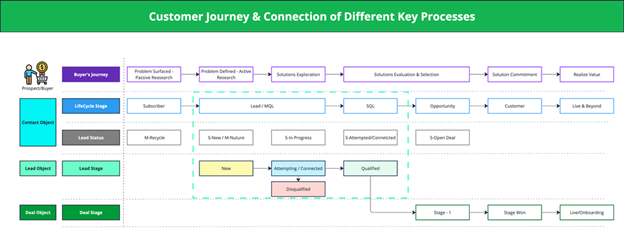
Understanding how Contacts, Leads, and Deals relate to each other is the single biggest factor that determines whether your HubSpot data is clean or chaotic. When these three concepts blur together, your CRM becomes noisy and misleading.
But when they’re used correctly, everything becomes structured and predictable.
HubSpot works best when you treat these three layers as a progression, not a guess:
Contact → Lead Pipeline (qualification) → Deal Pipeline (opportunity)
- Contacts = everyone.
- Leads = people you’re qualifying.
- Deals = people you’re selling to.
This flow is like running a café: everyone who walks in is a contact, people reading the menu or asking a question are leads, and people placing an order at the counter are deals.
When you use this flow correctly, your CRM can become cleaner, your reporting might become more accurate, and your revenue conversations will probably stop relying on guesswork.
And, the most important part is that every team, from marketing and sales to leadership, begins speaking the same language.
Which One Should You Actually Focus On?
Leads and deals serve very different purposes inside HubSpot, and each plays a role in keeping your revenue engine healthy.
But depending on what you’re focused on, whether it’s demand, pipeline performance, or revenue clarity, you’ll naturally gravitate toward one more than the other.
Here’s a table to help you understand their importance in a way that enables you to make better decisions:
| Your current goals | What to focus on? |
| Filling the top of funnel and getting more leads | Generate contacts and focus on the lead pipeline |
| Converting more deals | Focus on the deals pipeline and converting more leads into deals |
| Reporting clarity and revenue clarity | Focus on reviewing whether each team member is using each pipeline correctly, and then build dashboards for accurate reporting |
The System Only Works When Each Part Does Its Job
Understanding leads and deals isn’t admin. It’s how you protect the truth in your pipeline. It’s how you prevent your team from chasing ghosts, misreading performance, or forecasting numbers that were never accurate to begin with.
When you delay tightening this process, the cost quietly compounds:
- Deals age inaccurately.
- Reports drift further from reality.
- Lead quality becomes harder to diagnose.
Before you know it, you’re making decisions based on data that doesn’t tell the real story. Fixing this isn’t hard… but waiting always is.
From here, you can start by reviewing how enquiries move through your Lead Pipeline and when deals are actually being created.
That single exercise will reveal more about the health of your revenue engine than most dashboards ever will.

Does Your Portal Need Work? Here’s How to Do a HubSpot Health Check
About the Author




Get the best content marketing insights right in your inbox!
Subscribe to our Newsletter and get marketing insights delivered to your inbox every week.