









SEO Grader: 6 Free & Paid Tools to Check Your Site (2026)

Last updated 4 November 2026. Tools and pricing checked in November 2026.
Key Takeaways
- SEO graders scan your website and score it on speed, mobile-friendliness, security and on-page SEO
- The best free SEO graders are HubSpot Website Grader and Google PageSpeed Insights. Semrush and Ahrefs run deeper paid site audits
- Different SEO graders weigh issues differently, so compare the problems they flag, not just the score
- Fix what stops Google from crawling and indexing your pages first, then work on speed and mobile
- A high score doesn’t guarantee leads. Your site still needs working forms, tracking and lead capture
Quick Answer
An SEO grader scans your website and scores how search-friendly it is, flagging issues with speed, mobile, security and on-page SEO. The best free options are HubSpot Website Grader and Google PageSpeed Insights. Semrush and Ahrefs offer deeper paid audits.
Use the score to find problems, then fix the issues that block Google first.
But a good score doesn’t mean that your site brings in leads.
Our free HubSpot consultation checks what happens after visitors arrive: forms, tracking and lead capture. Book a call with our experts through the link below:


Want to Get More Leads From Your Website?
Ever feel in the dark about how well your website performs in search engines? You’ve heard that SEO is crucial, but knowing what to improve—and where to start—can feel overwhelming.
This is where website SEO graders come in.
SEO graders are tools that provide a snapshot of your site’s strengths and weaknesses, helping you understand what needs attention.
Yet, 95/100 from an SEO grader doesn’t mean you’ll rank. Plenty of sites with near-perfect scores sit on page five, while scrappy sites with a 70 own page one. The score is a checklist, not a strategy.
But how do you use these tools effectively, and what should you focus on once you’ve got your results?
In this article, you’ll learn how to harness SEO graders to boost your website’s performance.
By the end, you’ll know not only how to interpret the scores these tools provide but also how to take actionable steps that will move the needle on your SEO strategy.
What is a Website SEO Grader?
A website SEO grader is a tool designed to analyse various aspects of your website and provide an overall “score” or assessment of its performance in search engine optimisation (SEO).
These tools evaluate key factors that impact how search engines, like Google, rank your site—everything from page speed and mobile-friendliness to keyword usage and backlink quality.
SEO graders are especially helpful because they offer a quick, at-a-glance report on your site’s strengths and weaknesses. They show you which areas need improvement and recommend ways to strengthen your SEO strategy. Whether you’re a business owner with limited SEO experience or a seasoned marketer, these tools simplify optimising your website for search engines.
In short, SEO graders are like diagnostic tools for your website—they help you identify what’s working, what’s not, and where you should focus your efforts to improve your site’s visibility.
SEO Grader vs Page Grader vs SEO Analysis
- SEO grader: scores a whole website (speed, mobile, security, technical SEO) and flags issues. Examples: HubSpot Website Grader, Semrush Site Audit
- Page grader: scores a single page against a target keyword, checking the title, headings, content and internal links. Example: Moz’s on-page grader
- SEO analysis: the human step. You take the grader’s findings, check them against your rankings and traffic in Google Search Console, and decide what to fix first
Popular SEO Graders: Which Ones to Use?
With so many SEO graders available, it can be hard to know which one is right for you.
While some are free and give you a basic overview, others offer more in-depth analysis and advanced features, often for a fee.
Here’s a summary of the best SEO website graders:
| Tool Name | Best For | Features | Pricing |
| HubSpot Website Grader | Quick overall health check | Scores performance, SEO, mobile and security out of 100, with fix suggestions | Free |
| Google PageSpeed Insights | Site speed and performance analysis | Page load times, mobile-friendliness, interactivity, and visual stability; offers speed improvement suggestions | Free |
| Ahrefs’ SEO Checker | Full-site SEO analysis, including backlinks | On-page SEO audit, backlink analysis, keyword optimisation, broken links detection | Paid (Limited free version) |
| SEMrush Site Audit | Comprehensive SEO analysis, competitor research | Checks for 140+ SEO issues, internal linking audit, page speed, meta tags, competitor insights | Paid (Free trial available) |
| Ubersuggest SEO Analyzer | Beginners looking for an easy-to-use free tool | Technical SEO audit, keyword ideas, backlink opportunities | Paid (Free trial available) |
| Moz SEO Analyzer | In-depth keyword and on-page SEO analysis | On-page optimisation, keyword analysis, domain authority insights, meta tags review | Paid (Free trial available) |
Here’s some more detail on each of these website graders.
1. HubSpot Website Grader (Free)
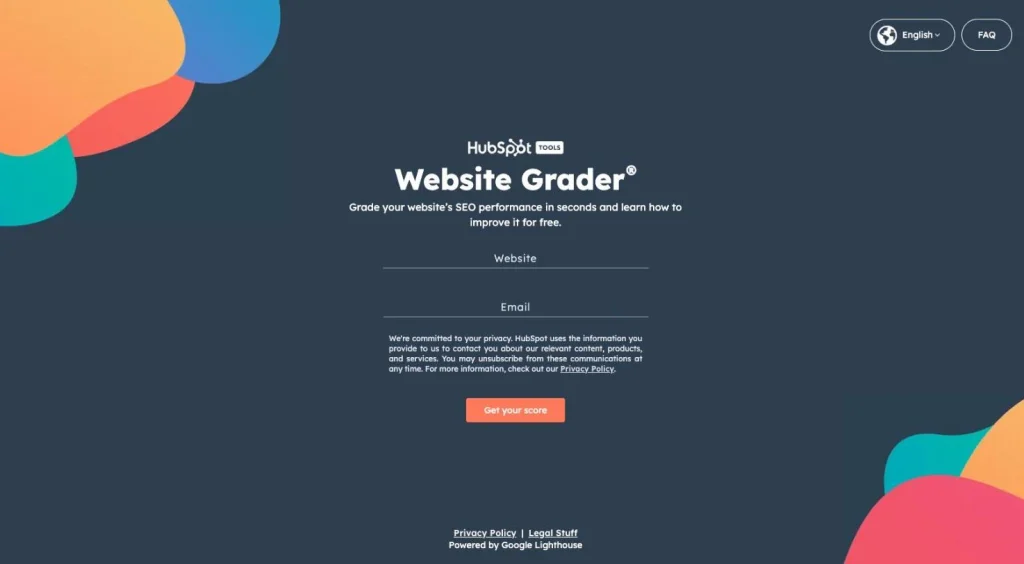
HubSpot’s Website Grader is one of the simplest free SEO graders. Enter your URL and email address, and it scores your site out of 100 across four areas: performance, SEO, mobile and security. Each area comes with plain-English fixes.
It won’t give you keyword or backlink data, but it’s a quick health check for business owners who want to know where to start.
Best for: a fast, free snapshot of your site’s overall health before you dig deeper.
2. Google PageSpeed Insights (Free)
Google’s tool focuses on your website’s speed and performance on both mobile and desktop. It provides scores for different metrics such as LCP (loading), INP (interactivity) and CLS (visual stability). INP replaced FID in March 2024.
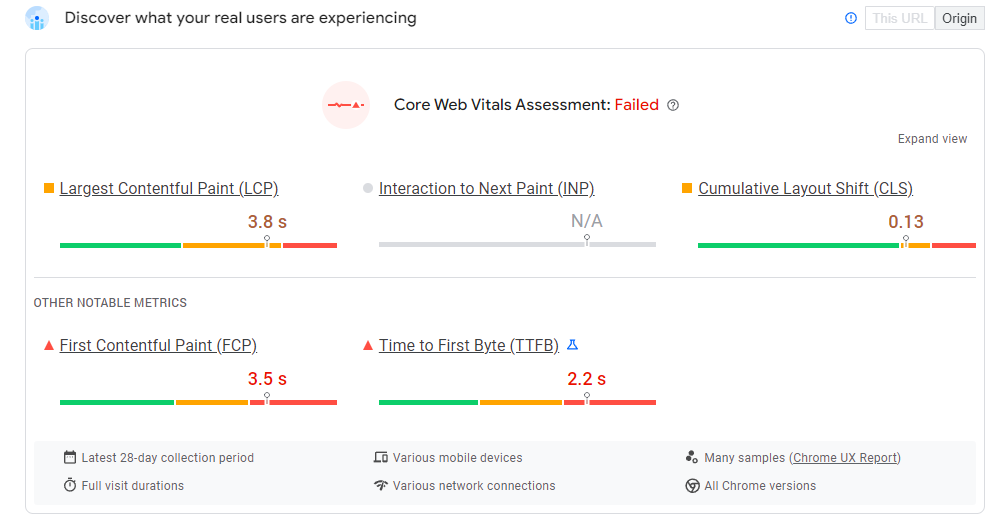
PageSpeed Insights also offers suggestions to improve your site’s speed, a crucial factor in both user experience and SEO rankings.
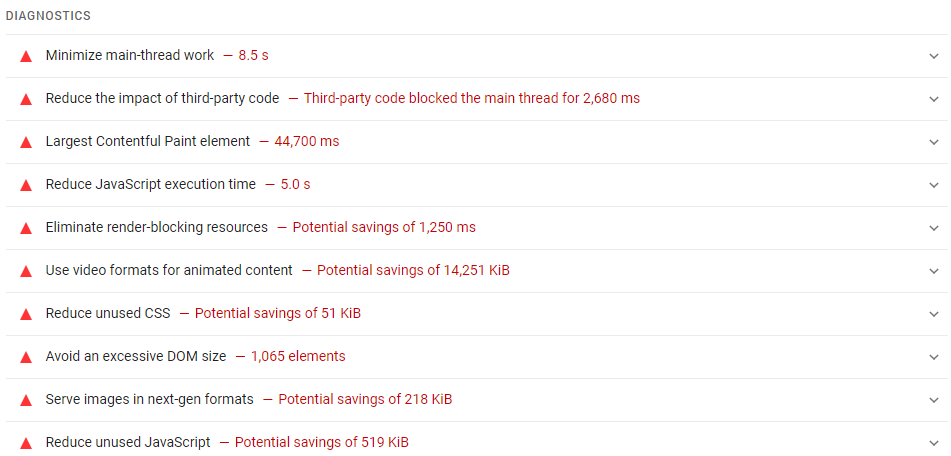
If you click the dropdown arrow next to the items under ‘Diagnostics’, as shown above, you’ll see the full recommendation.
Best for: Measuring site speed and performance, and making quick fixes to improve loading times.
3. Ahrefs’ SEO Checker (Paid, with limited free version)

Ahrefs is a comprehensive SEO tool that includes a website audit feature. It evaluates on-page SEO, checks for issues like broken links or slow page loading, and offers keyword optimisation suggestions.
Ahrefs also provides detailed backlink analysis, making it invaluable if you’re focusing on improving off-page SEO.
Here are the different plans available:
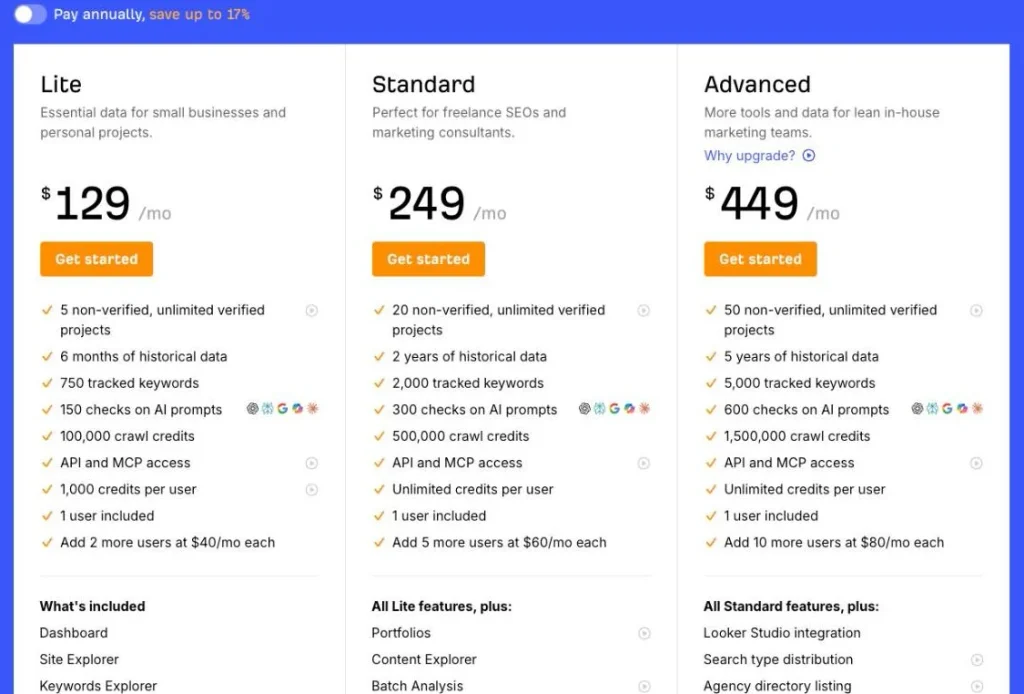
Best for: Full-site SEO analysis, including on-page and off-page factors like backlinks and keyword strategy.
4. SEMrush Site Audit (Paid, with free trial)

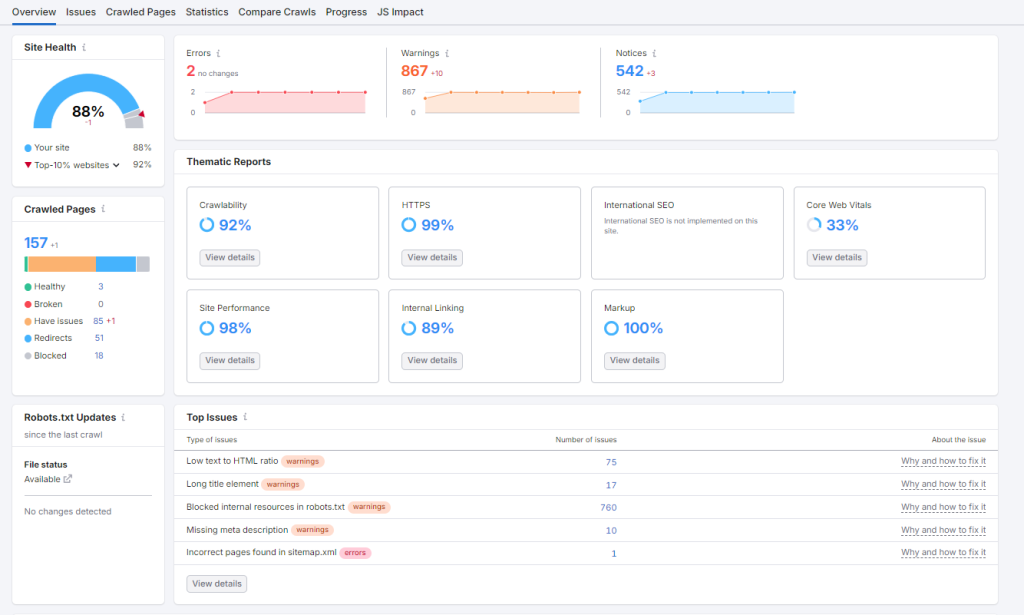
SEMrush offers one of the most detailed SEO graders around. Its site audit tool checks for over 140 SEO-related issues, including site speed, meta tags, content optimisation, and internal linking.
SEMrush also offers insights into competitor strategies, helping you see how your SEO compares to others in your niche.
Read: How to Use SEMRush to Research your Competition for Free
Here’s what the report in SEMrush looks like:
Best for: Advanced users who want a comprehensive view of their SEO health and competitor comparisons.
5. Ubersuggest SEO Analyzer (Paid, with limited free trial)
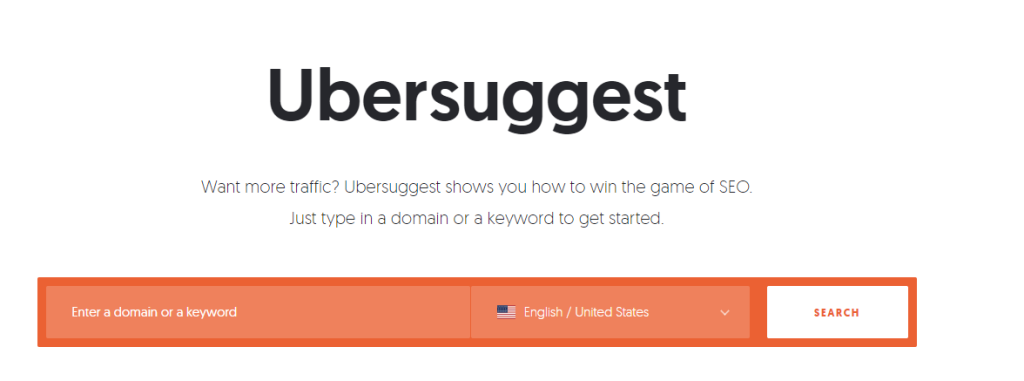
Created by Neil Patel, Ubersuggest’s SEO analyzer is a user-friendly tool that provides a wide range of insights. It covers technical SEO issues, keyword ideas, and backlink opportunities, making it a great choice for beginners.
While it’s not as detailed as some paid tools, it offers solid value for beginners.
Here’s an example of one of the reports this tool generates, helping you see what keywords your website is ranking for and how much traffic those keywords are bringing:

Best for: Beginners looking for a free, easy-to-use tool to improve their SEO.
6. Moz SEO Analyzer (Paid, with free trial)
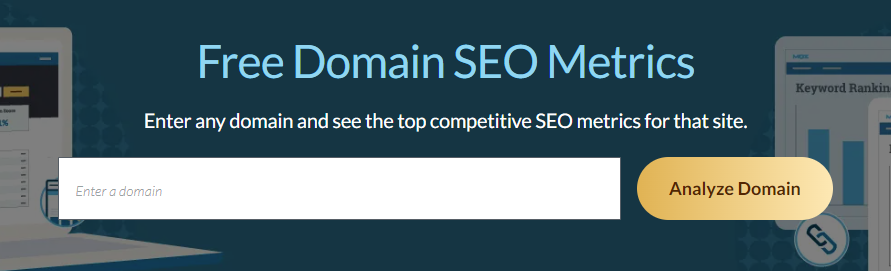
Moz offers an SEO grading tool that checks for on-page optimisation issues and provides insights on domain authority, keyword usage, and page optimisation.
It’s particularly useful for understanding how search engines view your content and what you can do to improve it.
Best for: Users who want in-depth keyword and on-page SEO analysis.
These tools, whether free or paid, offer valuable insights into your website’s performance.
Depending on your goals and budget, you can choose one or a combination of these graders to start making meaningful improvements to your SEO strategy.
Interpreting the Results: What Do They Really Mean?
Once you’ve run your website through an SEO grader, you’ll be presented with various scores and metrics. While it might be tempting to focus solely on the overall score, it’s important to understand what each individual metric means and how it impacts your SEO.
Here’s a breakdown of the most common results and what they tell you:
1. Page Speed
Page speed measures how quickly your website loads on desktop and mobile devices.
Faster load times are crucial for a better user experience and can significantly impact your search engine rankings.
- Why it matters: Google considers page speed as a ranking factor, and a slow site can result in higher bounce rates. If your score is low, you risk losing visitors who get frustrated with slow loading times
- What to do: What you do will depend on wha the report says for your specific website, however some common things you can do to improve site speed include optimising images, minifying CSS and JavaScript files, and using browser caching to reduce load times
2. Mobile-Friendliness
With mobile-first indexing now the standard, Google prioritises sites that are optimised for mobile devices. Mobile-friendliness checks how well your site performs on smaller screens.
- Why it matters: If your site isn’t mobile-friendly, you risk being penalised in mobile search results and losing traffic from the increasing number of mobile users
- What to do: Ensure your website uses a responsive design, with text, images, and buttons that adjust smoothly to different screen sizes
Google retired its standalone Mobile-Friendly Test in December 2023, so use PageSpeed Insights or Lighthouse instead.
3. On-Page SEO Elements
This section usually includes checks on your meta tags, headers, keyword usage, and internal links. It focuses on how well-optimised your content is for search engines.
- Why it matters: Search engines use meta tags (such as title tags and meta descriptions) and headers to understand the content of your pages. Poorly optimised content can result in lower rankings, even if the rest of your site performs well
- What to do: Ensure your meta titles and descriptions are compelling and include relevant keywords. Use clear header structures (H1, H2, etc.) and incorporate keywords naturally throughout your content
Read: How to Optimise a Blog for SEO
4. Security (HTTPS)
Many SEO graders will check if your site is secure, meaning it uses HTTPS instead of HTTP. This ensures that data exchanged between the user and your website is encrypted.
- Why it matters: Google favours secure sites and will rank them higher than non-secure ones. In addition, visitors are more likely to trust and engage with secure websites
- What to do: If your site isn’t using HTTPS, get an SSL certificate to secure your website and protect user data
5. Technical SEO
This category often checks for issues like broken links, site structure, XML sitemaps, and robots.txt files, which help search engines crawl and index your website more efficiently.
- Why it matters: Good technical SEO ensures that search engines can properly read and rank your site. Broken links, missing sitemaps, or improperly configured robots.txt files can prevent search engines from accessing important pages
- What to do: Fix any broken links, ensure your XML sitemap is up-to-date, and review your robots.txt file to make sure search engines can crawl all important pages
By understanding these individual metrics, you can better focus your SEO efforts on the areas that will have the most significant impact. Interpreting the results properly allows you to go beyond just “fixing scores” and helps you build a well-rounded SEO strategy.
What’s a Good SEO Score?
Most graders treat 80 to 100 as good, 50 to 79 as needs work and below 50 as poor.
But scores aren’t comparable between tools, because each grader weighs different factors.
Track your own score in one tool over time, and focus on the specific errors it flags, not the number.
How Often Should You Use an SEO Grader?
Using an SEO grader regularly is essential to maintain and improve your website’s performance, but how often should you run these audits?
The answer depends on your website’s goals, content updates, and overall strategy.
Here are some guidelines to help you determine how frequently you should grade your site:
1. After Major Website Updates
If you’ve recently made significant changes to your website—whether it’s a complete redesign, new content, or a change in site structure—run an SEO audit right away.
SEO graders can help you spot any new issues, such as broken links, slow load times, or missing meta tags, that might have arisen due to these updates.
2. Regular Quarterly Audits
Even if you haven’t made any significant updates, it’s important to check your website’s SEO health at least once a quarter. This ensures your site keeps up with the latest SEO best practices and that no new issues have cropped up over time, such as broken links or speed issues.
3. Tracking SEO Improvements
If you’ve made changes based on a previous SEO audit, follow up by rechecking your website’s performance. This helps you gauge whether your efforts to improve site speed, keyword optimisation, or backlinks have been successful.
4. After Algorithm Updates
Search engines like Google frequently update their algorithms, and these changes can sometimes affect your rankings. If there’s been a major update, it’s wise to run an SEO grader to see whether it has impacted your site’s performance.
5. Competitor Benchmarking
If you’re keeping an eye on your competition, you can also use SEO graders to benchmark your website’s performance against competitors. Some tools, like Ahrefs and SEMrush, let you audit competitor sites to identify where they’re outperforming you and where you can improve.
In summary, how often you use an SEO grader depends on how active your website is and how often you make changes. Regular audits will help you stay ahead of any SEO issues and keep your website optimised for better search rankings.
What to Fix First After Running an SEO Grader
- Anything blocking Google: pages marked noindex by mistake, robots.txt blocks, broken redirects
- Core Web Vitals failures on key pages: slow loading (LCP) or layout shifts (CLS) on your homepage and service pages
- Missing or duplicate titles and meta descriptions on pages that already get impressions in Search Console
- Broken internal links and orphan pages
- Everything else, batched into a quarterly clean-up
If you’re not sure which issues matter for your site, that’s where an SEO specialist earns their keep.
Frequently Asked Questions: SEO Graders
What is an SEO grader?
An SEO grader is a tool that scans your website and scores how well it’s set up for search engines. It checks speed, mobile performance, security, meta tags and technical issues like broken links, then lists what to fix. Popular SEO graders include HubSpot Website Grader, Google PageSpeed Insights and Semrush Site Audit.
Is HubSpot Website Grader an SEO tool?
Yes. HubSpot Website Grader is a free SEO grader that scores your site out of 100 across performance, SEO, mobile and security, with fix suggestions for each. It’s a good first check, but it doesn’t analyse keywords or backlinks, so pair it with Google Search Console or a tool like Semrush.
What is a page grader?
A page grader scores a single web page against a target keyword. It checks whether your title tag, headings, content and internal links are optimised for that term. Website-wide SEO graders check the whole site, while a page grader helps you improve one important page at a time.
What is an SEO analysis?
An SEO analysis is a review of how well your website can rank in search, and why. It combines SEO grader findings with real data from Google Search Console, such as rankings, impressions and clicks, to decide which fixes will have the biggest impact on traffic and leads.
What is a good SEO score?
Most SEO graders treat 80–100 as good, 50–79 as needing work and below 50 as poor. Scores aren’t comparable between tools, though, because each weighs different factors. Track one tool over time and focus on the specific errors it flags rather than the overall number.
Are free SEO graders accurate?
Free SEO graders like HubSpot Website Grader and Google PageSpeed Insights accurately flag technical issues such as slow pages and missing tags. They can’t tell you which issues matter most for your rankings or business, so use them to find problems, then prioritise with Search Console data or an SEO specialist.
Final Tips for Incorporating SEO Graders into Your Strategy
SEO graders are powerful tools, but they’re most effective when used as part of a broader, ongoing SEO strategy.
Here are some final tips to ensure you’re getting the most out of them:
1. Don’t Focus Solely on the Overall Score
While it’s tempting to chase a perfect score, focus on specific areas that directly impact your website’s performance. Address the issues that will provide the biggest SEO boost, such as improving page speed, mobile-friendliness, or fixing broken links. Sometimes, small gains in the most important areas can have a bigger impact than chasing after a high overall score.
2. Use Multiple Graders for a Complete View
No single SEO grader will give you a complete picture of your website’s performance. Combine insights from multiple tools to get a well-rounded view. For example, use Google PageSpeed Insights for technical performance, Ahrefs for backlink analysis, and Moz or Ubersuggest for content optimisation.
Incorporating SEO graders into your strategy is a smart, data-driven way to monitor and improve your website’s performance.
Next, read our article on the 20 things you can do to improve your website’s SEO right now.
About the Author




Get the best content marketing insights right in your inbox!
Subscribe to our Newsletter and get marketing insights delivered to your inbox every week.